

Running agents in parallel leaves a worktree behind for every task. Archiving one removes its folder from disk and keeps its chats. Before version 1.2.0 of the Unstoppable desktop app, the archive dialog warned that a worktree's local changes would be lost. Version 1.2.0 saves the worktree's Git state when it archives, lets you look at the saved changes, and puts them back when you restore.
What archiving saves
Choose Archive followed by the branch name on a worktree. The Archive worktree? dialog says whether the worktree has local changes, and explains that archiving removes it from disk but saves its commits and local changes, with its chats and eligible pipeline history, for the retention period. The Archive button then asks what to do with the original local branch: Delete local branch or Preserve local branch.
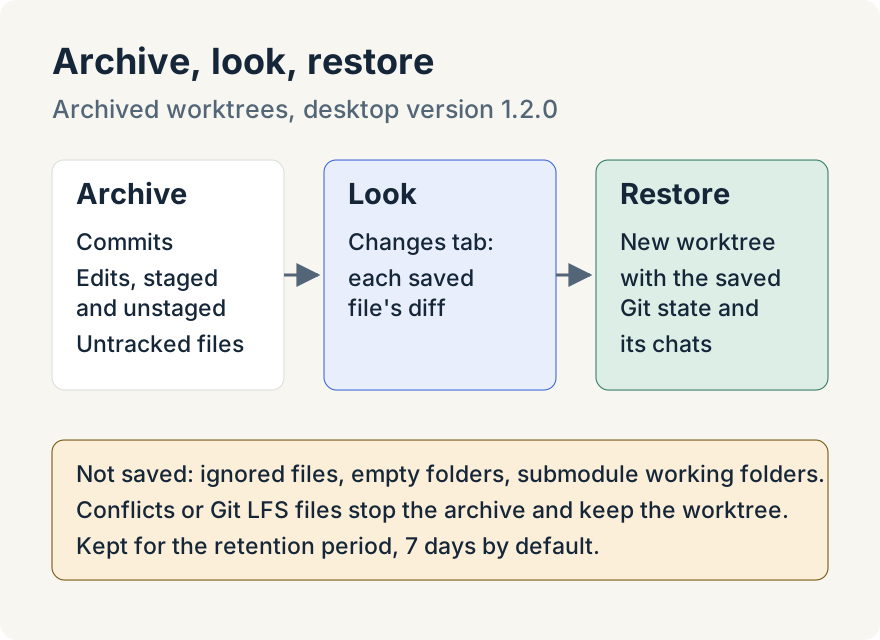
The saved state covers commits, staged and unstaged edits, deleted files, file modes, symlinks, and untracked files that Git doesn't ignore. The worktree is only removed from disk after the capture succeeds.
Look before you restore
Archived worktrees appear in a collapsible Archived group in the workspace's part of the sidebar. Opening one shows its base branch and commit, when it was archived and when it expires, with tabs for Changes, Chats, Pipelines, Attachments and Plans. Changes lists the saved files; select one to see its archived diff.
Restore it
Restore creates a new worktree and puts the saved state back: commits, staged and unstaged edits and untracked files, with the chats, attachments, plans and pipelines. It branches from the original base branch when that branch still contains the archived base commit; otherwise it uses the workspace's default branch and tells you to review the base. If the original branch name is taken, the worktree comes back under a new name and a message says which. If a restore fails, the archive is kept and the partly built worktree is removed.
Where it stops
Archives are kept for the number of days set under Archive Retention in the project's settings, 7 by default, and then removed. If Archive deleted worktrees is off there, the action deletes the worktree instead and saves nothing.
Some things are never saved: ignored files, empty folders and the working folders of nested submodules. Archiving refuses, and leaves the worktree in place, when there are unresolved conflicts, dirty submodules, nested Git repositories, or files whose Git attributes transform their content, such as Git LFS files. The archive depends on the original repository, so it isn't a backup you can move elsewhere. Cowork entries are archived without Git state.
Tommy Irish built the Git capture and restore for archived worktrees.
Version 1.5.0 (September 11) split removal into Archive worktree, kept until you delete it, and Delete worktree, restorable for the configured retention period. Both retain the saved Git state.
Try it
Archiving with saved Git state is in version 1.2.0 of the Unstoppable desktop app. Download it, then archive a finished worktree from its menu in the sidebar.