
Partway through a task, a chat can turn up a second piece of work that should run on its own. You can stop and set up a new chat yourself, or you can ask the agent to split the work off and keep going with the original task.
From version 1.6.0, Claude and Codex chats in Unstoppable Code have two tools for this. Tommy Irish built them.
Forked and branched chats
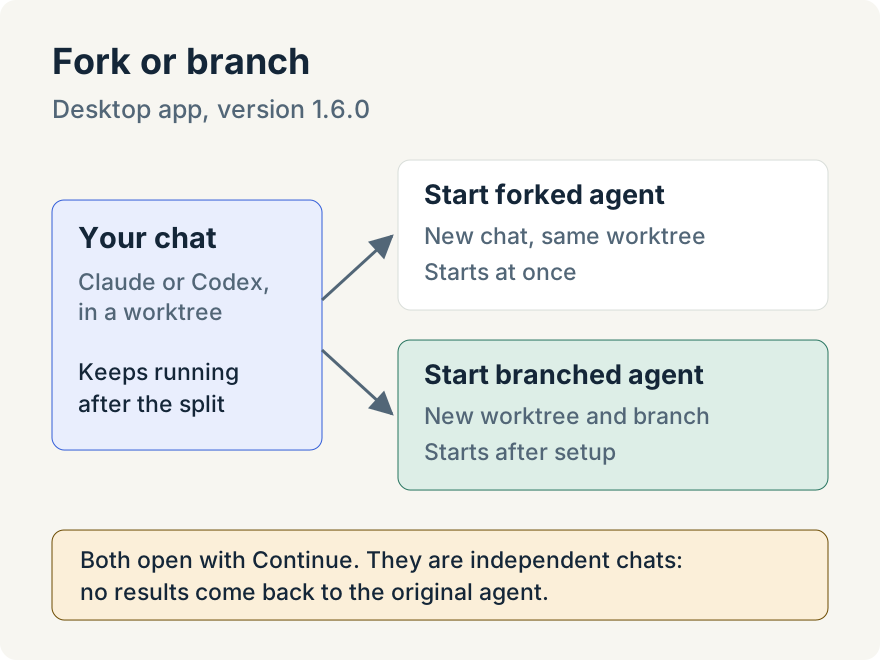
- Start forked agent copies the chat, with everything said so far, into a new chat in the same worktree and starts it straight away. The new tab's title begins with
Fork:. - Start branched agent creates a new worktree whose branch starts from the current branch, copies the chat into it, and starts it once the worktree is set up.
Both tools take one thing from the agent: the instruction for the new chat. The new chat opens with Continue as its first visible message, and the instruction travels with it privately. It keeps the model, permissions, plugins and conversation settings of the chat it came from.
A branched chat is told where its new working directory is. The original worktree and branch are given to it as read-only references, and all of its changes stay in its own directory. The branch starts from the current branch's commits, so changes that haven't been committed don't come along.
The original chat keeps running. The agent gets a short confirmation that the new chat started, and the activity row in its turn reads Start forked agent or Start branched agent with the instruction.
How to use it
The tools are for clear requests. Each tool's description tells the agent to use it only when splitting off work was explicitly asked for, by you or by a skill. Ask plainly: say whether you want a fork or a branch, and what the new chat should do.
Choose a fork when the new work belongs in the same files, such as writing tests for the code this chat is changing. Choose a branch when the new work should be kept apart and reviewed separately.
Limits
- Independent chats, not subagents. The original agent can't read the new chat's transcript, direct it or get its results back. Check on it yourself in its own tab.
- Worktree chats only. In version 1.6.0 the tools are available in native Claude and Codex chats in a Code worktree. Claude chats in the managed terminal, Cowork chats and other harnesses don't have them.
- Fork shares files. A forked chat works in the same directory as the original, so the two can edit the same files. Use a branch when that would get in the way.
Try it
Forked and branched agents are in the Unstoppable Code desktop app from version 1.6.0. Download the app, open a Claude or Codex chat in a worktree, and ask it to split off the next piece of work.