
The Unstoppable desktop app could already bring in projects and chats from Claude Code, Claude Desktop and Codex. Desktop v1.22.0 adds T3 Code and OpenCode. If you've worked in either tool, you can bring your projects and chat history across without moving a folder.
Import projects and chats
Open Settings › General. Under Get started, the Import projects row names the tools it found on your computer, for example Import from T3 Code and OpenCode. Choose it to open Import projects.
Each project the app found has its own row. For each one, you choose whether to bring it in and, with Import chats, whether to bring its chats too. A note on the row says how its chats will arrive, for example "1 continues in place · 2 import as history only". Show chats lists the chat titles and tags each history-only chat.
A new install's first-run page, Let's get started, offers the same projects. It imports projects only; chats come from Settings.
Which chats continue
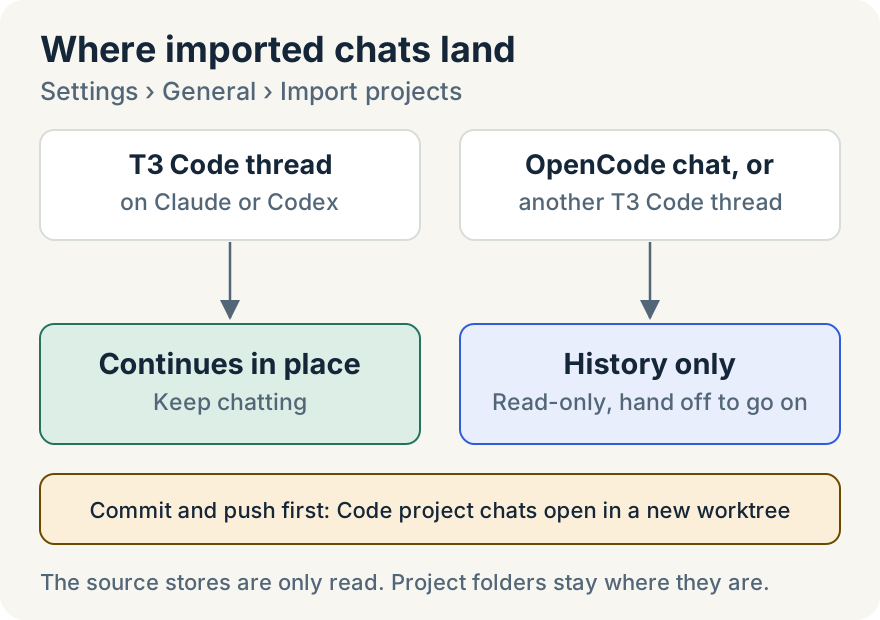
- T3 Code threads that ran on Claude or Codex continue in place, as long as that agent's own record of the conversation is still on your computer. You can open one and keep chatting.
- Every other T3 Code thread imports as history: your messages and the replies, with the commands, file changes, web searches and errors from the conversation. Attachments are copied.
- OpenCode chats always import as history: messages, reasoning, tool calls and their results, and context summaries. Subagent sessions are left out.
A history-only chat opens with a notice: "Messages are read-only. Hand off to keep working from here." Its Start new session and Hand off session buttons let you carry on from it.
What stays where it was
- Your folders. A Git repository becomes a Code project in place. Any other folder becomes a Cowork project in place.
- The other tools' data. The app reads T3 Code and OpenCode data from a copy and never changes it. It doesn't read their credential or account tables.
- What you've already imported. Running the import again adds only new chats. A project you imported before offers Import N new chats.
Chats from Code projects open in a new worktree. Commit and push your work in the project before you import its chats.
Where it looks
- T3 Code:
~/.t3, or the folder in theT3CODE_HOMEenvironment variable. - OpenCode:
~/.local/share/opencode/opencode.db, or the location set byXDG_DATA_HOMEorOPENCODE_DB.
There is no setting to point the import elsewhere. Choose folder… adds a project folder, not another tool's data.
Where it stops
- If a tool's chat database and its write-ahead log together are larger than 512 MB, the import skips that tool.
- One run imports up to 200 chats per project and 128 MB of chat history. The app tells you what it left out, and importing again adds the rest.
- A chat larger than 48 MB is skipped.
- If a tool stores chats in a layout the app can't read, it tells you to update that tool and scan again.
Ryan Le built the T3 Code and OpenCode import.
Try it
T3 Code and OpenCode import are in desktop v1.22.0. Download the desktop app, then open Settings › General › Import projects. For Claude Code and Codex, see How to bring your Claude Code and Codex projects into Unstoppable.