

Pipelines in Unstoppable chain agent steps and built-in actions into a repeatable job. Writing one means getting the YAML Ain’t Markup Language (YAML) right: jobs, steps, inputs and the exact fields each built-in action expects. Version 0.26.12 of the desktop app adds the Pipeline Assistant, a chat on the Pipelines page that writes and edits that YAML for you and saves the result in the editor.
Where it is
On the Pipelines page, the assistant opens as a panel on the right, next to the pipeline list or the editor. It's open by default; the chat button in the page header, Show pipeline assistant or Hide pipeline assistant, toggles it, and you can drag its edge to make it wider or narrower. It works like other chats in the app, with tabs for separate conversations and the same model picker, and it always has the app's pipeline-writing skill attached.
Creating a pipeline
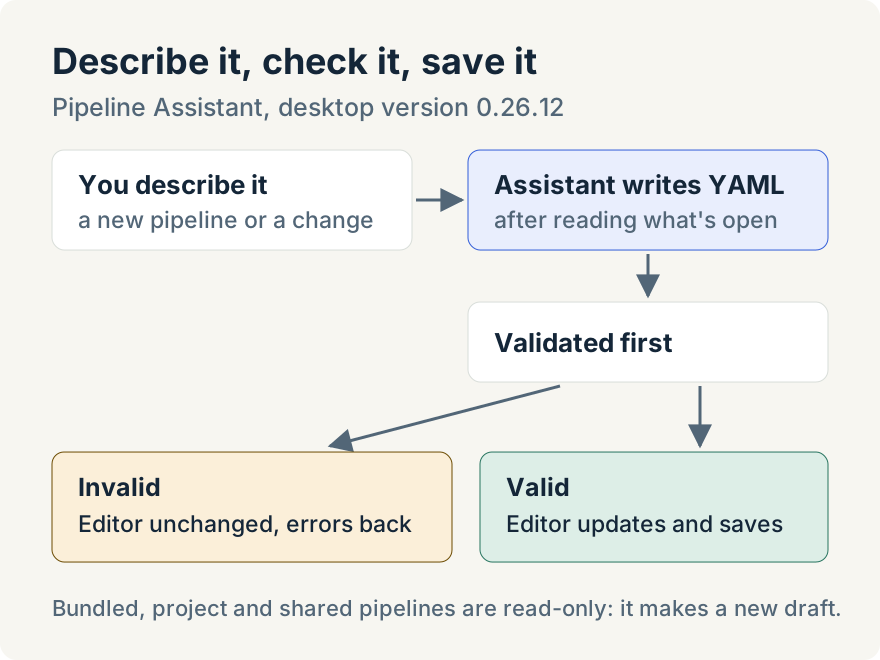
Describe the pipeline you want in the chat. The assistant creates a new draft in the editor and writes the complete YAML into it. Every write is checked first: the YAML is parsed and validated, and if it fails, the editor is left unchanged and the assistant gets the validation errors to fix. When the YAML is valid, the editor shows the new pipeline in its usual views, and it's saved.
When a step needs one of the app's built-in actions, the assistant can read that action's definition before using it, so the inputs it fills in match what the action expects rather than a guess.
Changing an existing pipeline
Ask the assistant to open a pipeline by name, or open it yourself, and describe the change. It reads the pipeline that's open, including any validation problems the editor already shows, writes the updated YAML and saves it. You see the change in the editor as soon as it lands.
Bundled pipelines, pipelines that come with a project and shared pipelines are read-only. If you ask for a change to one of those, the assistant makes a new draft pipeline with your changes instead of editing the original.
Where it stops
- It saves as it goes. Each valid change is written to disk straight away; there's no separate approval step. Read what it wrote in the editor before you run the pipeline.
- It writes pipelines; it doesn't run them. It can list, open, create, edit and save pipelines, but it doesn't start runs or read their results.
- Claude and Codex. The assistant's pipeline tools are built for Claude and Codex models.
- Wide windows only. The panel is hidden when the app window is narrow.
- Desktop only. The Pipelines page is in the desktop app.
Tommy Irish built the Pipeline Assistant.
Try it
The Pipeline Assistant is in version 0.26.12 of the Unstoppable desktop app. Download Unstoppable, open Pipelines and describe the pipeline you want. In current versions, pipelines are called workflows and the panel is the Workflow Assistant.