
An agent working in a fresh worktree needs a few things a developer usually carries in their head: how to install dependencies, how to start the app, what to do when a commit check fails, and the conventions of the repository. Version 1.1.0 of the Unstoppable desktop app checks each Code workspace for those pieces and offers to have an agent add the ones that are missing.
What the check looks for
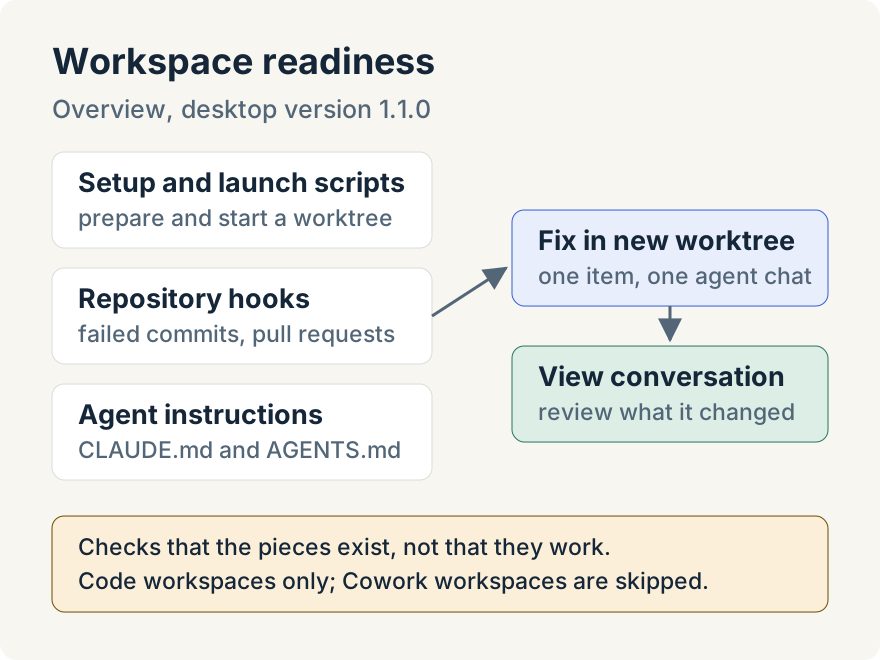
Open Overview from the sidebar. The Workspace readiness section, "Suggestions for deeper integration with your repositories." lists each Code workspace whose repositories are missing something. It checks three things in every repository:
- Setup and launch scripts. A setup script prepares a new worktree, for example by installing dependencies, and a launch script starts the app. When both are missing, the recommendation reads Add setup and launch scripts; when one is missing, it names that one.
- Repository hooks. Hooks let the app act on events such as a failed commit check or a pull request event. With none configured, it suggests Add repository hooks.
- Agent instructions. Claude Code reads
CLAUDE.mdand Codex readsAGENTS.md. With neither file at the repository root, it suggests Initialize agent instructions. With only one, it suggests Link agent instructions, so both agents get the same guidance.
When nothing is missing, the section says that all Code workspaces have setup and launch scripts, hooks, and shared agent instructions in place. The same recommendations appear in a workspace's settings, on the Details tab.
Fix one item in a new worktree
Each recommendation has a Fix in new worktree button. It creates a worktree, starts a chat there with instructions for that one fix and the app's built-in configuration skill, and leaves the Overview where it is. The button then becomes View conversation, which opens the chat.
The instructions ask the agent to read the repository before editing anything: build manifests, the README, continuous integration workflows and the commands developers use.
- Scripts: it adds the missing setup or launch commands to
unstoppable-code.json, the repository's source-controlled configuration, and validates the file. - Agent instructions: it keeps an existing file as the source and links the other to it, with a symlink on macOS and an identical copy on Windows. With neither file, it writes a concise
CLAUDE.mdwith the real build, lint and test commands and the conventions an agent would otherwise get wrong, then addsAGENTS.md. - Hooks: it looks at the repository's checks and pull request conventions first, and uses a conservative default set when the repository doesn't show what it needs.
Because the work happens in its own worktree, your current checkout isn't touched while the agent works.
Where it stops
The check covers Code workspaces only; Cowork workspaces are skipped. It looks for whether scripts, hooks and instruction files exist, not whether they work: a launch script that fails still counts as present. What the agent writes is a proposal from reading the repository, so check it before you rely on it.
Ryan Le built workspace readiness.
Try it
Workspace readiness is in version 1.1.0 of the Unstoppable desktop app. Download it, add a repository as a Code workspace, then open Overview.