
A larger context window lets a Codex chat keep more of the conversation and code in view before it has to summarize. It also costs more: above 272k tokens, each request is billed at a higher rate, or uses a ChatGPT plan's limits faster. Version 1.20.0 of the Unstoppable desktop app lets you make that choice per chat instead of living with one size.
Set a default for new chats
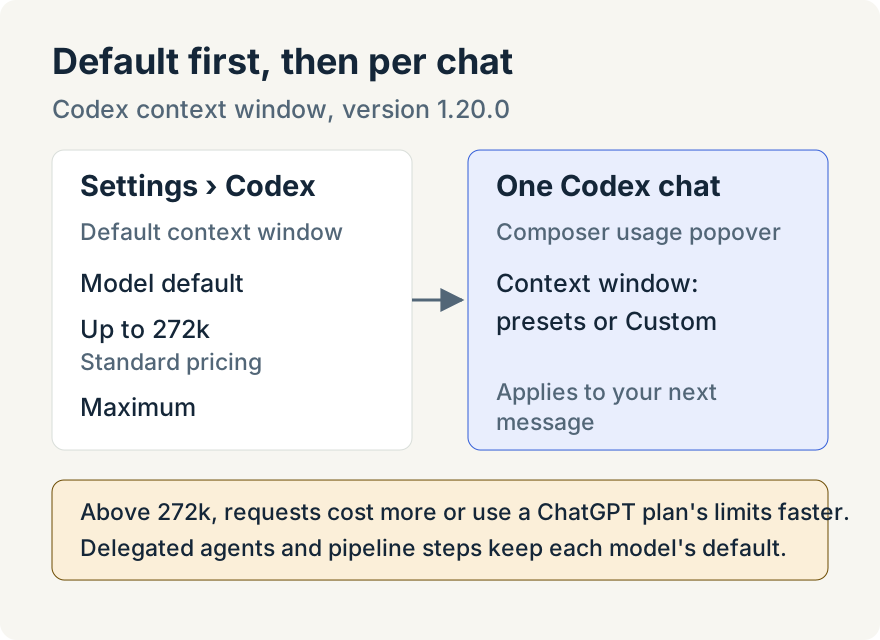
Open Settings and choose Codex. The Context window section has a Default context window with three choices:
- Model default: each model's own window, which varies by model.
- Up to 272k: the largest window at standard pricing.
- Maximum: the largest window each model allows.
The section's description spells out the trade: above 272k, each request costs 2× for input and 1.5× for output, and on a ChatGPT plan those requests use your limits faster. The default applies to new Codex chats. Models that can't go larger keep their own window.
Change one chat
In a Codex chat, open the usage indicator in the composer. Its popover has a Context window control with the model's preset sizes and Custom, where you type a size in thousands of tokens within the range it shows. A note under the control tells you how much of the window is usable, since Codex keeps the rest for its output, and repeats the pricing line when you go above 272k. A change applies to your next message.
If you shrink the window below what the chat already uses, the app asks Compact this chat first? It shows how many tokens the chat uses and explains that earlier messages are summarized before your next message to fit. Choose Reduce window to go ahead or Cancel to keep the current size.
Where it stops
The choice only exists for models whose largest window is bigger than their default. For other models the popover says the context window is fixed and shows its size. The setting covers chats only: delegated agents and pipeline steps use each model's default. The web view of a paired desktop shows the same usage popover without the control.
The pricing note describes how requests above 272k are charged or counted by the provider. It isn't a bill, and how much more of a ChatGPT plan a long request uses isn't published, so the app doesn't show a figure for it.
Tommy Irish built the context window setting and control.
Try it
The Codex context window is in version 1.20.0 of the Unstoppable desktop app. Download it, connect Codex, then open Settings and choose Codex.