
Agents, terminals and pipelines often need different settings. An agent may need a test application programming interface (API) key that your own terminal shouldn't use, and one project may point at a staging database while another points at a local one. The Unstoppable desktop app already had a single list of environment variables applied to everything it started. Version 0.25.3 replaces that list with named environments, which you can assign separately to each kind of process and override for a single workspace.
Environments and inheritance
Environments is a new item in the app's sidebar. New Environment creates one; give it a name and add variables. The editor has two modes: Key-Value, one row per variable, and Bulk, where you paste lines in the KEY=VALUE form of a .env file. Blank lines and # comments are ignored.
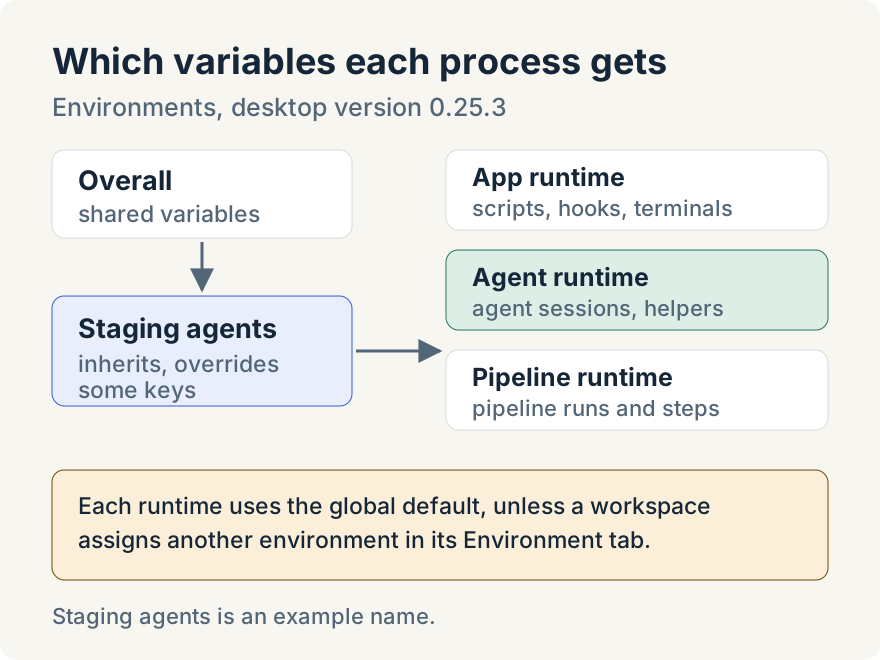
An environment can inherit from another with Inherits from. Inherited values apply first, and the environment's own variables override matching keys. Resolved Variables shows the final list, so you can check what a process will actually get before you save.
Four environments come built in. Overall sits at the top, and one environment for each kind of process inherits from it. Variables from the old single list move into Overall automatically, so nothing you set before is lost.
Three runtimes
Each environment is used by assigning it to a runtime. There are three:
- the app's own runtime, for workspace scripts, hooks, terminals, and setup and launch scripts;
- the Agent Runtime, for agent sessions and helper agents;
- the Pipeline Runtime, for pipeline runs and the agent steps inside them.
Global Runtime Defaults on the Environments page chooses an environment for each runtime. To change one workspace, open its settings and the Environment tab. Each runtime there can stay on the global default or use a different environment, and Save Environment Assignments saves the choice. The Environments page shows where each environment is in use.
Keeping values safe
Values are stored encrypted with your operating system's keychain when one is available, and the editor says so: "Values are encrypted at rest using the OS keychain." When no keychain is available, for example on Linux without a keyring, the editor warns that values will be saved in plain text and suggests not storing secrets until a keychain is set up.
Where it stops
- Assignments are per workspace and per runtime. You can't give a single worktree or a single chat its own environment.
PATHis managed by the app and can't be set in an environment.- Variables are applied when a process starts. Restart a terminal or start a new chat to be sure it uses a change.
- Environments are stored on your computer; they aren't shared with a team.
Tommy Irish built environments.
Try it
Environments are in version 0.25.3 of the Unstoppable desktop app. Download Unstoppable, open Environments from the sidebar and give your agents the variables they need. In current versions you'll find it under Settings, Environments.