

Some preferences apply to every chat with a coding agent, such as how commit messages should read or which test command to run. Version 1.5.0 of the Unstoppable desktop app adds one place to write them down instead of repeating them. Open Settings and choose Instructions, after Models in the Agents group. What you write there is added to every new agent session, and you can narrow parts of it to the sessions where they belong.
Overall instructions
The page has two sections. Chats is "Applied to chat agent sessions across Cowork, Code, and App Advisor." Pipelines is "Applied to pipeline agent steps (agent prompts and Codex pipeline turns)." Each section has an Overall instructions field for text that applies to every session in that section. Changes save as you type.
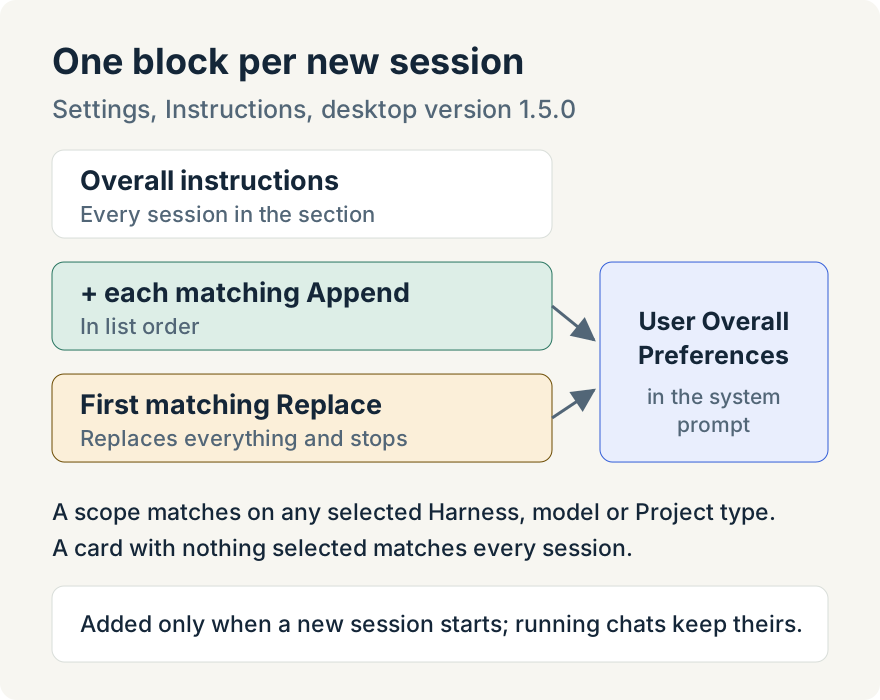
The app combines what applies into a block called "User Overall Preferences" and adds it to the agent's system prompt when a new session starts.
Scoped instructions
Under the overall text, Add scoped instruction adds a card with its own text and a scope. A scope can name:
- a Harness: Claude, Codex or Ollama;
- specific models, grouped by provider;
- in Chats only, a Project type: Cowork, Code or App Advisor.
A scoped instruction applies when a session matches any one of its selections. With nothing selected, it applies to every session in the section.
Each card also has a mode. Append adds the text after the overall instructions when the scope matches. Replace "Fully replaces the constructed global instructions when this scope matches. The first matching Replace wins and stops further processing." The order of the cards is their priority, and you move cards up and down to change it. When a Replace card would hide another card, the page warns you on the hidden card.
When instructions apply
Instructions are added only when a new agent session is created. A chat that is already running keeps what it started with, and so does a session the app resumes. To try a change, start a new chat. Switching a chat to another provider clears its saved block, so the next session picks up the current text.
Where it stops
- There is no scope for a single project or repository.
- Editing instructions doesn't change chats or pipeline steps that are already running.
- The harness choices are Claude, Codex and Ollama, the harnesses the app ran in 1.5.0.
Tommy Irish built the Instructions page and scoped instructions.
Try it
Instructions are in version 1.5.0 of the Unstoppable desktop app. Download it, open Settings, choose Instructions, and write the preferences you usually repeat.