
A coding agent can already split work among its own subagents, but those subagents run on the same provider as the chat that started them. Version 1.8.0 of the Unstoppable desktop app adds managed delegation: a worktree chat can hand part of a task to an agent on another model, for example a Codex model from a Claude chat, or Claude from a Codex chat. Unstoppable starts each delegate, tracks it in the chat and gives you a way to stop it.
Managed delegation is an experiment in 1.8.0 and is off until you turn it on. Tommy Irish built it, including the queue for work over the limit and Windows support.
Turn it on
Open Settings, choose Experiments and find Managed delegation. The section reads "Let worktree chats delegate tasks to another model. Tasks may use additional tokens." It has three settings.
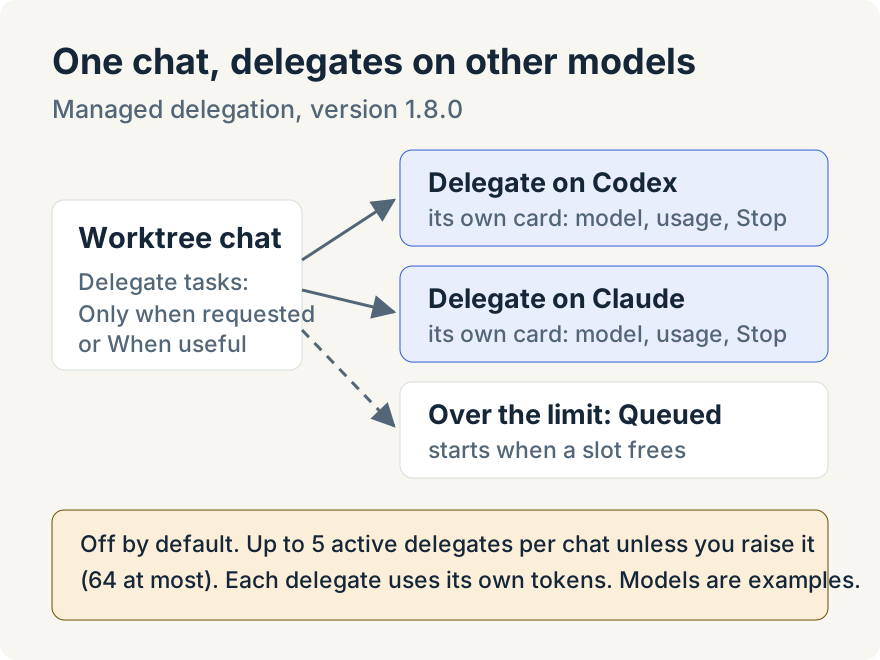
Delegate tasks decides when a chat may delegate:
- Off: the default. Chats use their provider's own subagent tools as before.
- Only when requested: the chat delegates when you ask it to.
- When useful: the chat may decide to delegate on its own.
The setting applies to new turns in worktree chats. Turning it on replaces the provider's native subagent tools in those chats. Turning it off cancels any managed delegates that are still running, and the parent chat carries on.
Maximum concurrent subagents limits how many delegates can be active across the whole chat, nested ones included. It defaults to 5 and goes up to 64, which is also the limit for the whole app. Maximum delegation depth limits nesting. The default, 1 (no nesting), means a delegate can't start delegates of its own; the setting goes up to 10, and even then each delegation has to allow its child to delegate further.
Ask for a delegate
With Only when requested, ask in the chat for the part of the work you want handed off and the model you want it to run on, for example a review of the current change by a Codex model while a Claude chat keeps working. The chat looks up the models it can delegate to, starts the delegate and records it as a card in the conversation.
A delegate is a separate session on its own model. Completion is silent unless the parent arms a Watch Delegates watcher. That watcher tells the parent when the delegate finishes; the parent then reads its result. The parent can keep working, or end its turn, while the delegate runs. The parent can also send a delegate a follow-up, steer it while it runs, or interrupt it.
Delegates start with the chat's plugins, skills and Model Context Protocol (MCP) servers unless the parent chooses otherwise.
Read the card
Each delegate has a card in the chat. Expanded, it shows:
- Model names the selected delegate model. Runtime model appears if the running model differs. Harness shows the parent and delegate harnesses, for example Claude to Codex.
- Execution, whether the task runs in the foreground or the background.
- Workspace: Shared with parent, Isolated · retained or Isolated · discarded.
- Permissions: Read and search, or the paths it may edit, with "Parent approvals apply."
- Thinking, and Usage in input and output tokens when the provider reports them.
When more work is requested than the concurrency limit allows, the extra tasks aren't refused. Their cards read Queued, and they start automatically as running delegates finish.
Shared or isolated workspace
By default a delegate works in the chat's own worktree. It can read and search there, and it can edit only the files the parent explicitly allows. Your approval settings still apply to its commands and file changes. Edits land directly in the worktree, where Git and checkpoints track them, so the card doesn't list them separately.
The parent can instead ask for an isolated workspace. The delegate then gets a clean checkout of the parent's last commit, and its edits stay there until the parent decides what to do with them. Setup scripts don't run automatically in that checkout; the delegate is told the setup command and runs it before building or testing.
While an isolated workspace is retained, the card offers Show changes. It lists up to 200 changed files, each with its status and a diff from the starting commit. Reading the changes never applies them. The parent agent can then apply the delegate's work to the main worktree or discard it. Applying is all or nothing: every file is checked and every approval is collected before anything is written, and if a write fails, nothing in the main worktree changes.
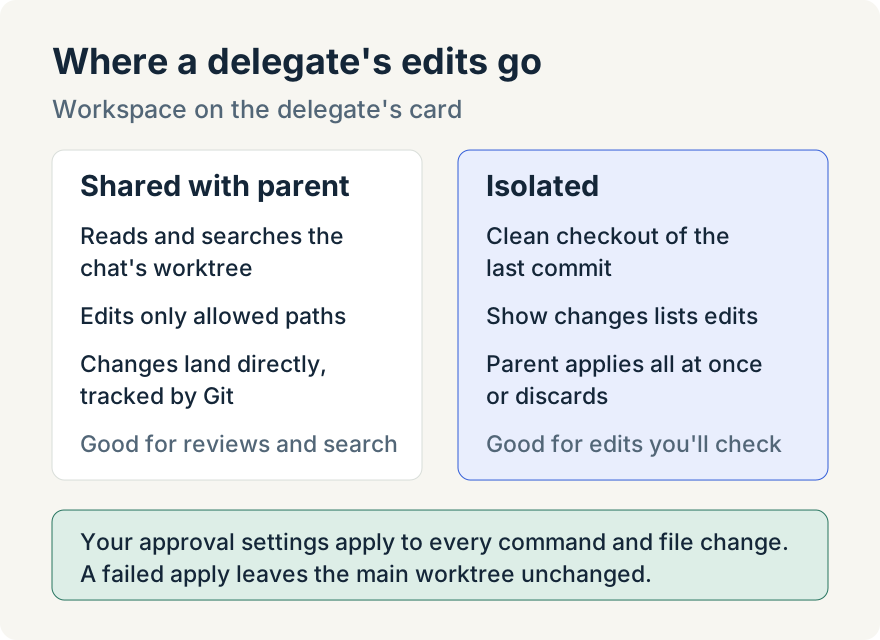
Use a shared workspace when the delegate mainly reads, such as a review or a search through the code. Use an isolated one when you want to look at a delegate's edits before they touch the files the chat is working on.
Stop what you started
Delegated work can keep running after the turn that started it ends, so stopping it is separate from stopping the chat. While a delegate is queued, starting or running, its card has a Stop button. Its tooltip reads Stop delegation, or Stop delegation and the tasks it started when it has delegates of its own. A delegate stopped by its parent shows Stopped by parent.
The chat's agent activity section offers Stop all delegates whenever at least one is live. It asks Stop N delegations? with Stop all and Keep running, then stops every managed delegate in the chat at every depth. It doesn't touch background processes, pipeline runs or the provider's own subagents. The composer's Stop ends only the parent turn; it doesn't stop delegates.
Where it stops
- It's an experiment, off by default. Nothing changes until you choose Only when requested or When useful.
- Desktop, macOS and Windows, Code worktree chats only. In 1.8.0, App Advisor, Cowork chats and pipelines don't delegate this way.
- Each delegate uses more tokens. It's a separate session on its own model, counted against that provider's limits or billing.
- On Windows, Codex delegates run without the Codex sandbox. Your approval settings still gate their commands and file changes.
- Only models you can use. A delegate runs on a model from your connected accounts.
Update (2026-10-09): version 1.9.0 added a Subagents panel that shows the agents a chat has handed work to as a tree, managed delegates included, and lets you message managed delegates. Tommy's How I keep track of what my subagents are doing covers it.
Try it
Managed delegation is in version 1.8.0 of the Unstoppable desktop app. Download the app, connect the accounts you use, open Settings, Experiments, and set Delegate tasks to Only when requested. Then, in a worktree chat, ask for a piece of the task to run on another model and watch its card.