
Some agent work is mostly waiting: a local server has to come up, a file has to appear, or a job needs a few minutes before its result is worth reading. Version 1.5.0 of the Unstoppable desktop app gives agents two ways to stop, end their turn, and pick the work up later in the same chat. Both are set up by the agent when you ask it to wait or to check back.
A wake-up after a delay
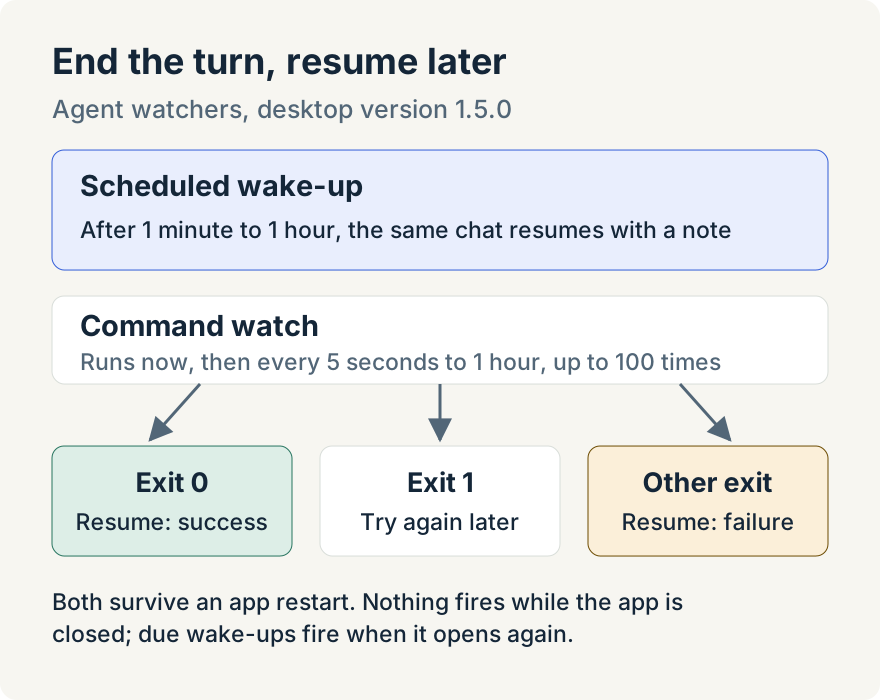
With a scheduled wake-up, the agent picks a delay between 1 minute and 1 hour and can leave itself a note about what to do next. It ends its turn. When the time comes, the chat resumes on its own with that note, and the agent carries on. In Claude chats the app keeps the wake-up itself, in place of Claude's own scheduling tool, so it is stored with the app's other watchers.
A check that runs until it passes
A command watch re-runs a short shell command in the chat's working folder:
- The first attempt runs straight away.
- Exit code 0 means success, and the chat resumes.
- Exit code 1 means not yet, and the command runs again after the interval, from 5 seconds to 1 hour.
- Any other exit code means failure, and the chat resumes with that.
The agent sets the number of attempts, up to 100, and each attempt can run for 60 seconds. When the watch ends, the agent gets the command's output. Output over 64 kibibytes (KiB) is saved to a file, and the agent gets its path, size and line count instead.
A command watch goes through the same approval check as any shell command the agent runs. Approving it covers that exact command and the number of times it may repeat.
After a restart
Both kinds are stored with the app's watchers, so they survive a restart. A wake-up that came due while the app was closed fires after it reopens. An attempt that was running when the app quit isn't run again; if it was the last one, the watch ends with Interrupted during restart. If the worktree has been removed, it ends with Worktree no longer available.
In the watcher list, a wake-up shows as Scheduled wakeup with its time, and a command watch shows the command with how often it runs and its attempt count. When one finishes, it shows Succeeded or Failed with the reason, such as Command succeeded, Maximum attempts reached or Attempt timed out.
Where it stops
- The agent creates these; there is no button for them. Ask in words.
- Nothing fires while the app is closed. Wake-ups that came due fire when it opens again.
- A wake-up waits 1 minute to 1 hour, and a command watch stops after its last attempt, 100 at most.
- The check should be quick and safe to run many times. Long-running commands and loops don't belong in it.
- For GitHub Actions runs, the dedicated workflow run watcher is the better fit.
Tommy Irish built scheduled wake-ups and command watches.
Try it
Scheduled wake-ups and command watches are in version 1.5.0 of the Unstoppable desktop app. Download it, start a chat, and ask the agent to check back on something in ten minutes.