
For anything risky, I ask the agent for a plan before it touches a file. A plan is cheap to change. Code that went in the wrong direction across nine files is not. I've written before about what I look for in a plan. This post is about the mechanics: how I comment on a plan, get the agent to revise it, hand it off and keep track of the work once I've said yes.
Version 1.17.0 of the Unstoppable Code desktop app closed the gaps that used to trip me up. I built these pieces, and this is how I use them.
Asking for a plan
In the chat composer, I open the + menu and turn on Plan mode. A Plan chip sits next to the + while it's on. Then I describe the change the way I would to a colleague: what needs to happen, what must not break, and anything I already know about where the code lives.
The agent reads the code and writes a plan instead of editing. When the plan is ready, the composer turns into a prompt titled Implement this plan? with numbered answers:
- Yes, implement this plan
- Run it as a workflow, when workflows can run in that project
Below them is a text row, No, explain what to do differently, for a quick redirect. The number keys pick an answer and Escape closes the prompt without deciding. The plan keeps waiting, and a Plan ready chip in the composer brings the prompt back.
When the agent writes its plan to a file, the turn now shows that as a wrote plan step, rather than counting it as an edit to my project. A turn that only planned no longer looks as if it changed code.
Commenting on the plan
A one-line redirect works for small plans. For a plan with real steps, I want to point at the exact passage I disagree with. The prompt's Open button opens the plan in its panel. There I select the text I want to talk about and add a comment, the way I would on a pull request. + Add comment adds a general note that isn't tied to a passage.
Comments I've written but not sent carry a Not sent badge. That badge is the reason this release matters to me. Before 1.17.0, I could stage two comments in the Plan panel, go back to the chat and choose Implement, and the agent would start without them. Nothing told me it never saw my feedback.
Now the prompt counts my unsent comments and adds an answer for them, Address 2 comments first. It sits after the numbered answers and has a message icon instead of a number, so a stray number key can't pick it by accident. Choosing it sends the comments to the chat waiting on the plan, and the agent revises.
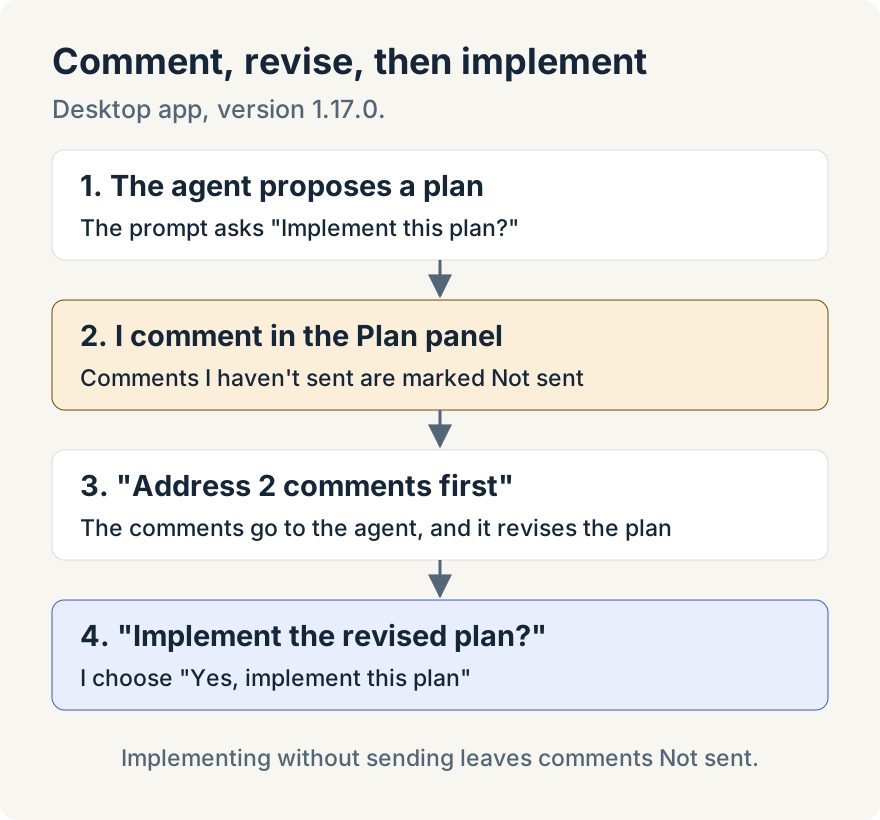
The warning only warns. Yes, implement this plan stays available, because sometimes I've decided a comment doesn't matter. If I implement anyway, the comments stay Not sent in the panel, and Submit 2 comments in its tray still sends them later. Nothing is sent behind my back.
While the agent revises
Sending comments, or any message that starts a new turn, retires the waiting prompt. The chat shows its normal working status while the agent rewrites the plan, and in the Plan panel the Execute choices are disabled, and their tooltip reads The agent is revising this plan. That stops me implementing the old version while the new one is half written.
When the revision arrives, the prompt comes back titled Implement the revised plan?. The Plan panel has a revision picker, so I can go back to the version I commented on and check my points were taken before I approve the new one. If I still disagree, I comment again. I'd rather go round twice on a plan than once on a bad diff.
Copying the plan
Plans are useful outside the chat. I paste them into a ticket so the people following the work can see the approach, or into another chat as the starting brief for a related change.
Copy copies the plan's exact Markdown: headings, lists, code blocks and all. It's in the prompt's header, at the foot of the plan turn, in the Plan panel's header and on the plan's card under Activity, Plans. It doesn't copy rendered text, so nothing gets flattened on the way out. When the full plan hasn't loaded yet, or only part of it reached that view, the button stays visible and says why rather than copying something incomplete: Loading the plan…, The plan's text isn't available or Only part of the plan arrived here.
Following the work after I say yes
Approving a plan used to be the end of the plan's story. The plan read Approved, and the work happened somewhere in a chat. If I came back the next morning to a list of approved plans, I couldn't tell which had been carried out.
Now, after I choose Implement, the plan's header and its Activity card read Implementing in chat, and Open replaces Execute. Open takes me straight to the chat doing the work. When that turn completes, the plan reads Finished in chat, and Open still goes to the chat so I can read what was done. A plan run as a workflow shows Implementing in workflow and Implemented in workflow instead, and Open goes to the run.
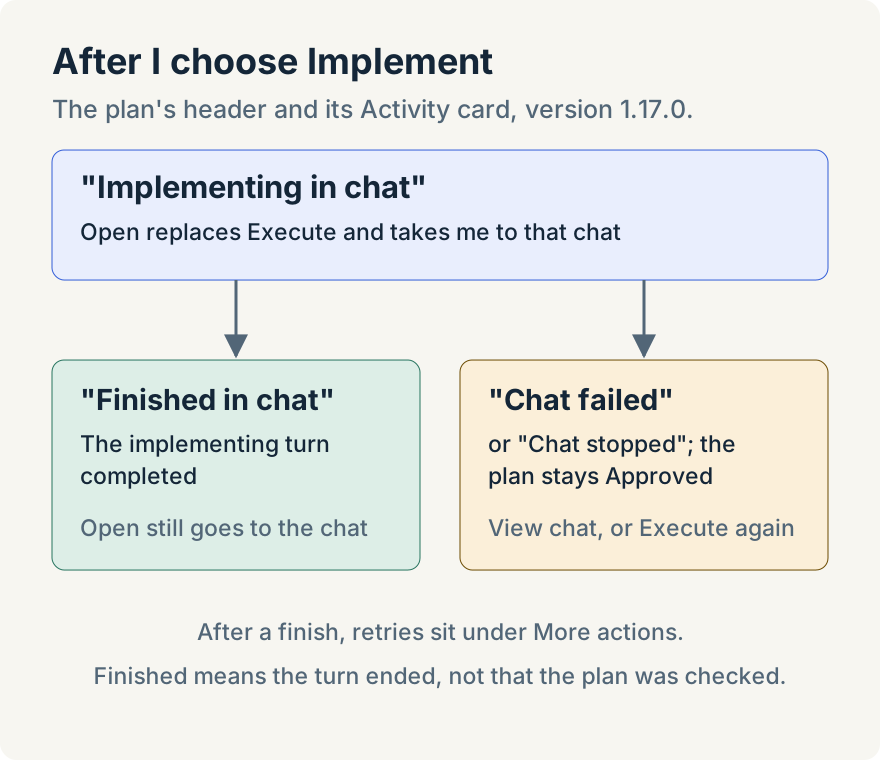
Work doesn't always finish cleanly. If the implementing chat fails or I stop it, the plan stays Approved with a note, Chat failed or Chat stopped, and a View chat link, and Execute is there to try again. After a finished attempt, retries move into More actions, as Implement again in chat or Run again as workflow, so a second run is a deliberate choice rather than the obvious button.
This is how I use the Plans section under Activity now. I scan it for Chat failed and Chat stopped notes, which are the plans that need me, and Implementing in chat tells me which ones are still in progress. Finished in chat tells me where to read the result.
What it doesn't do
A few limits are worth knowing before you rely on this:
- Finished doesn't mean correct. Finished in chat means the implementing turn completed. It doesn't mean the plan was checked against the code. I still read the diff and run the tests.
- Desktop only. The implementation status, the unsent-comments answer and the Plan panel are in the desktop app. On the web, plans keep Pending, Approved and Dismissed, and cloud chats have no plan mode.
- Not every agent implements plans. Plan mode and Implement work with Claude, Codex, Ollama and OpenCode. Cursor can write a plan, but its prompt shows Implementation unavailable. Copilot chats are read only.
- The warning lives in the prompt. The collapsed Plan ready chip, and Implement from the Plan panel or the Activity card, don't show the unsent-comments answer. If I've commented, I approve from the expanded prompt.
- One attempt per loaded chat tab. A new revision clears the status from older attempts, and if the app restarts without a known end, the plan goes back to reading Approved.
Try it
Plan review is on by default in the Unstoppable Code desktop app, version 1.17.0 and later; there's no setting to turn on. Download Unstoppable Code, turn on Plan mode for your next risky change, and comment on the plan before you let the agent start.