
Plan mode isn't the only place plans come from. An agent following a skill may write its plan to plan.md in the middle of an ordinary turn, and a teammate may hand you a plan they wrote by hand. Before version 0.26.11 of the Unstoppable desktop app, only plans produced in plan mode showed up under Plans. Now any Markdown or plain-text plan file in a worktree can become a tracked plan, and the app suggests the plan files your agent writes.
Importing a file
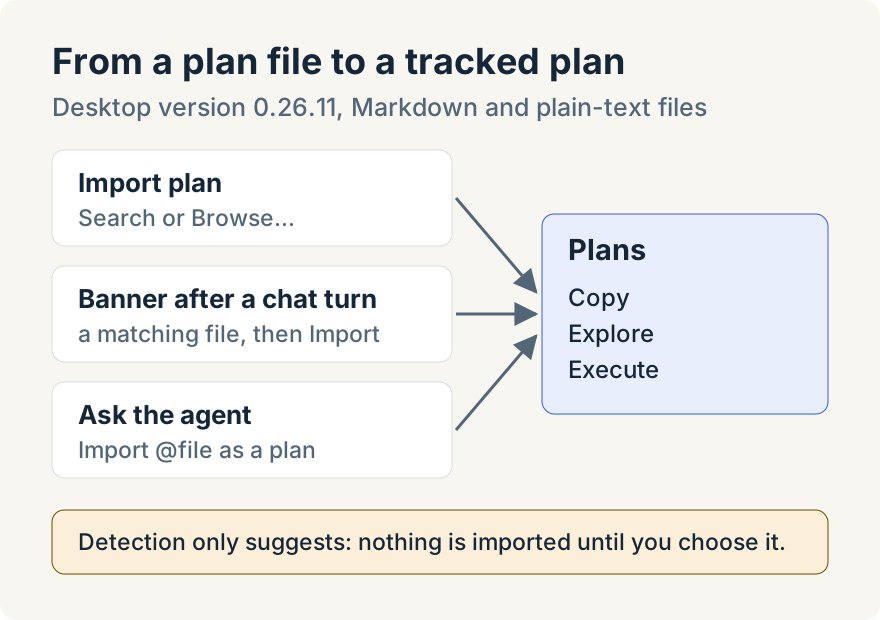
In the Plans section of a worktree's activity panel, the Import plan document button opens Import plan. It has two tabs. Search finds files in the worktree as you type ("Search files (.md or .txt)…"), and Enter imports the one you pick. Browse… opens the system file picker instead.
Search and agent imports accept .md and .txt files inside the worktree. Browse… can also import a file elsewhere on your computer. The import takes the file's content at that moment and adds it to Plans, where it sits alongside plans from plan mode.
You can also ask the agent. The Search tab points this out: tell your agent Import @<file> as a plan and it imports the file itself.
Suggestions from the chat
After each completed turn, the app looks at the file paths that appeared in it: files the agent wrote or read, and paths mentioned in the text. When one matches a plan rule, a banner appears above the chat input, "Detected a plan document in this conversation", with an Import button. Import opens the Detected tab, where each file can be imported or dismissed. Nothing is imported until you choose it.
Three rules are on by default: any file named plan.md, and Markdown specs under docs/superpowers/specs/ except files ending in -design.md. You can add include and exclude rules of your own in Settings, Plan Detection, add rules for one project in its settings under Plans, or commit shared rules to the repository's project configuration file so everyone working in it gets them. An exclude rule always wins.
What you get once it's in Plans
An imported plan gets the same card as a plan from plan mode: Copy for its Markdown, Explore to read it with comments and diagrams, and Execute, which runs it as a pipeline or sends it to the chat to implement. After you import a plan from a suggestion, the agent's next turn is told which file you imported, so it can refer to the plan as it continues.
Where it stops
- Suggestions come only from paths that appear in completed chat turns. The app doesn't scan the repository or watch files already on disk.
- The tracked plan starts from the file's content at the moment you import it.
- Only Markdown and plain-text files qualify. Search and agent imports stay inside the worktree; Browse can import from elsewhere on your computer. Plan import is in the desktop app only.
Tommy Irish built plan detection and import.
Try it
Plan import is in version 0.26.11 of the Unstoppable desktop app. Download Unstoppable, open a worktree's Plans section and import a plan file, or ask your agent to import one.