
Update (2026-10-06): Version 1.8.0 moved Code Graph out of Experiments to its own page in Settings, named Code Graph. Its Availability choices are Enabled, Disabled and Select projects, and Generation timeout and the generation queue are on the same page. This post describes version 0.29.0.
When an agent needs to know who calls a function or what a change might break, it usually searches the files in the worktree as text. Code Graph, added in version 0.29.0 of the Unstoppable desktop app on July 22, 2026, builds a structural index of each worktree instead: its files, the symbols defined in them and the edges between them. Claude and Codex agents in worktree chats can query that index through nine tools rather than scanning the whole tree.
Turn it on
Code Graph is controlled in Settings, Experiments, in the Code Graph section: "Generate local code graphs for richer code navigation, impact analysis, and agent tools." Choose one:
- Enabled: "Generate code graphs for every workspace." This is the default.
- Disabled: "Turn off code graph generation everywhere."
- Select workspaces: "Generate code graphs only for the workspaces you choose." Pick them in Workspaces.
Generation timeout stops a generation whose worker runs longer than the number of minutes you set, 30 by default. Below it, a live queue lists the generations that are queued or running, and you can reorder the queued ones.
Agent chats pick up the tools when they start. A chat started while Code Graph was off for its workspace doesn't get them later, so start a new chat after you turn it on.
What goes into the graph
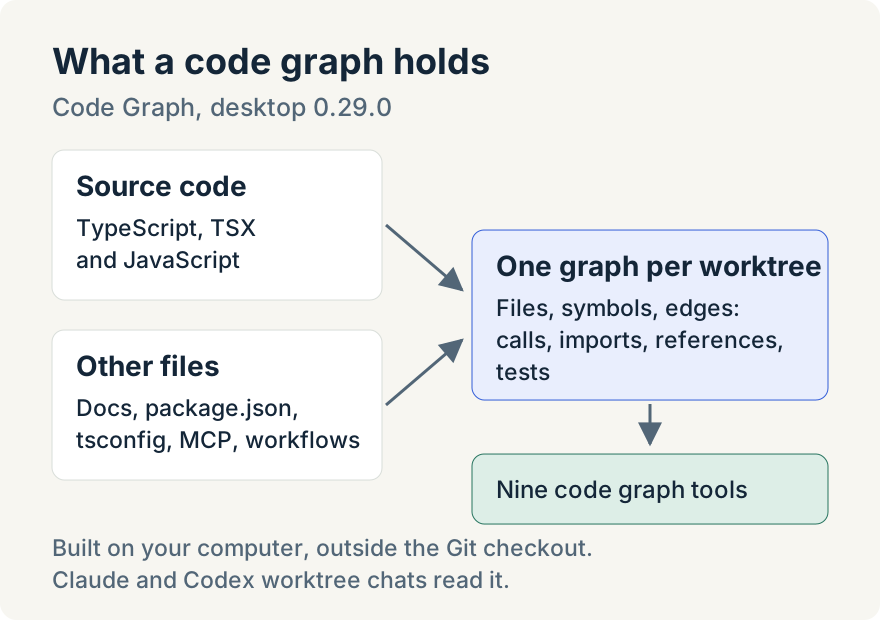
The graph is built on your computer, one per worktree, and stored with the app's data rather than inside the Git checkout. It parses TypeScript, TypeScript XML (TSX) and JavaScript into files and symbols such as classes, interfaces, functions, methods and variables, and records calls, imports, references and links between code and its tests.
It also reads some files that aren't code: Markdown documentation, package.json, tsconfig files, Model Context Protocol (MCP) server manifests and GitHub Actions workflows. For MCP manifests it records only the names of environment variables, never their values. None of this uses a model.
When it builds
Generation starts when a worktree is created. If the app already has a compatible graph of the repository's default branch, or of the worktree the new one was created from, the new worktree gets a copy before agents can start work, and the normal build then brings it up to date. After that, the graph refreshes when an agent turn changes files. There is no file watcher, so the graph can lag behind edits made outside an agent turn until the next refresh. An agent can also ask for a build with BuildOrUpdateCodeGraph.
Builds run in a separate process, not in the app's main window, with at most two running at a time.
What agents can ask
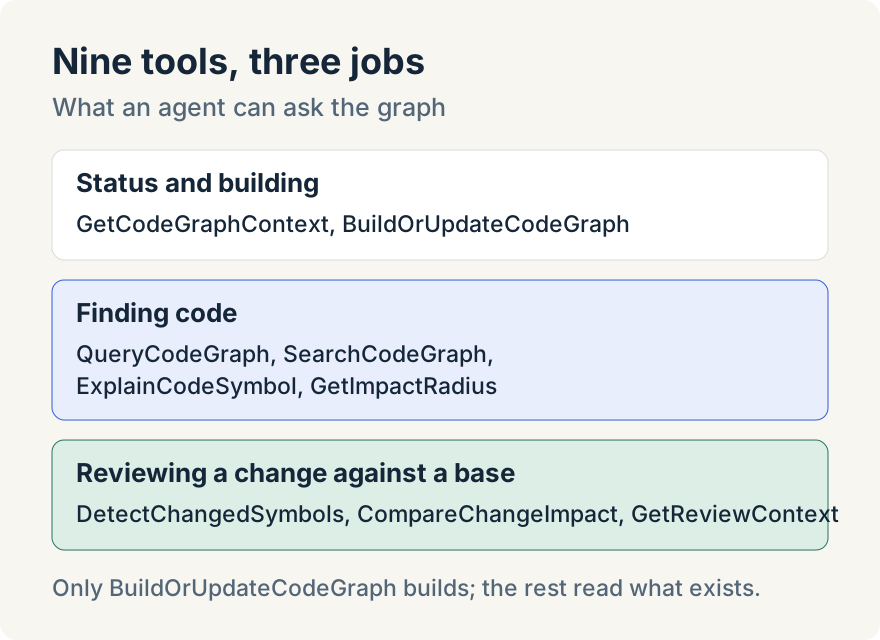
The nine tools fall into three groups:
- Status and building. GetCodeGraphContext reports whether a graph exists, how fresh it is and its counts. BuildOrUpdateCodeGraph builds or refreshes it.
- Finding code. QueryCodeGraph answers questions such as a symbol's callers and callees, a file's importers, the tests for a symbol and the docs for a file. SearchCodeGraph searches symbol names. ExplainCodeSymbol describes one symbol with its callers, callees and tests. GetImpactRadius walks backward from a symbol to what depends on it.
- Reviewing a change. DetectChangedSymbols maps the diff against a base branch to the symbols it touches. CompareChangeImpact adds what those changes affect. GetReviewContext puts that together for review, with impacted files and tests, changed functions that have no linked tests, and review priorities.
Answers are kept short by default. List results return five items unless the agent asks for more detail, which allows up to 50, or 200 for the three change review tools, and GetImpactRadius walks two steps out by default and at most four. When a result is cut off, it says so and suggests the next tool to call, so a short answer isn't mistaken for a complete one.
If a worktree has no graph yet, every tool except BuildOrUpdateCodeGraph answers that the graph is unavailable and points the agent to BuildOrUpdateCodeGraph. While a build is already queued or running, GetCodeGraphContext reports that instead, so the agent doesn't conclude that the feature is missing.
When a graph exists, the chat's instructions tell the agent to prefer the graph tools over broad file scans. In the chat, code graph calls appear as their own kind of tool call, labeled with the mode and target they used, and turn summaries count them separately.
See a worktree's graph
Open a worktree row's More actions menu, choose Branch info and go to the Code Graph tab. It shows the graph's Files, Symbols, Edges and Repositories, along with Unresolved edges, Files with errors and when it was Last generated. Generate Code Graph builds one if the worktree has none yet; Update Code Graph refreshes an existing one.
Tommy Irish built Code Graph, from the graph engine and its tools to the Settings controls.
Where it stops
- Only TypeScript, TSX and JavaScript are parsed as code. Other languages aren't indexed as code.
- Each graph covers one worktree. There is no graph across worktrees or projects.
- Files over 2 mebibytes (MiB) are recorded as files only, with no symbols or edges.
- Calls and imports that can't be resolved are kept and counted as unresolved rather than guessed.
- Only BuildOrUpdateCodeGraph builds. The other tools read the graph as it is, so a stale graph gives stale answers until it refreshes.
- The tools are available in worktree chats, not in chats without a worktree.
- Turning generation off pauses it. Existing graphs stay readable and are reused if you turn it back on.
Try it
Code Graph is in version 0.29.0 of the Unstoppable desktop app for macOS and Windows. Download it, check that Code Graph is Enabled in Settings, Experiments, and start a new chat in a worktree.