
Not every message in a chat needs the same model. A routine edit can go to a fast model, while a hard debugging question may be worth a more capable one. Version 1.8.0 of the Unstoppable desktop app adds Auto to the model picker: before each message, model routing picks one of the models your chat can already run.
Turn it on
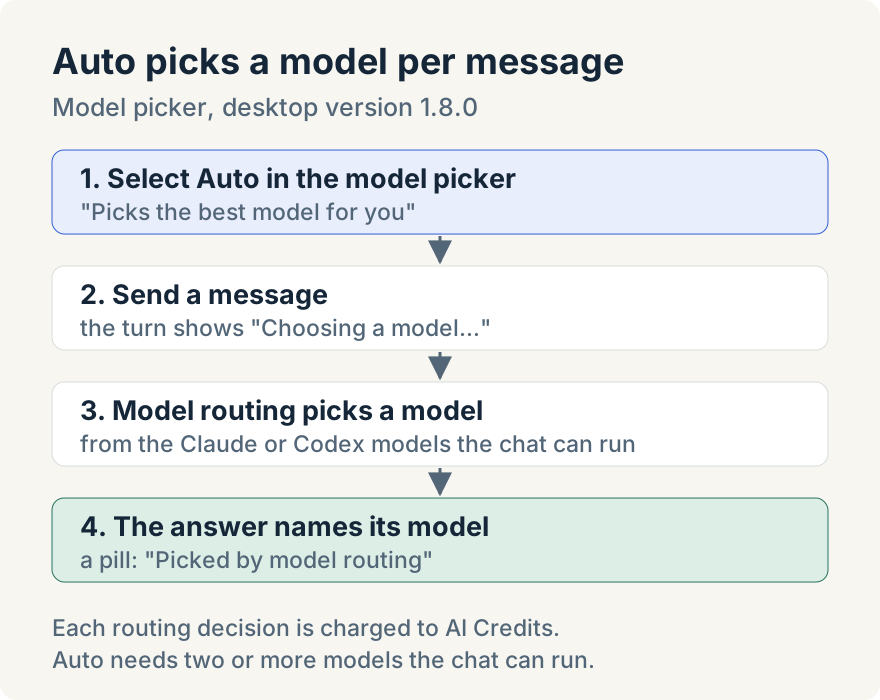
- In a chat's composer, or the composer on Home, open the model picker.
- Select Auto, the first row: "Picks the best model for you". Its tooltip reads "Model routing picks the best model for each message."
- The picker now reads Auto. Send messages as usual.
Auto has no switch in Settings; it's a choice in the picker, made per chat. To go back, pick any specific model and the chat returns to manual selection straight away.
What each message shows
While routing decides, the turn reads "Choosing a model…". When the answer arrives, the turn's footer shows a pill naming the model that wrote it, with the tooltip "Picked by model routing". The pills stay in the chat after the app restarts, so you can see which model handled each message.
Which models Auto chooses from
Auto chooses only among Claude and Codex models the chat can run:
- If the chat runs on your own Claude or Codex sign-in, Auto picks among the models of the providers you're signed in to. When Codex reports an account model list, choices are limited to that list.
- If the chat runs on AI Credits, Auto picks among the models offered on AI Credits.
- A new chat can start on either Claude or Codex. Once a chat has started, Auto stays with that chat's provider, so the conversation keeps its context.
Auto also avoids throwing away a warm prompt cache. If the current model answered in the last five minutes, routing keeps it rather than switching to a cheaper model when re-reading the conversation would cost more than the switch saves. A switch to a model with a higher input rate, usually a more capable one, is never held back.
If routing is unavailable or times out, Auto falls back to the current model if it is still eligible, otherwise the chat provider's default or another eligible model.
Where it stops
- AI Credits. Each routing decision is charged to Unstoppable AI Credits, even when the chat runs on your own Claude or Codex sign-in. Without AI Credits the row prompts you to add some, and selecting it opens the page where you add them instead of turning Auto on.
- Two or more models. If fewer than two models can run in the chat, the row reads "Needs two or more models".
- Chats only. Auto appears in the chat and Home composers. Pipeline steps, hooks, automations and a custom agent's base model still use a fixed model.
- What routing reads. To choose, model routing receives the start of your message (up to 8,000 characters), up to 12 recent messages within 12,000 characters, and the names and descriptions of the candidate models.
Aaron Quirk built Auto model routing.
Try it
Auto is in version 1.8.0 of the Unstoppable desktop app. Download it, open the model picker in a chat and select Auto.
Future plans
Auto routing currently relies on Unstoppable AI Credits. The team is reworking model routing so that a coming version will let you route using your own AI subscription, or use a deterministic Auto routing option that doesn't require credits. This post will be updated when that change ships.