
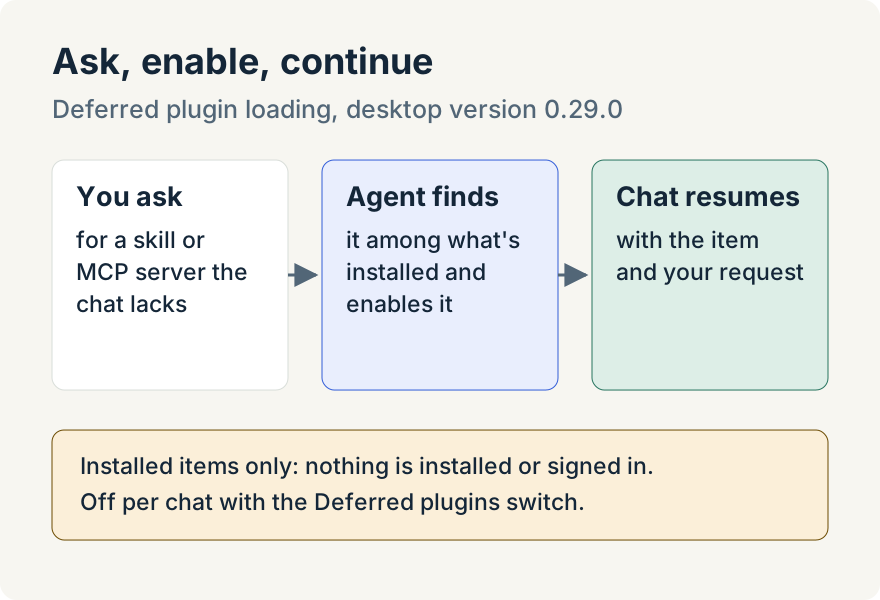
A chat starts with the skills, plugins and Model Context Protocol (MCP) servers chosen for it. Until version 0.29.0 of the Unstoppable desktop app, if you asked for something outside that set, say a skill you installed last week or an MCP server you set up for one project, the agent had no way to reach it from the chat you were in. Now it can find the missing item among what you have installed, turn it on for that chat and carry on with your request.
How it works
Two tools are available to Claude and Codex chats. The agent uses the first to search your installed skills, plugins (including the skills and slash commands inside them) and configured MCP servers that aren't active in the chat. It uses the second to enable what it found.
When an item is enabled, the agent's turn stops and the chat resumes on its own once the item is available, continuing the request you made. You don't resend your message.
The agent is told to use these tools only in two cases: when you ask for something that isn't enabled, or when an active skill names a skill, plugin or MCP server that's missing. It isn't meant to go looking for tools on its own or to recommend ones you didn't ask for.
Turning it on or off
It's on by default. In Settings, choose Plugins and find Deferred plugin loading, which lets agents find and enable missing skills, plugins and MCP servers. It has separate switches for worktree chats, standalone chats and the app's built-in assistants, and each sets the starting value for new chats.
To change it for one chat, open that chat's plugin picker and use the Deferred plugins switch at the bottom. Turning it off keeps the chat to what it started with.
Where it stops
- Installed items only. The agent can enable what is already on your computer. It doesn't install from the marketplace, set up a connection or sign in to anything. Install the item first, then ask.
- MCP servers you've configured. Only MCP server configurations you've enabled can be loaded.
- Provider support. Some plugins can't run in a given provider's chats. Those are left out of the results, and plugins that haven't been downloaded yet aren't offered.
- One reload at a time. If a chat is already reloading to add an item, a second request is turned down until the first one finishes.
Tommy Irish built deferred loading for Claude and Codex chats.
Try it
Deferred plugin loading is in version 0.29.0 of the Unstoppable desktop app. Download it, start a chat without a skill you have installed, and ask the agent to use that skill by name.