
The last steps of a pull request are often the fiddliest: a review comment nobody answered, a conflict with the base branch, a continuous integration (CI) check that failed. Version 0.26.12 of the Unstoppable desktop app puts those steps in the worktree's status bar. You can merge the pull request from there, and when something is in the way, one click starts an agent chat to deal with it.
Merging from the status bar
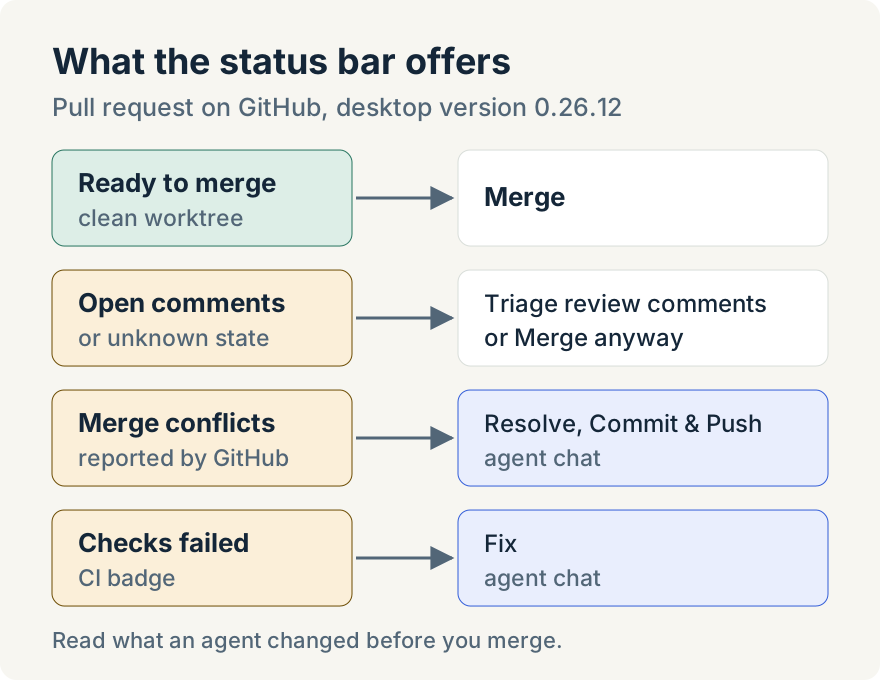
When a worktree's branch has an open pull request that GitHub reports as mergeable, the status bar shows Merge ("Merge the pull request"). It only appears when the worktree is clean, with nothing uncommitted or unpushed, so what you merge is what you see locally. The app checks the pull request's state with GitHub again before merging, merges the exact commit it checked, and confirms with GitHub that the merge happened.
In a workspace with several repositories, Merge lets you choose which repositories' pull requests to merge.
When comments are still open
Before merging, the app counts unresolved review threads on the pull request. If there are any, or if it can't tell, the Merge button changes color and its tooltip says why. Clicking it opens Unresolved comments, which says how many there are and offers three ways forward:
- View pull request on GitHub, to read them yourself;
- Triage review comments, which starts an agent chat to work through the review comments;
- Merge anyway, when you've decided they don't need to block the merge.
Cancel leaves everything as it was.
Conflicts and failing checks
Two more buttons appear only when they're needed.
- Resolve, Commit & Push shows when GitHub reports merge conflicts. Its tooltip, "Merge conflicts detected", says what happens next: an agent resolves the conflicts, then commits and pushes the resolved merge. It starts from a clean worktree, like Merge.
- Fix sits next to the CI badge when checks have finished and failed ("Fix failing CI checks"). It starts an agent chat that investigates the failing checks and fixes them.
Each of these opens its own chat tab, in the right repository for multi-repository workspaces, so you can watch the agent and step in.
Where it stops
- The agent chats need your review. They start the work; read what the agent changed before you merge.
- Merge needs a clean worktree and a pull request GitHub reports as mergeable. Conflicts and failing checks come first.
- Desktop only, for pull requests on GitHub.
Tommy Irish built Merge and the conflict, comment and CI chats.
Update (2026-10-09): on repositories that require a merge queue, Merge now starts a chat that queues the pull request and watches it until it merges. See How I hand off a pull request and stop watching the merge queue.
Try it
Merge and the pull request chats are in version 0.26.12 of the Unstoppable desktop app. Download Unstoppable, open a worktree whose branch has a pull request and look at the status bar.