
Agent work leaves a long trail of chats. A decision you made with an agent last week, the explanation it gave for a failing test, or the plan you agreed on usually sits in a chat whose title no longer says what was in it. Version 0.29.0 of the Unstoppable desktop app lets the command palette search what was said in those chats, not just their names.
The command palette itself was already available in Unstoppable's first release on June 1. This release adds searching inside conversations and plans.
One box for everything
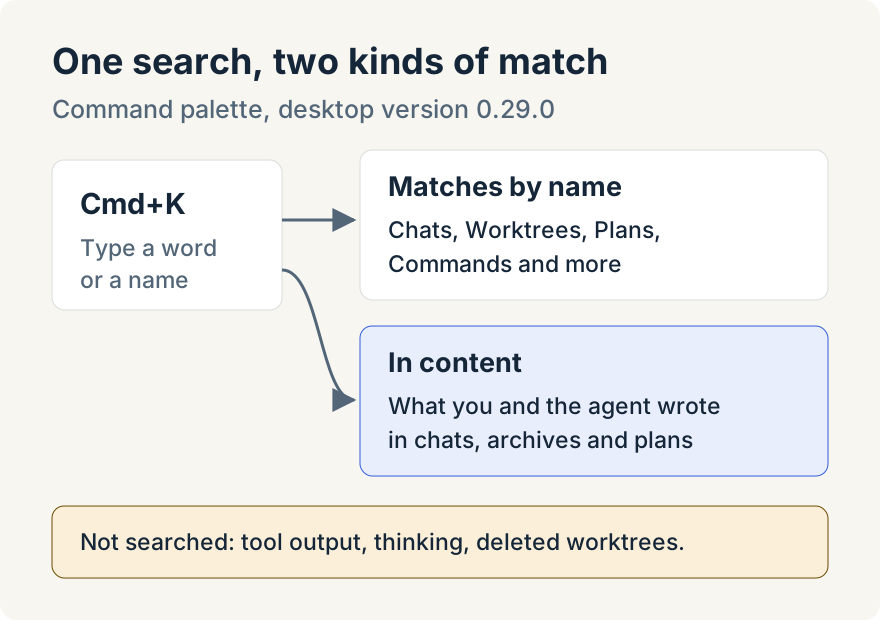
Press Cmd+K to open the palette. The box reads "Search chats, worktrees, commands… (type > for commands)" and searches across worktrees, chat titles, plans, pipelines, automations, watchers, agents, plugins, skills, settings sections and commands. Results are grouped under headers such as Chats, Worktrees and Plans, with the strongest match first.
Two shortcuts change what you see:
- An empty box shows your recent chats and worktrees, followed by common commands.
- Typing
>first searches commands only. A>on its own lists every command.
Searching inside chats and plans
Below the grouped results, an In content section lists chats and plans whose text matches what you typed, with the matching words highlighted in a short snippet. It covers your live worktree chats, archived chats and plans, including a plan's full Markdown text.
Choosing a result takes you to it. A chat result opens its worktree and tab, an archived chat opens its saved transcript, and a plan opens in the plan viewer in the worktree it belongs to.
What it searches, and what it doesn't
The index holds the text you and the agent wrote: your messages and the agent's replies. Tool calls, tool results, the agent's thinking and system messages are left out, so a search for a string that only appeared in a command's output won't find it. Chats in a worktree you deleted aren't searched either.
The index lives on your computer as derived data built from your saved chats, which stay the source of truth. The first time you open the palette, it starts building the index in the background, so content results fill in as it finishes. After that it updates as chats change, when you archive or restore a worktree and when a plan is written.
Later versions added scope tabs along the bottom of the palette; the In content results still come last.
Tommy Irish built the unified palette and the chat content index.
Try it
Content search is in version 0.29.0 of the Unstoppable desktop app. Download it, open a project with some agent chats, press Cmd+K and type a word you remember from one of them.