
Automations in Unstoppable Code run agent work on a schedule: a chat prompt or a pipeline that starts on its own at the times you set. Once one works well, other people may want the same thing. Public preview links arrived in version 1.6.0. Version 1.7.1 adds packaged dependencies and installation: anyone who opens a link can install their own copy in the desktop app.
Aaron Quirk built public sharing with its dependencies and one-step install. The public automation page and link controls were built by Sergii Iurevych.
Sharing an automation
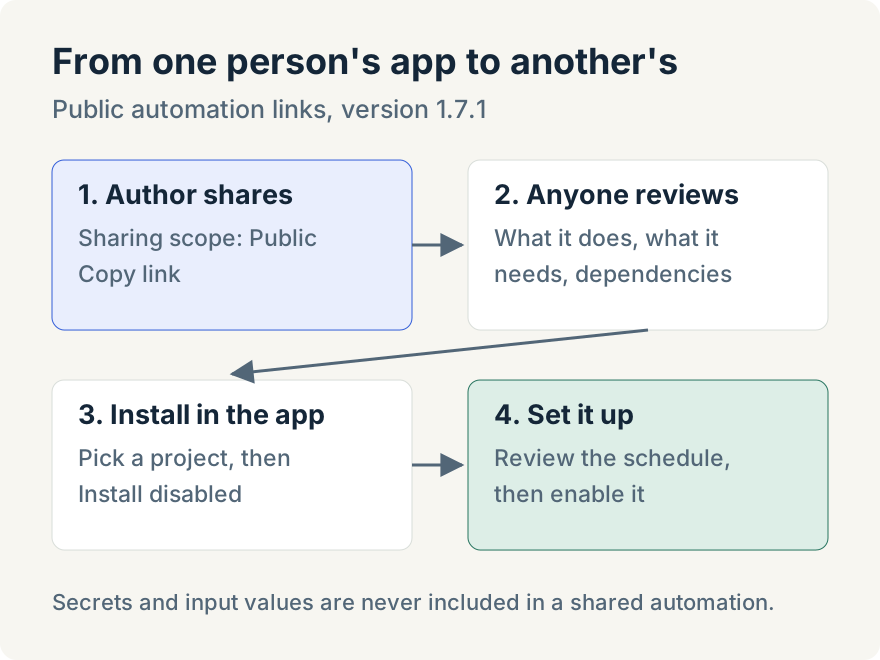
On the Automations page, select Share on one of your automations to open Share automation. Under Sharing scope, choose Public, add an optional description, and select Share Automation. The dialog explains what that means: "Anyone can view this automation and download its included dependency files. It may appear in public discovery and search."
Before sharing, the dialog lists anything that can't travel under Kept private when sharing:. Secrets and input values are never included. Things that only exist on your computer, such as a chat attachment, are left out and named, so you know what the person installing it will have to supply.
Afterwards, the shared automation's Public link row has Copy link. If you change the automation later, Update to latest republishes it, and Remove takes the link down.
Installing from a link
The link opens a public page that anyone can read without signing in. It shows the automation's name, the author's username when their public profile allows it, what it does and what it needs, and whether its dependencies are included, need setup, or are not included.
Install hands off to the desktop app, which opens Install shared automation. There you choose the project the automation runs in. If it runs a pipeline that only exists on the author's computer, you pick one of your own pipelines instead; if the pipeline travels with the share, it is listed as a Bundled pipeline and installing creates your own copy of it.
The button reads Install disabled, and that is what it does: "The copy is created disabled. Review the schedule and bindings, then enable it from the Triggered tab." Nothing runs until you have chosen when it should.
If the author publishes an update, opening the link again offers the update for the copy you already have rather than installing a second one.
Limits
- Sharing and installing need the desktop app. The public page is for reading; installing happens in the app. Sharing needs you to be signed in to an Unstoppable account that supports shared automations.
- Not every automation can be shared. Automations that resume a specific pipeline run can't be shared.
- Some parts stay behind. Secrets, input values, attachments and anything tied to your own chats or computer are left out, and the recipient fills them in.
- The schedule is the recipient's. The installed copy starts disabled and runs only after its new owner sets it up.
Try it
Installing automations with bundled dependencies from public links is in the Unstoppable Code desktop app from version 1.7.1. Download the app, open an automation, and share it with the Public scope.