
A lot of agent work doesn't start from a blank branch. You want an agent to finish a teammate's pull request, fix review comments on your own, pick up a branch you pushed yesterday, or start on the Linear issue you were assigned. Version 1.0.0 of the Unstoppable desktop app puts all of those starting points in one dropdown on the Home composer, so the agent's worktree is on the right branch before you type the first message.
One dropdown, four tabs
On Home, open the branch picker next to the project picker. It opens on four tabs:
- Worktrees: start a new worktree, or pick one of the project's existing worktrees.
- PRs: the repository's open pull requests.
- Branches: local and remote branches that no worktree is using yet.
- Issues: Linear issues you can search.
The search box filters the tab you're on, and the arrow keys move between rows and tabs. Pick a row, write your message and send it. For a pull request, branch or issue, a new worktree checks out what you picked and the chat starts there.
What each source does
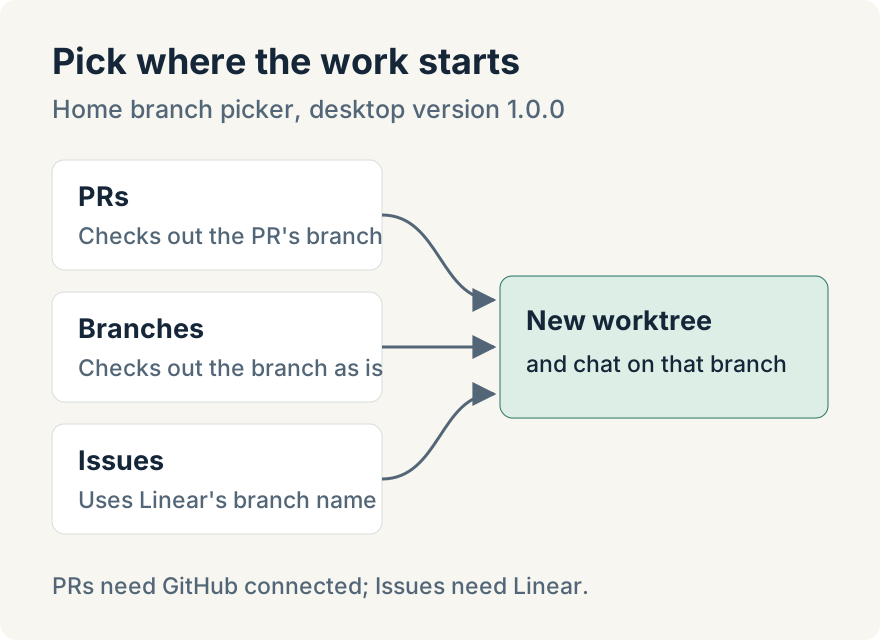
A pull request checks out the pull request's own branch in a new worktree, so the agent starts from the same commits the pull request has. If the one you want isn't in the list, paste its link or number. If the link belongs to a different repository, the composer switches to the project whose remote matches, or offers to add that repository as a project first.
A branch is checked out exactly as it is.
A Linear issue uses the branch name Linear suggests for it. If that branch already exists, the worktree checks it out; if not, it's created.
Where it stops
- Connections. The PRs tab needs GitHub connected and the Issues tab needs Linear. Without them, each tab shows a prompt that takes you to the account settings to connect.
- Pull requests from forks appear in the list but can't be picked, because their branch lives in someone else's repository.
- Git projects only. In a project with several repositories, the source repository is the one used.
The same starting points are available in the board view's new task dialog, and the app's built-in assistant can create a worktree from a branch, pull request or issue when you ask it.
Ryan Le built the create-from flow.
Update (2026-08-26): Home also has a base picker for starting a new task from another branch. Choose the base branch for a new worktree describes that flow.
Try it
Starting from a pull request, branch or Linear issue is in version 1.0.0 of the Unstoppable desktop app. Download it, connect GitHub, open Home and choose the PRs tab in the branch picker.