
Once an agent opens a pull request, the work isn't finished. Checks fail, reviewers leave comments, and the base branch moves until the branch conflicts with it. Each of those usually means noticing the change, opening the right worktree and asking an agent to deal with it. Hooks in the Unstoppable desktop app do that step for you. They were part of the first Unstoppable desktop release, version 0.25.3, on June 1, 2026.
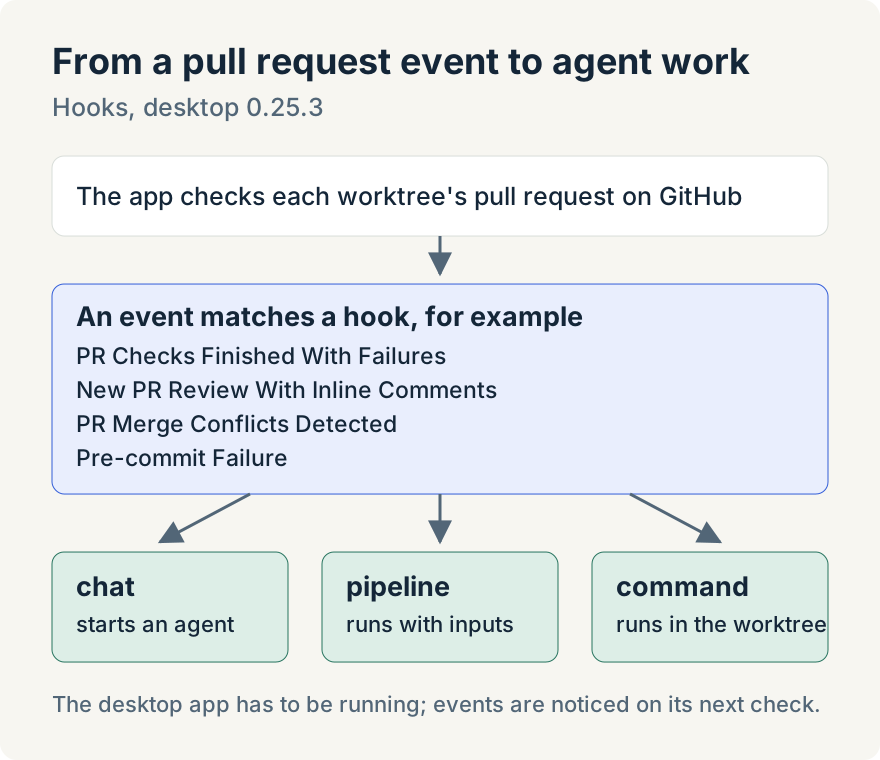
A hook pairs an event on a worktree's pull request with one or more actions. When the event happens, the app runs the actions in that worktree.
The events
In version 0.25.3 there are fourteen pull request (PR) and commit triggers. These four suit handing work to an agent:
- PR Checks Finished With Failures: every check has finished and at least one failed. PR Check Failed fires earlier, as soon as any single check fails.
- New PR Review With Inline Comments: a reviewer submitted a review that comments on specific lines. New PR Review Submitted fires for any new review.
- PR Merge Conflicts Detected: the pull request can't merge cleanly.
- Pre-commit Failure: a commit the app made failed in your pre-commit checks.
The others cover the rest of a pull request's life: PR Created, PR Comments Updated, PR Labels Updated, PR Check Passed, All PR Checks Passed, PR Checks Finished, PR Merged and PR Closed.
The actions
Each trigger runs a list of actions in order. An action is one of three types:
- chat opens a new chat tab in the worktree and sends your prompt to an agent. You can choose the model and plugins, and the hook editor can insert details of the pull request into the prompt as variables.
- pipeline starts one of your pipelines with inputs you set. It has to be a pipeline that can be started on request.
- command runs a shell command in the worktree.
So a hook on PR Checks Finished With Failures can open a chat that asks an agent to find out why the checks failed, fix the cause and push. A hook on New PR Review With Inline Comments can ask an agent to work through the review. A hook on PR Merge Conflicts Detected can ask one to update the branch and resolve the conflicts.
Because the actions in one hook run one after another, a command can prepare something, such as fetching the latest base branch, before the chat that follows it starts. A pipeline action works the same way for multi-step work, such as running a review pipeline when a pull request is created, as long as that pipeline can be started on request. The hook continues once the pipeline is started or queued; it does not wait for the pipeline to finish.
Set them up
Open the project's settings and choose the Hooks tab, or choose Open hooks settings from the Hooks section of a worktree's Activity panel. Choose Add hook action, pick the trigger and the action type, and fill it in.
The tab has two modes. Source controlled keeps hooks in the repository's unstoppable-code.json file, so everyone who opens the repository in Unstoppable gets the same hooks. Local override keeps them on your machine only. A source-controlled hook uses JavaScript Object Notation (JSON) like this (the prompt is an example):
{
  "hooks": {
    "pr:checks:finished:has-fail": [
      {
        "type": "chat",
        "prompt": "The checks on this pull request failed. Find the cause, fix it and push."
      }
    ]
  }
}
Workspaces with several repositories can set hooks for the whole workspace or for one repository, and a repository can turn off a hook it would otherwise inherit.
Decide when a hook should stay quiet
A chat action can have an If command: a shell command that runs first. If it exits with 0, the chat starts. If it exits with 2, the hook stops quietly. Any other exit code marks the hook as failed. This lets you write your own condition, for example only starting a chat when a particular check is the one that failed.
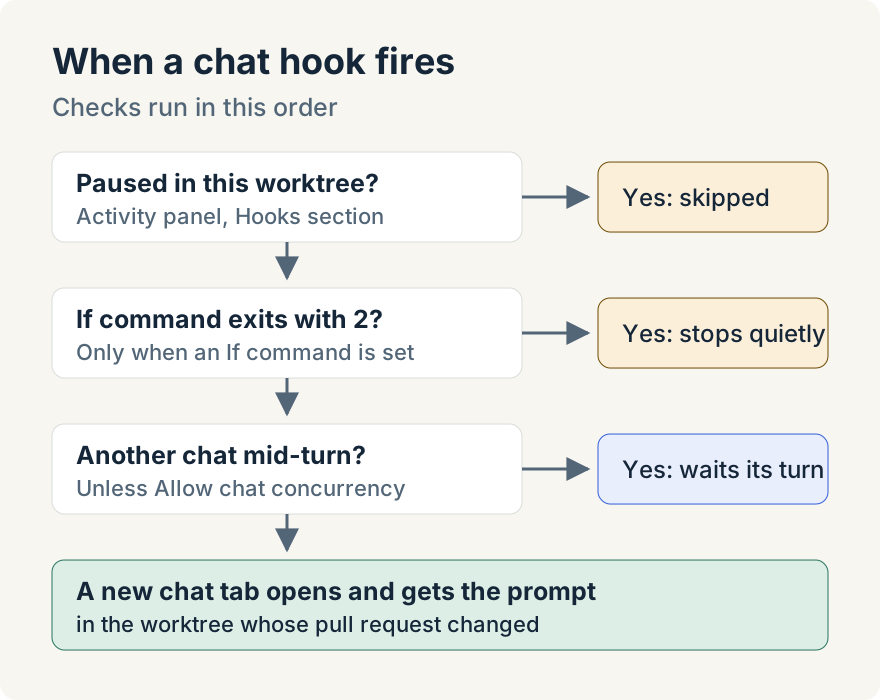
Three more rules keep hooks from tripping over other work:
- A chat started by a hook waits until other chats in that worktree finish their turns, unless you turn on Allow chat concurrency.
- Pipelines started by hooks queue behind pipelines that are already running, unless you turn on Allow pipeline concurrency. Runs for the same repository never overlap.
- When one check of a pull request turns up several events at once, their hooks run in a fixed order, from PR Created through the review and check events to PR Merged and PR Closed.
Watch and pause them
Each worktree's Activity panel has a Hooks section listing the hooks that apply to it. From there you can pause one hook or use Pause all hooks for that worktree, for example while you're working on the branch yourself. Pauses belong to the worktree on your machine; they don't change the repository's file. Run starts a hook by hand, which needs the worktree to have an open pull request.
Tommy Irish built hooks: the triggers, the chat and pipeline actions, the If command and the pause controls.
Where it stops
- The desktop app watches GitHub by checking each worktree's pull request in turn. It has to be running, and an event is noticed on the next check rather than the moment it happens.
- It needs GitHub access: a personal access token saved in the app or a signed-in GitHub command-line tool.
- Pre-commit Failure only fires for commits the app makes, not commits you make in your own terminal.
- A hook reacts to the pull request of its worktree. It doesn't watch other branches or repositories.
- Hooks start agents with the prompt you wrote. Check what an agent pushes the way you would check any other change.
Try it
Hooks are in version 0.25.3 of the Unstoppable desktop app for macOS and Windows. Download it, open a project's settings and choose the Hooks tab.