
An agent's turn can run for a while. It reads files, runs commands and edits code before it answers. While it works, you can watch what it is doing, and sometimes you see that it is missing a fact it needs or heading toward the wrong part of the code.
Until version 1.7.1, the Unstoppable Code desktop app gave you two choices at that point. You could let your message wait in the queue until the turn finished, or press Interrupt, which stops the turn and sends your message next. Waiting lets the agent keep going in the wrong direction. Interrupting ends the current turn; edits and commands already completed remain.
Version 1.7.1 adds a third choice: Steer. It delivers your message into the turn that is already running, so the agent can take it into account without starting over. Tommy Irish built steering for Claude and Codex chats.
How it works
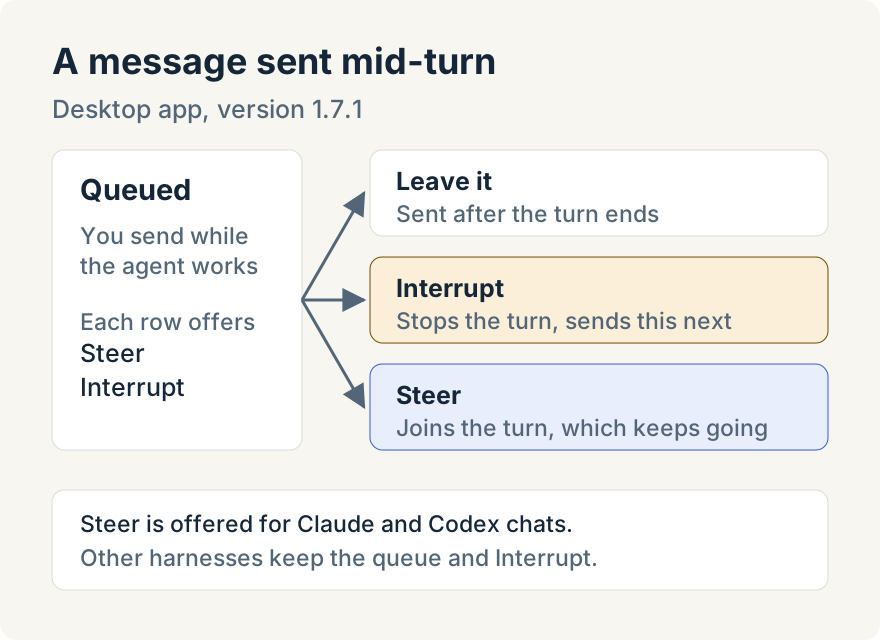
While a turn is running, sending a message doesn't interrupt anything. The message goes into the chat's queue and shows as a row labeled Queued. That part is unchanged: if you do nothing, it is sent as the next message when the turn ends.
Each eligible queued row now has two buttons:
- Steer hands the message to the running turn. The agent keeps working and reads your message at its next opportunity.
- Interrupt stops the current turn, then sends this message.
You choose per message. Interrupt suits a message that makes the current work pointless, because the turn ends and the agent starts again from your message. Steer suits extra information or a correction the agent can take into account without discarding what it has done so far, because the turn continues with your message added.
Messages you leave alone behave as before. When the turn ends, the queue sends the next message automatically. You can still edit or remove a Queued row before it goes. Steering only changes what happens to the rows you choose to steer.
When the agent has taken a steered message in, it appears in the transcript with a Steering title, so the conversation history shows that it arrived during a turn rather than as a new request.
Claude: Pending until it is picked up
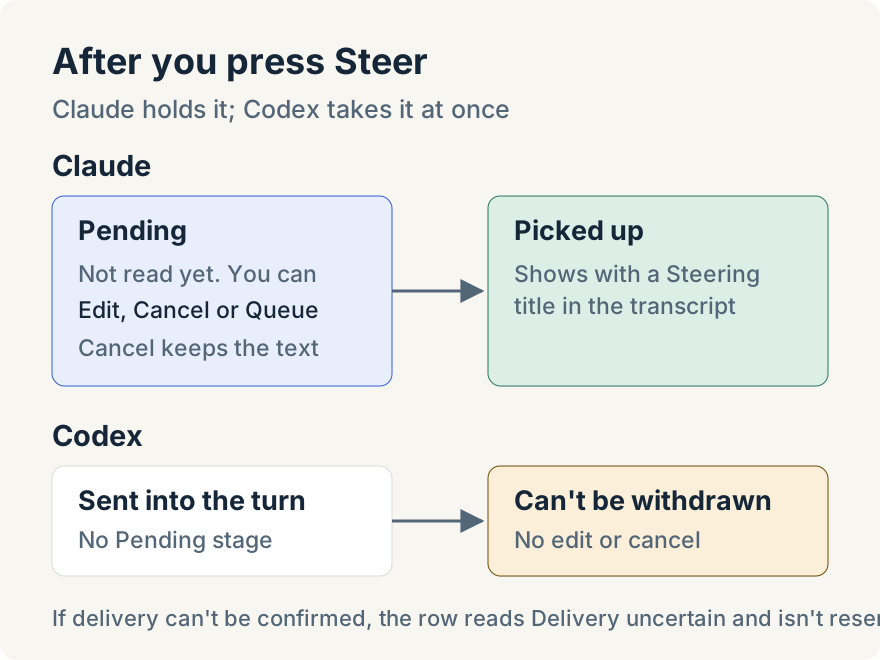
Claude decides when to read input it has been handed. Between the moment you press Steer and the moment Claude picks the message up, the message sits in a group after the running turn, labeled Pending.
While a message is Pending you can still change your mind, because Claude has not read it yet:
- Edit withdraws the message first, then opens it for editing. Saving sends the edited version. Cancelling the edit sends the original again.
- Cancel withdraws the message. It stays in place as a Cancelled row, with its text kept, and is never sent unless you choose Resend or Queue.
- Queue withdraws it and moves it back into the ordinary queue, where it waits for the turn to end.
Once Claude picks the message up, the row reads Picked up and the editing controls go away. If the app can't confirm what happened to a message, for example because the connection dropped at the wrong moment, the row reads Delivery uncertain with the note "Delivery could not be confirmed. This message will not be resent automatically." Nothing is resent behind your back; you decide what to do with the text.
Pressing Interrupt or stopping the turn also withdraws any Claude messages that are still Pending. They become Cancelled rows rather than disappearing.
Codex: delivered straight into the turn
Codex chats steer through Codex's own steering request. The message goes straight into the running turn. There is no Pending stage, so a steered Codex message can't be edited, cancelled or moved back to the queue afterwards. If you aren't sure about a message, leave it in the queue or use Interrupt instead.
Notifications can steer too
Some messages in a chat don't come from you. Watchers post a message when something you asked to be told about happens, such as a pipeline finishing. Before version 1.7.1, a notification that arrived during a turn waited behind any messages you had queued. Now it tries to steer the active turn, so the agent hears about the event while it is still working.
Where it works
Steering is part of the desktop app's chats, including App Advisor and standalone chats. It needs no setting: when a Claude or Codex turn is running, queued messages offer Steer.
Update (2026-10-09): The Subagents panel uses the same Queued row, with Steer and Interrupt, to talk to a running managed delegate. Tommy describes that case in How I keep track of what my subagents are doing.
Limits
- Claude and Codex only. Steer is offered for Claude and Codex chats. Claude chats running in the managed terminal, Ollama models and other harnesses keep the earlier behavior: the queue and Interrupt.
- Only while a turn is running. When the agent is idle, sending a message works as it always has.
- Not in cloud chats. Steering in version 1.7.1 covers chats the desktop app runs.
- Pickup is the agent's call. A steered message is read at the agent's next opportunity, not instantly. Claude chooses when to read it; until then the message stays Pending.
- No guarantee of what the agent does with it. Picked up means the agent received the message, not that it changed course the way you hoped. Check the next steps it takes.
Try it
Steering is in the Unstoppable Code desktop app from version 1.7.1. Start a Claude or Codex chat, send a follow-up while the agent is working, and press Steer on the Queued row. Download the app.