

If you already pay for GitHub Copilot, version 1.8.0 of the Unstoppable desktop app lets you use that account as an agent provider beside Claude and Codex. You connect it once in Settings, then pick a Copilot model wherever you pick a model.
Turn it on
- Open Settings and go to Experiments.
- Find the GitHub Copilot section: "Connect your GitHub account to use Copilot models, tools, and skills."
- Select Connect Copilot. The app downloads Copilot's own runtime first, and the section shows the download size and progress.
- GitHub sign-in opens in your browser. The section reads "Finish signing in in your browser" until you do.
- When it reads Copilot connected and "Signed in as" your GitHub username, you're done.
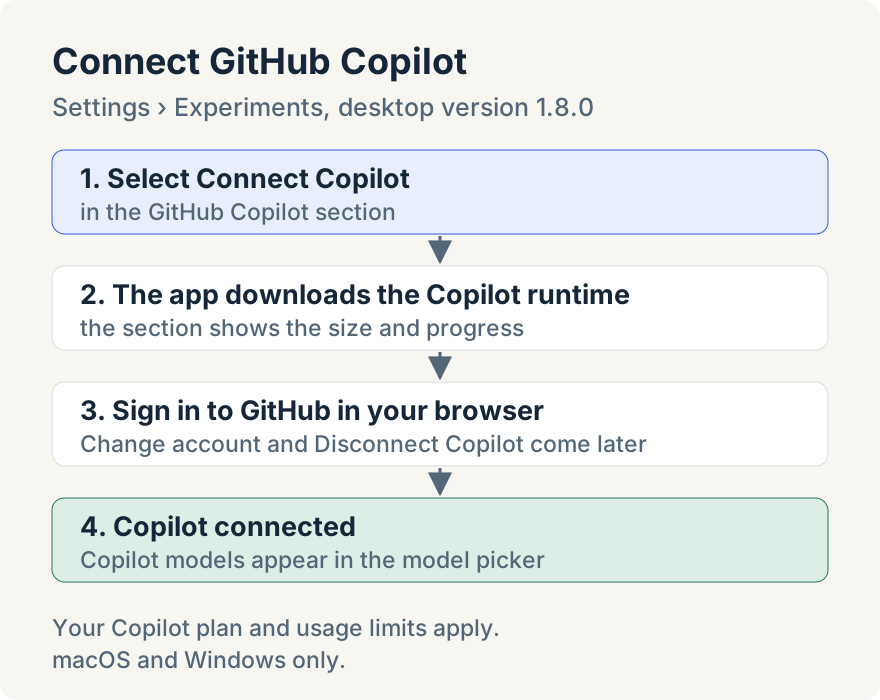
The same section has Change account, which signs out the connected account before opening GitHub sign-in again, and Disconnect Copilot. Disconnecting stops any Copilot tasks that are running.
Where Copilot shows up
Once connected, the model picker gets a Copilot tab listing the models your Copilot account offers, with their reasoning choices. If you open the picker before connecting, Copilot is listed as a provider to connect, and choosing it takes you to the Settings page above.
Copilot works in the same places as the other providers:
- Chats in worktrees and Cowork projects, with the app's shared approvals, Model Context Protocol (MCP) servers and skills.
- Pipeline steps that name a Copilot model.
- Delegated tasks, when a chat hands part of its work to another model.
- Remote Control, where a browser steering your desktop sees the same Copilot models.
Usage comes from your Copilot account: the app shows what the account reports, in tokens, and doesn't estimate a cost for Copilot turns.
Limits
- Your Copilot plan applies. The section says it plainly: "Your Copilot plan and usage limits apply."
- macOS and Windows only. On other systems the section doesn't appear.
- Organization gateways. If your organization requires every model to go through its own model gateway, Copilot isn't offered.
Ryan Le built the GitHub Copilot integration.
Update (2026-10-19): In desktop 1.12.0 the Experiments page in Settings is renamed Labs. The GitHub Copilot section is there.
Update (2026-10-29): From desktop 1.16.1, once Copilot moves out of Labs, its sign-in appears in Settings › Accounts as a provider row beside Claude and Codex.
Try it
GitHub Copilot support is in version 1.8.0 of the Unstoppable desktop app. Download it, open Settings, and connect your Copilot account.