
Agents in the Unstoppable desktop app keep working after you step away from your computer. Version 1.0 of the Unstoppable mobile app, released in the App Store on July 24, 2026, lets you follow that work from your phone and send the next instruction without going back to your desk.
Who could use it
Version 1.0 was built for organizations. You sign in with Continue with Google, Continue with GitHub or Sign in with Apple, using the same account as the desktop app. If the account isn't part of an organization, the app shows No organization and asks you to contact your organization's owner for an invite. If you have a pending invitation, it offers to accept it.
What the app does
Five tabs run along the bottom of the screen:
- Activity: your organization's recent agent activity, with a filter.
- Overview: usage for the organization, split into Overview, Team Impact, Tokens, Observed cost, Pipelines, Tools and Activity, over a time range you choose.
- Members: the people in the organization, with an invitation action for accounts permitted to manage members.
- Workspaces: Remote Control for the desktop app on your computer.
- Account: your profile, application programming interface (API) keys, sign-in methods and two-factor settings.
Pair it with your desktop
The Workspaces tab connects to one computer at a time:
- In the desktop app, open Remote Control and select Enable Remote Control. A six-digit code appears. It expires after 10 minutes.
- On the phone, open Workspaces. Under "Connect to your desktop", enter the code and tap Connect.
- The phone lists that computer's workspaces and chats. Open a chat to read the conversation, send a message, stop a turn or start a new conversation.
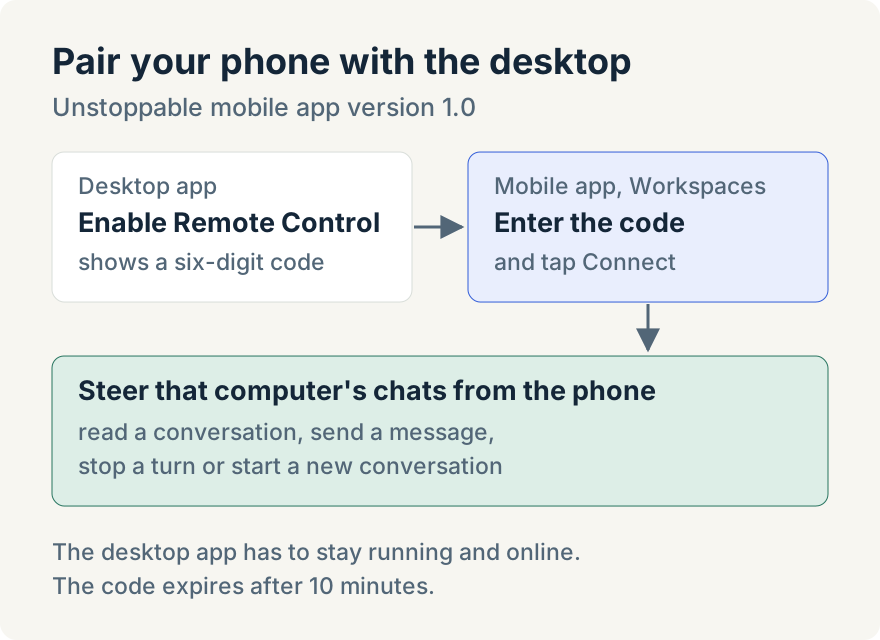
The phone steers the sessions on your computer; it doesn't run agents itself. The desktop app has to stay open and online, and you end the session from the desktop with Disable Remote Control.
Limits
- Organization accounts only in version 1.0.
- One paired computer. The phone controls the computer it is connected to.
- Desktop stays on. If the computer sleeps or the app closes, the phone has nothing to steer.
Ryan Le built the mobile app's Remote Control tab, its release to the stores and its rename to Unstoppable.
Update (2026-08-11): Version 1.1.1 sends a push notification when an agent chat run of a minute or more finishes, not only when it fails. Tapping the notification opens that chat.
Update (2026-09-16): According to the App Store's version history, version 1.1.4 extends Remote Control to accounts outside an organization.
Try it
The Unstoppable mobile app is in the App Store. You'll also need the desktop app: download it, enable Remote Control, and enter the code on your phone.