
Desktop v1.24.0 brings dictation to the Linux app. Until now the microphone in the composer was only on macOS. On Linux you can now speak an instruction to your agent instead of typing it, and the text lands in the composer for you to check and send.
Speech is recognized on your computer, not by a cloud service. That takes one download first.
Set it up once
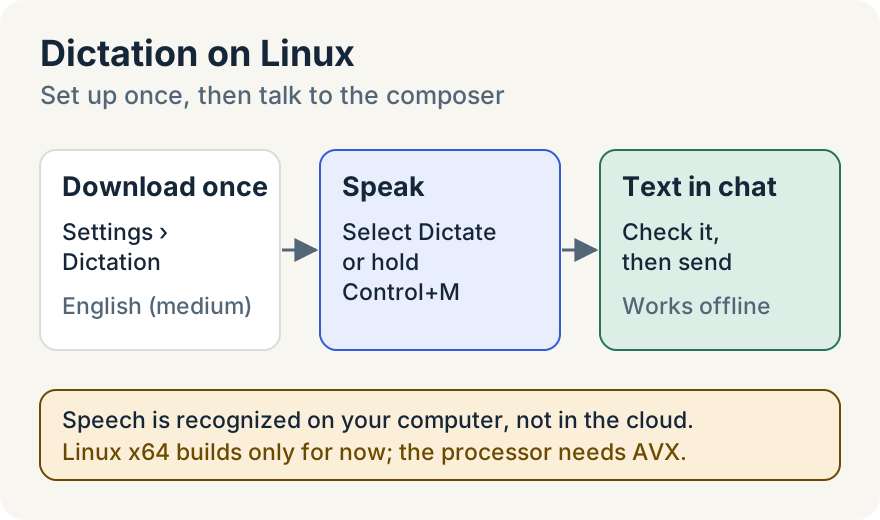
- Open Settings and choose Dictation. Enable dictation is on by default.
- Under Speech model, find English (medium) and select Download (269 MB). A progress bar shows the download, and you can select Cancel download to stop it.
- When the row reads "Downloaded. Dictation works offline.", you're ready.
The app checks every file against its expected size and checksum before it uses the model. For now the model downloads from Moonshine, the speech engine dictation uses on Linux. To free the space later, select Remove speech model.
Dictate a message
In any chat, or in New task, select the microphone button (Dictate) and start talking. Select it again (Stop dictation) when you're done, and the text appears in the composer. Nothing is sent until you send it, so you can fix a misheard word first.
You can also use the keyboard. Hold Control+M while you talk and let go when you're done, or tap Control+M once to keep listening until you tap it again.
If you select the microphone before the model is downloaded, the composer tells you how to get it.
Where it stops
- Linux x64 only, for now. The arm64 Linux builds don't include the dictation helper yet.
- The processor needs AVX. On a processor without it, Settings and the composer say dictation is unavailable on this computer.
- English only. English (medium) is the only speech model in this release.
- Your default microphone. Dictation records from the system's default input device. If it can't hear you, check that a microphone is connected, chosen as the input in your sound settings and not in use by another app.
- The first download needs a connection. After that, dictation works offline.
Anna Nhan built dictation for Linux: the speech helper, the model download and the Linux Settings and composer support.
Try it
Dictation on Linux is in desktop v1.24.0. Download Unstoppable Code, or update the app you have. The composer guide covers everything else you can do from the message box.