
I rarely sit still while an agent works. If it's refactoring a module, I might fix a comment or rename something in the same file in my own tab. So the question comes up often: the agent saves the file while I have unsaved edits. What happens to mine?
Since version 1.16.1 of the Unstoppable Code desktop app, I keep both, and I only choose where we actually changed the same lines. I built this, and here's how it works.
When we changed different lines
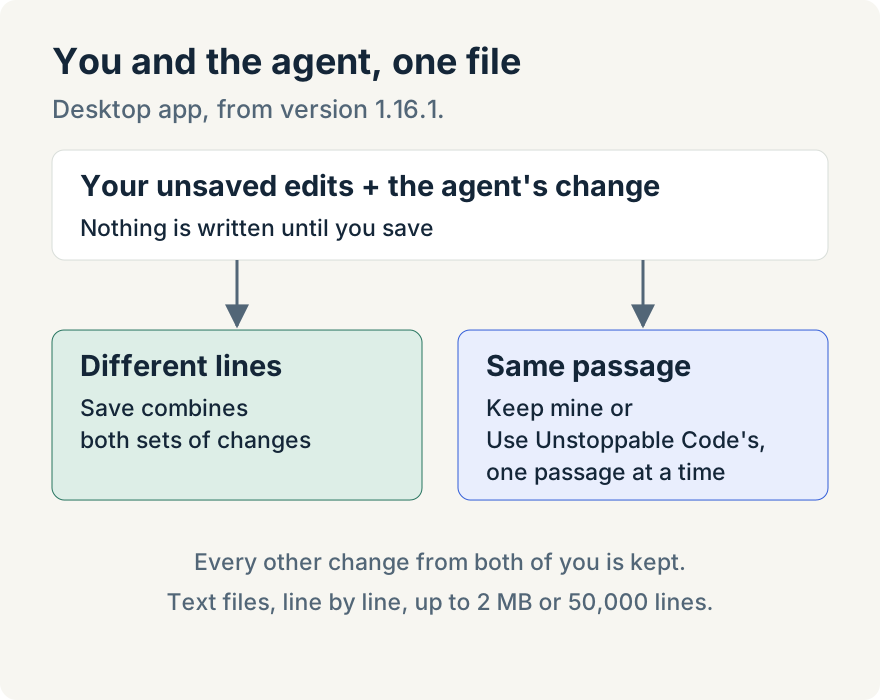
If the agent changes a file I'm editing and our changes don't overlap, a notice says Unstoppable Code updated the document while I was editing, and asks me to save to combine my updates with its changes. Nothing is written yet. When I save, both sets of changes go into the file, and a short notice confirms that they were combined.
When we changed the same passage
If we both changed the same lines, a notice says Unstoppable Code edited text I also changed: "Pick a version. Everything else is kept."
For each passage it shows both versions, mine and the agent's, with a Keep mine and a Use Unstoppable Code's choice. Neither is the default. With several passages it counts them, as in "Passage 2 of 3", highlights the one I'm deciding in the editor and moves to the next after each choice. Long passages collapse behind Show all.
My choices go into the editor, not the file. I read the result and save it myself. If I'm not ready, Decide later closes the notice and pauses autosave, so nothing is written behind my back.
If the file changes again
Sometimes the agent writes the file again while I'm deciding. Then my save stops with Not saved, and I choose between showing the agent's version and Save my version. Neither happens until I pick one.
Where it stops
The merge works line by line on text files. For files over 2 MB or 50,000 lines, or versions it can't compare, I get the older choice: Keep my edits or Show latest. It works in the desktop app's editable file tabs; read-only workspaces don't offer it. The notice names the agent only when the change came from an agent. Other changes on disk are described neutrally.
Try it
It's in the desktop app from version 1.16.1. The labels here are from version 1.17.0. Download Unstoppable Code to try it.