
Most of the commands I run while an agent works are the same handful: start the dev server, run the tests, run the linter. They already exist in the repository, in package.json, a Makefile or a justfile. I still had to remember each one's exact name and which folder to run it from.
The chat box in Unstoppable Code has had a terminal mode for a while: start a message with ! and it runs as a command instead of going to the agent. In version 1.15.0 of the desktop app, that mode knows your repository's scripts.
Approve first
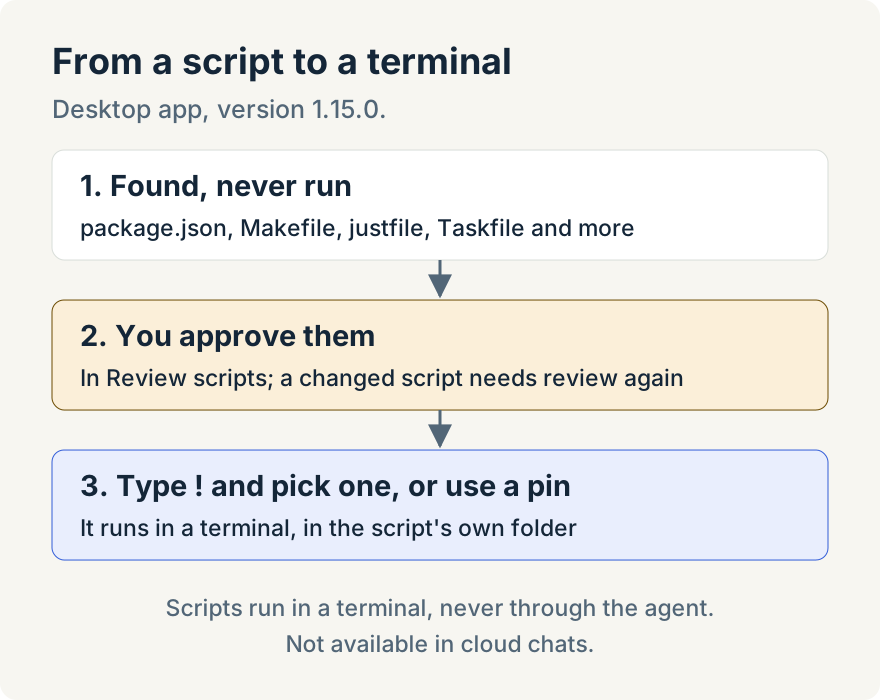
When I add a repository, a notice says how many scripts it found, with a Review button. The app reads the files that define scripts, such as package.json, Makefiles, justfiles, Taskfiles, composer.json, deno.json, Cargo and Go projects, and shell scripts in folders like scripts/. It never runs them to find out.
Review scripts lists them under Needs review. Its own description says it plainly: "Only approved scripts can run, and they run in a terminal, never through the agent." I read the commands, select the ones I use and choose Approve selected.
If a script changes after I pull a branch, it goes back to Needs review. I like that. A test command that suddenly does something else is exactly what I want to read before running it.
Then type !
In a worktree's chat box, I type ! and a list of approved scripts appears, grouped by repository and package. Typing narrows it. Picking test doesn't run anything yet: it fills in the full command, so I can add --watch or a file name and press Enter. The script runs in a new terminal, in its own package folder, so a script from apps/web runs there without me changing directories.
Pins and shortcuts for the ones I use all day
For dev and lint, I turn on Pin to header. One click on the pin runs it. If it's already running, the pin shows that terminal instead of starting a second copy. I can also give a script a keyboard shortcut in the same panel. Shortcuts work across the app, including in the chat box, but not inside a terminal.
If I want my own shell aliases in the list, Scan shell configuration reads files such as ~/.zshrc without running them, and each alias still needs approval.
The limits
- Running scripts is a desktop feature. On the web with a paired desktop, you can review scripts and change preferences, but not run them, and cloud chats don't support it.
- Detection covers common manifest files and folders, not every task runner. Python projects are covered through poe and pdm tasks in
pyproject.toml. - Shortcuts belong to the app, not your whole computer.
Try it
Script detection, the ! list, pins and shortcuts are in version 1.15.0 of the desktop app. Open a worktree and type ! in the chat box, or open your project's settings and choose Scripts. You can download the app here.