
Agents often produce a page you want to look at: a generated report, a one-off prototype, a static site. Before version 1.8.0 of the Unstoppable desktop app, the built-in browser refused local files, so checking such a page meant starting a local server and keeping it running. In 1.8.0 the built-in browser opens local HTML files directly. Aaron Quirk built the change, along with a setting that opens the links you click in the app in the same browser.
Open a file
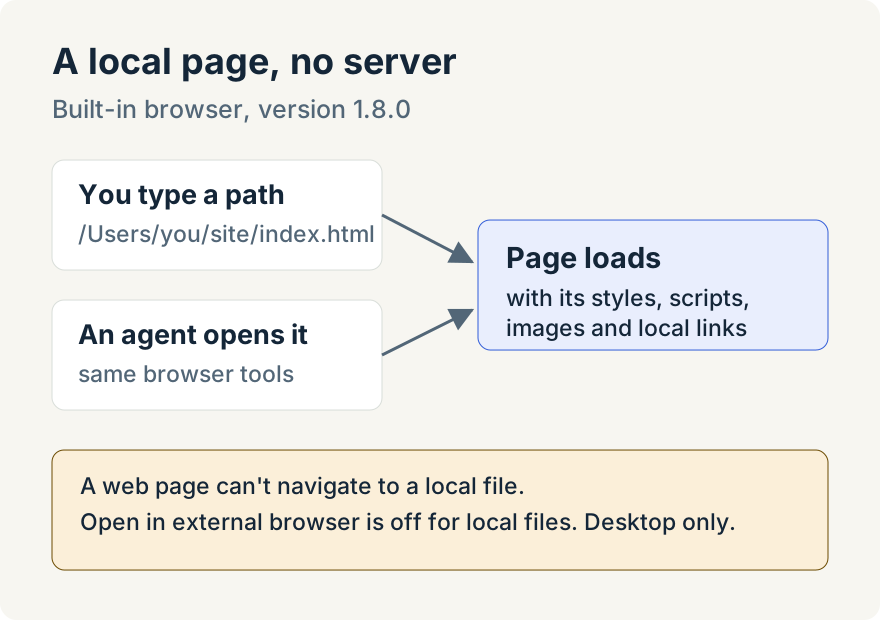
In the built-in browser's address bar, type the absolute path to the file, such as /Users/you/site/index.html on macOS or C:\reports\index.html on Windows, or a file: address. The page loads with its relative stylesheets, scripts and images, and links to neighboring local pages work. Paths with spaces or non-English characters are handled. If the file isn't there or can't be read, the error names the file instead of showing a raw error code.
Agents get the same ability. The browser tools they use to open and navigate pages accept local paths, so you can ask the agent to open the page it just wrote and look at it beside the chat. If that page is already open, the browser switches to it instead of opening a second copy.
What stays restricted
- Only allow local sites in Settings, Browser still means what it says for the network: the browser only loads sites running on your computer. Local files open whether it is on or off.
- A web page can't send the browser to a local file. That attempt is blocked and noted in the browser's console.
- Open in external browser is turned off while the browser shows a local file.
Open links in the built-in browser
The same release adds two switches to Settings, Browser, both off by default:
- Open links in the built-in browser: "Links you click in Unstoppable Code open here instead of in another browser." Sign-in pages and links you explicitly choose to open in your system browser still go there.
- Make Unstoppable Code your default browser: "Links from other apps, like email, open in Unstoppable Code." This works in the installed app on macOS and Windows. On Windows you may need to finish by choosing the app in Windows Settings under Default apps. On Linux the setting reads "This is not available on Linux yet."
Where it stops
- The built-in browser is in the desktop app only.
- Opening a file shows it; it doesn't run a build. Pages that need a development server, such as an app that fetches from its own API, still need that server running.
Try it
Local files and the link settings are in version 1.8.0 of the Unstoppable desktop app. Download the app, open the browser in a task and type the path to a local HTML file.