
Update (2026-09-16): Agents can now fork or branch a chat themselves when you ask them to. Ask an agent to split off work into a new chat describes those tools. This post describes the Fork and Branch buttons in version 0.25.3.
Sometimes a conversation with an agent reaches a point where you want to try two things: keep going one way, and also see what happens if you take a different approach from the same starting point. The first Unstoppable desktop release, version 0.25.3, on June 1, 2026, gives you two buttons for that.
Where the buttons are
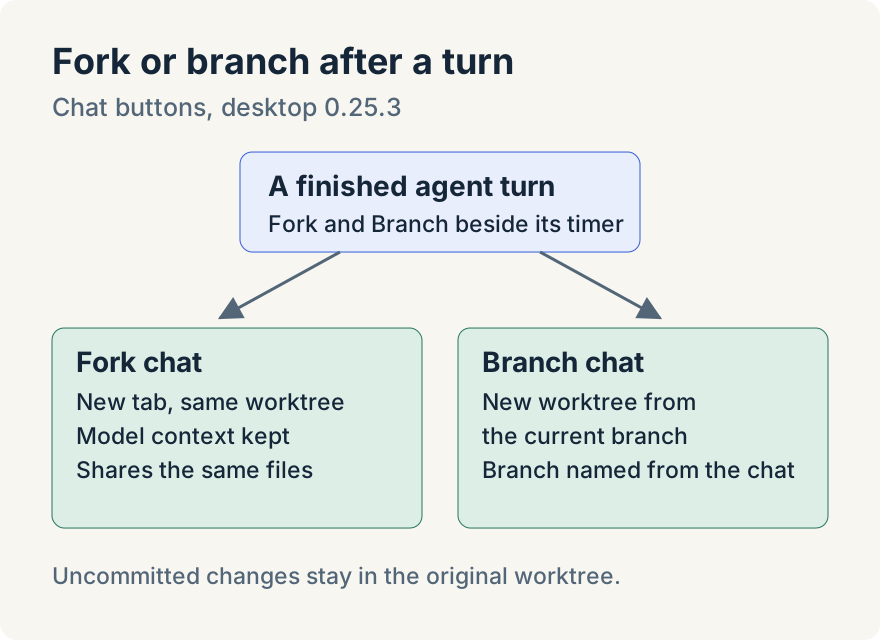
When an agent finishes a turn, two small buttons appear next to the turn's timer on the latest finished turn:
- Fork chat "duplicates this conversation into a new tab and preserves full model context."
- Branch chat into new worktree "creates a new worktree from this one and continues the conversation there."
Fork: same worktree, new tab
Fork copies the conversation into a new tab right after the original, titled Fork: followed by the original name, and switches to it. The model, thinking level, plan mode settings and plugins come along. The agent keeps its context too: a Claude chat continues the same session, and a Codex chat gets a forked copy of its thread. Both tabs work in the same files, so a fork suits a side question or a second line of work on the same changes.
Branch: a new worktree with the conversation
Branch creates a new worktree that starts from the current worktree's branch, copies the chat into it and continues there. The new branch gets a descriptive name generated from the conversation. Because it has its own directory and branch, the original worktree is left alone, which suits trying an alternative you might throw away.
Tommy Irish built branching a chat into a new worktree and its branch naming, on top of the Fork button built by GitHub contributor Armen-Arakelian in April.
Where it stops
- The buttons appear on the latest finished turn. If another turn is already running, copying the earlier turn keeps the visible history but starts without its model context.
- Only Claude and Codex chats carry their model context. If the Codex thread can't be forked, the new tab starts a fresh session with the history still visible.
- A branched worktree starts from the branch's commits. Changes that haven't been committed stay behind in the original worktree.
- Branch isn't offered for standalone chats outside a project.
Try it
Fork and Branch are in version 0.25.3 of the Unstoppable desktop app for macOS and Windows. Download it, let an agent finish a turn in a worktree and look beside the turn's timer.