

Update (2026-11-03): Agents are now managed in Customize, on the Agents tab, rather than on their own page. Create and share custom agents describes the current steps; the date above is that article's date. This post describes Agents as they first shipped.
If you give the same model the same instructions and turn on the same plugins every time you start a certain kind of task, that setup can be saved. Version 0.28.0 of the Unstoppable desktop app, released on July 14, 2026, added Agents: reusable presets that combine a base model, instructions and plugins under one name you can choose wherever you choose a model.
Find Agents
In version 0.28.0, Agents is an item in the sidebar's More menu. To keep it in the main sidebar, choose Customize sidebar from the same menu and drag Agents above the More divider.
The page reads "Create reusable model presets with instructions and plugins."
Create an agent
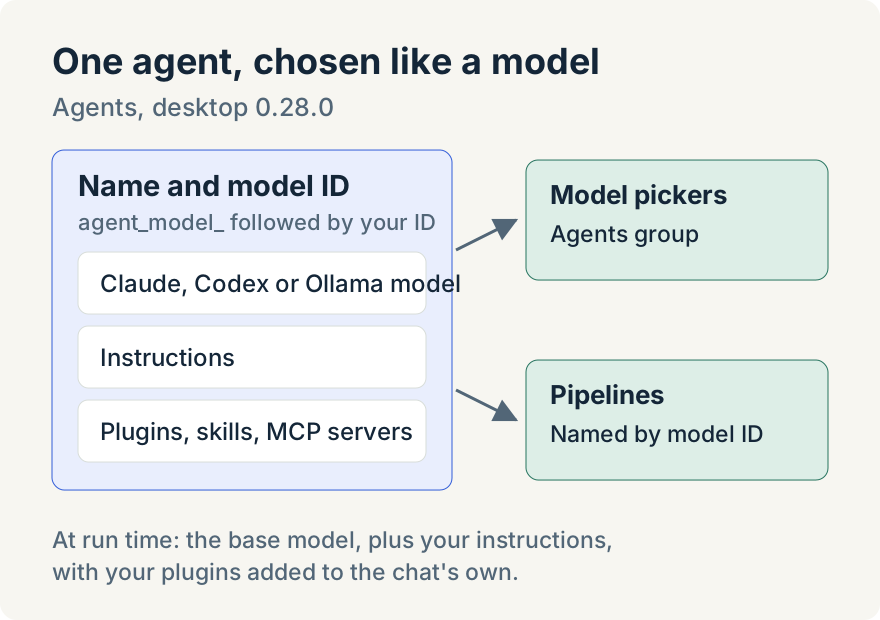
Choose New Agent and fill in the fields below, including the model identifier (ID):
- Name, shown in model pickers.
- Model ID, which starts with
agent_model_and is used in pipelines and model pickers. It can't be changed once the agent exists. - Base model, a built-in Claude, Codex or Ollama model. Another agent can't be a base model.
- Instructions, added to the system prompt whenever the agent is used.
- Plugins, enabled automatically on top of whatever the chat or pipeline already selects. They can include skills, plugins, collections and Model Context Protocol (MCP) servers.
Choose Create Agent to save it.
Use it
New agents appear in an Agents group in the model picker. Choose one for a chat and the base model runs with your instructions added to its system prompt and your plugins turned on alongside the chat's own. Pipelines can name an agent by its model ID. Deleting an agent warns that existing chats and pipelines using it will fail until another model is selected.
Share it
The Local tab lists your agents with their base model and plugins, and each row has Edit, Share and Delete. Share offers a Sharing scope for the agent. The Shared tab lets you search agents others have shared and Import them. Sharing and browsing shared agents need a connected cloud account, which you set up in Accounts settings, and sharing with a team or organization is available only when that account supports it.
Tommy Irish built Agents.
Where it stops
- Agents can't be shared if they include collections, local-only plugins, MCP servers or MCP sign-in preferences.
- Instructions are limited to 64 kibibytes (KiB).
- An agent whose base model is no longer available is marked Unavailable.
Try it
Agents are in version 0.28.0 of the Unstoppable desktop app for macOS and Windows. Download it, then open Agents from the sidebar's More menu.