
Update (2026-11-04): The turn summary, diff viewer and discard dialog have since been redesigned. Review changes with Changed files describes the current steps. The date above is the support article's date; the redesign spans several releases. This post describes version 0.25.3.
When an agent works through a task in several turns, it helps to know which turn touched which file. The first Unstoppable desktop release, version 0.25.3, on June 1, 2026, shows that under each turn and lets you throw away one file's uncommitted changes without touching the rest.
A summary under every turn
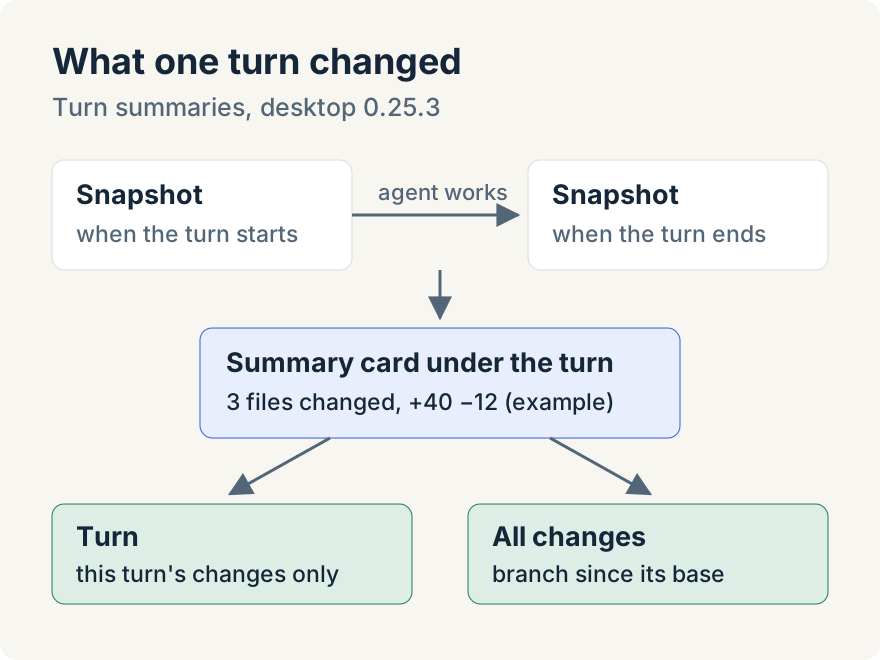
When a turn changes at least one file, a card appears under it: "3 files changed" (or however many), with the lines added and removed. Each file is a pill with its status, name and its own line counts. In a workspace with several repositories, each pill also names its repository.
The card starts open when a turn changed ten files or fewer and closed when it changed more. It folds itself away once the next turn starts, so the chat doesn't fill up with old summaries.
Read the diff
Hover over a pill for a moment to see that file's diff for the turn. Expand opens the full view and Edit opens the file in the editor. In the full view, Turn shows only what that turn did and All changes shows everything the branch changed in that file since it left its base branch. You can switch between unified and split layouts.
Turn diffs come from snapshots the app takes of the worktree when a turn starts and ends. A turn without both snapshots can't show its own diff; the Turn button says so and All changes still works.
Images get a picture diff: PNG, JPEG, GIF, WebP, SVG, BMP and AVIF files up to 5 MB appear side by side as Previous and Current in split view.
Discard one file
The Activity panel's Changed Files section lists the worktree's files under Uncommitted and Committed. Hover over an uncommitted file and choose its revert button. The Revert File dialog can show the diff first, then warns: "This will permanently discard all uncommitted changes to this file. This action cannot be undone." A file the agent created is deleted. Committed work isn't touched.
Tommy Irish built turn summaries, the diff views and file revert.
Where it stops
- Revert is for uncommitted changes only, and it can't be undone.
- Other binary files show "Binary file — diff not available", and very large text diffs are cut short.
- The Changed Files list shows at most 200 untracked files.
Try it
Turn summaries and file revert are in version 0.25.3 of the Unstoppable desktop app for macOS and Windows. Download it, start a chat in a worktree and look under the agent's first turn that edits a file.