
Update (2026-10-06): Version 1.8.0 moved the Split PR settings into the Pull requests section of Settings, Git, where they read Split PR, Split PR threshold and Split PR planner model. Settings worth reviewing once describes the current page. This post describes version 0.28.0.
Agents can produce a lot of change in one branch. A pull request with a thousand changed lines is hard to review well. Split PR, added in version 0.28.0 of the Unstoppable desktop app on July 14, 2026, turns one large pull request into a stack of smaller ones. A model proposes the split, you approve or edit it, and the app carves each piece, checks that it builds and opens a pull request for it.
Turn it on
Split PR is controlled in Settings, Git:
- Split PR: "Offer to split large pull requests into smaller, stacked child PRs." The switch is on by default. Turn it on if it has been turned off.
- Split PR threshold (changed lines): the minimum total changed lines before the Split PR option appears. The default is 500.
- Split PR planner model: the model that plans the split. It can be a Claude or a Codex model.
You also need a connected GitHub account and an open pull request in the worktree.
When Split PR is offered
Split PR appears for an open pull request whose total changed lines reach the threshold. You can find it in three places:
- Split PR… in a worktree row's actions menu.
- A Split PR button on the pull request card in Activity, with the changed line count.
- A Split PR button in the pull request status bar, shown when nothing blocks it.
When something blocks the split, the menu item and the card button stay visible but disabled, and a tooltip names the reason, for example "Commit or discard local changes first", "Push local commits first", "Wait for active pipelines to finish" or "Wait for active agent chats to finish". A split needs a clean, pushed branch that matches the pull request.
Start: a dialog that says what will happen
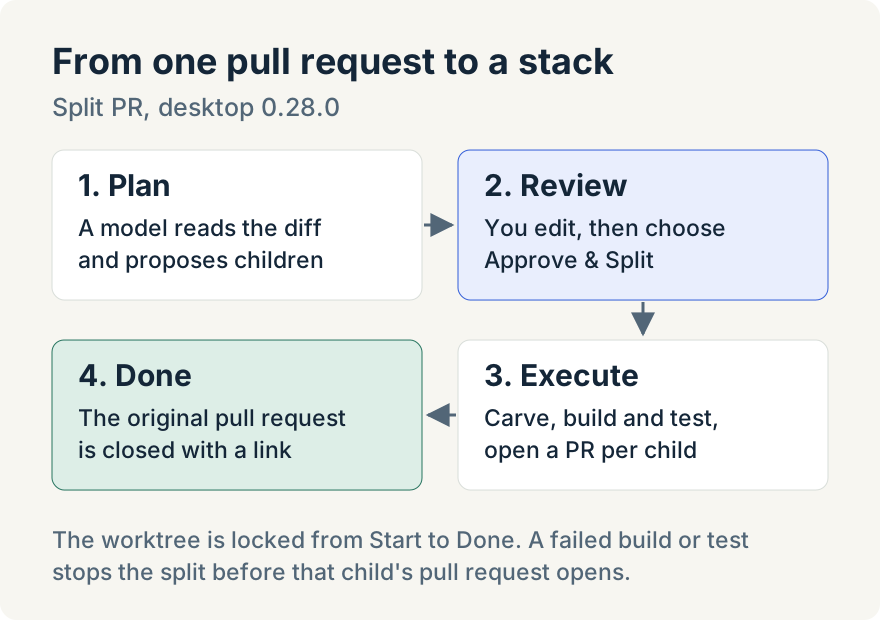
Choosing Split PR opens Start Split PR. Under What happens next it lists the five stages: plan, review, create the integration branch, carve, verify and open a pull request for each child, and finalize by closing the original pull request.
The dialog also warns that the worktree will be locked while the split runs: no chats, pipelines, scripts, terminals or hooks until it finishes. If terminals, browser tabs or scripts are running, it lists what Starting will close. Choose Start to begin, or Cancel.
Plan: a model reads the diff
The worktree switches to a Split PR view and shows "Analyzing PR diff…" while the planner model reads the pull request's changes hunk by hunk, along with the repository's CLAUDE.md and CODEOWNERS files. Planning is the only step that uses a model, and it makes no Git or GitHub changes.
The planner groups changes by purpose rather than by file. Its instructions aim for children of about 200 to 400 lines, a shallow stack of about three to seven, and refactoring before features, so one file's reshaping can land in an early child and its new behavior in a later one. The plan is checked automatically, and the planner gets one retry if it produces an invalid plan.
Review: you approve or edit the plan
Before anything changes in Git, the plan comes back to you. The review shows the Final goal, a Build/test command you can edit, and a check that the children add up to the original pull request's lines. For each child you can edit the title, its type (refactor or feature), the test that proves it, its risk, and which child it depends on. You can reorder children and move hunks from one child to another.
Approve & Split stays disabled until the plan passes validation. Regenerate plan asks the planner again, and Cancel leaves without changes.
Execute: carve, verify, open
After approval the app creates an integration branch from the original base. Then it works through the children in dependency order. For each one it:
- Carves that child's hunks onto its own branch, based on the integration branch or on the single child it depends on.
- Runs the worktree's setup script, then the build/test command.
- Pushes the branch and opens a pull request titled with its position, such as
[2/5].
Each child gets its own worktree, so the children appear in the sidebar like any other work. If a child fails its build/test command, the split stops there rather than opening a pull request that doesn't build.
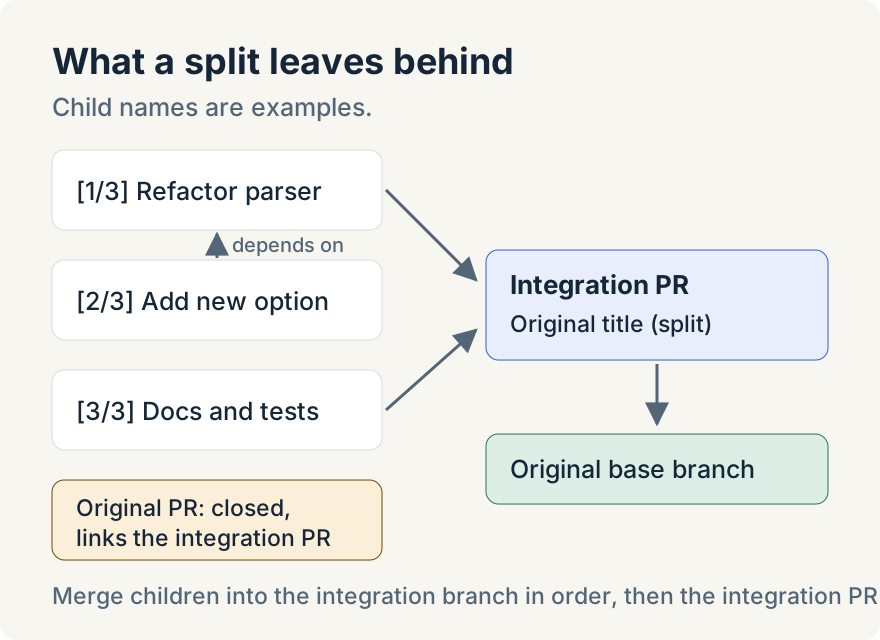
The integration pull request takes the original title with " (split)" added and targets the original base branch. Every pull request body gets a stack section that says which split it belongs to, what to merge into and in what order, and which child it depends on.
Finish
When every child is open, the app switches the original worktree to the integration branch, moves any other open pull requests that targeted the old branch onto it, and closes the original pull request with a comment that links to the integration pull request and its stacked children. The view shows Split complete.
If a step fails, a Split PR failed dialog offers to retry, edit the plan, or discard the split state and plan a new split. If the app restarts mid-split, Split PR interrupted offers to resume from the last checkpoint.
Tommy Irish built Split PR, from the planner to the stacked pull requests.
Where it stops
- The split works on hunks. Edits interleaved inside one hunk can't be separated, and binary files and renames stay whole.
- Each child depends on at most one other child.
- Pull requests from forks and workspaces with more than one repository aren't supported.
- Planning can't be paused once started; you can leave it, and nothing is changed until you approve.
- The worktree stays locked until the split finishes or you discard it.
For what happens after review, Aaron's post on handing off a pull request covers seeing a pull request through a merge queue.
Try it
Split PR is in version 0.28.0 of the Unstoppable desktop app for macOS and Windows. Download it, connect GitHub, check that Split PR is on in Settings, Git, and open a worktree with a large pull request.