
Update (2026-08-04): You can now also start a worktree from a Linear issue in the branch picker on Home, on the branch name Linear suggests for it. Start a worktree from a pull request, branch or Linear issue describes it. This post describes Create Task in version 0.25.3.
If the work you want an agent to do is already written up in a Linear issue, you don't have to copy it into a chat by hand. The Create Task dialog in the Unstoppable desktop app can search your Linear issues and start the work from one. It was part of the first Unstoppable desktop release, version 0.25.3, on June 1, 2026.
Connect Linear
Open Settings, choose Accounts and find Linear integration. Paste a personal Linear application programming interface (API) key; these start with lin_api_, and the section links to the Linear page where you create one. The app checks the key, then shows "Linear API key is valid." and the Linear account it belongs to.
Until a valid key is saved, the Linear option in Create Task stays disabled, and hovering over it tells you to add a key in settings.
Start a task from an issue
Choose Create Task in the sidebar. The dialog reads "Describe the task and choose how to start work" Pick the workspace, then switch Source from Manual to Linear. Type an issue identifier or part of a title into the search box and choose the issue. It appears under Linear ticket.
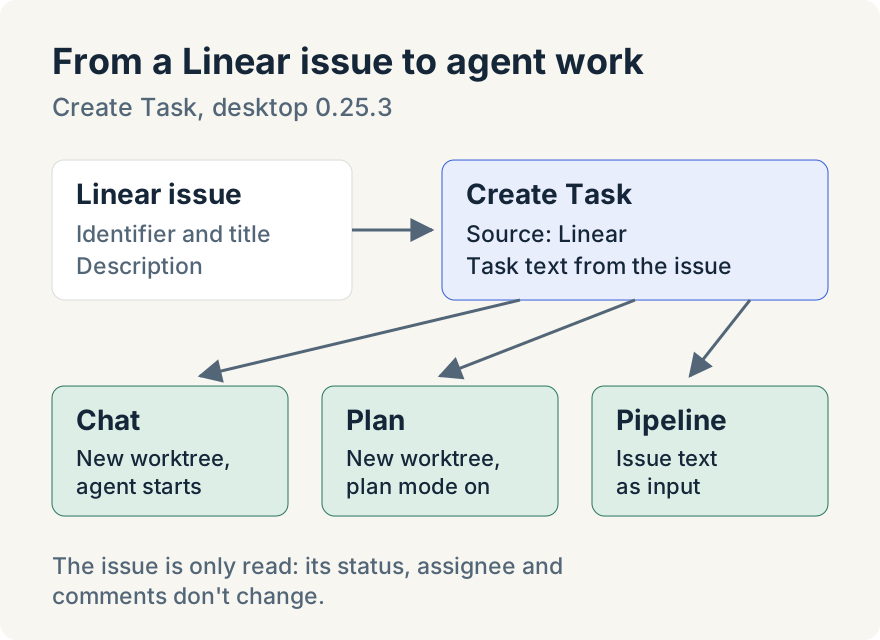
The task becomes the issue's identifier and title, followed by its description. Then choose how to start:
- Chat creates a new worktree and sends the task to an agent as the first message.
- Plan does the same with plan mode on, so the agent proposes a plan before it changes code.
- Pipeline opens Run Task Pipeline, where you pick a pipeline that runs on a ready task and it gets the issue text as its input.
Switching back to Manual keeps anything you typed there, so you can look up an issue and return to your own wording without losing it.
Pipelines can read tickets too
When a Linear key is saved, the app passes it to pipeline runs, so a pipeline step can use the built-in read-linear-ticket action to fetch a ticket's details while it works. The action only reads; it doesn't change the issue.
Tommy Irish built the Linear connection and the Create Task flow.
Where it stops
- The connection uses a personal API key that you paste in. There's no Linear sign-in screen.
- It reads Linear and never writes to it. Starting a task doesn't change the issue's status, assign it or add a comment.
- Only the identifier, title and description become the task. Comments, attachments and linked issues aren't included.
- Each Chat or Plan start creates a new worktree in the workspace you chose.
Try it
Starting tasks from Linear issues is in version 0.25.3 of the Unstoppable desktop app for macOS and Windows. Download it, add your Linear key under Settings, Accounts, and choose Create Task.