
Until now, a chat in the Unstoppable desktop app stayed with the provider it started on. To use a model from another provider, you started a new chat. In desktop v1.22.0, you can switch a started chat between Claude, Codex, Cursor and GitHub Copilot models and keep the same chat. The new model picks up the conversation so far.
Switch a chat
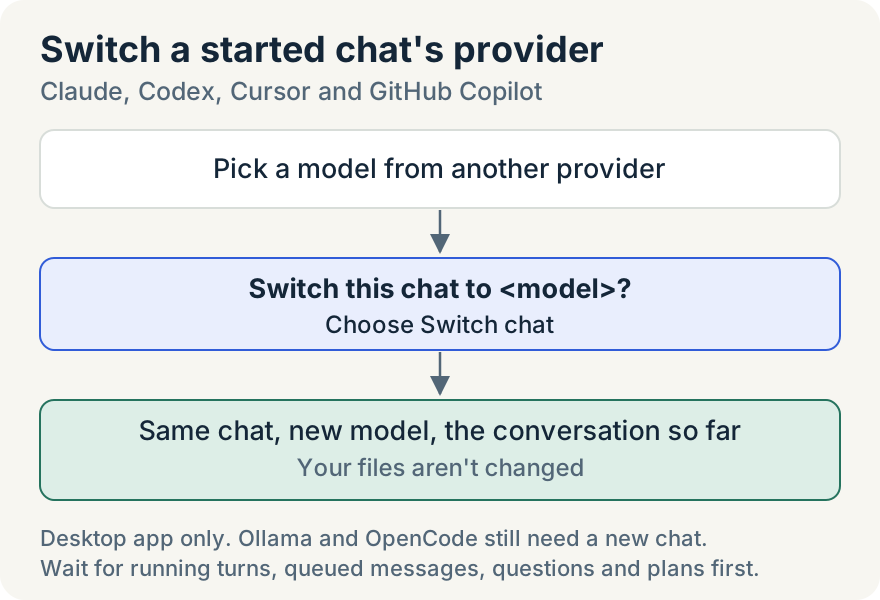
- In a started chat, open the model picker in the composer and choose a model from another provider.
- The app asks Switch this chat to <model>? and explains that the model picks up this chat with the conversation so far. Your files aren't changed.
- Choose Switch chat.
The chat stays where it is, in the same worktree and with the same history on screen. A notice marks the change: "This chat switched to <model>, which picks up the conversation so far." Your next message goes to the new model.
When you switch between Claude and Codex, the dialog also offers Start new chat. That choice leaves this chat as it is and starts a new chat from a summary, as before.
What the new model receives
The new provider starts a fresh session. With your first message after the switch, it receives the chat's earlier conversation, marked as history. That history includes your messages and the replies, tool calls and their results, and the paths of files you attached. Each tool call's input and output is cut to 4,000 characters.
The history has a budget: a quarter of the new model's context window, and never more than 400,000 characters. In a long chat, the oldest messages are left out first and the newest are kept whole. Images and the previous model's thinking don't carry over.
The new provider runs on the account or billing the row you picked uses, and the thinking level goes back to that provider's default.
If you switch back before you send a message to the new model, the earlier provider's session picks up where it stopped. Once you've sent one, switching back starts a fresh session with the history, like any other switch.
When you can't switch yet
The app waits until the chat is idle. The picker tells you what to do first:
- "This chat is still working. Stop or finish the current turn, then switch."
- "This chat still has queued messages. Let them finish or clear them, then switch."
- "This chat is waiting on your answer. Respond to the question, then switch."
- "Approve or reject the pending plan before continuing on another provider."
Where it stops
- Only Claude, Codex, Cursor and GitHub Copilot switch in place. Ollama and OpenCode models still need a new chat, and so do Orchestrator chats and terminal mode.
- Cursor and GitHub Copilot models appear in the picker only once you've set up those providers. Use GitHub Copilot in Unstoppable covers Copilot.
- Switching is in the desktop app only. In Remote Control on the web and in the mobile app, a chat stays on its provider.
Nick Shatilo built the switch, the history it carries and the way each provider's session is set aside.
Try it
Switching a started chat is in desktop v1.22.0. Download the desktop app, connect the AI accounts you already have, and open the model picker in any started chat.