
When several agents work at once, one of them often depends on another. A chat that hands work to other chats needs to know when each one has finished, and what it reported. Version 1.4.0 of the Unstoppable desktop app lets an agent in any project chat set up that wait itself, with a watcher.
Ask the chat to wait
Watchers for other chats and for automations are set up by the agent, not from a button. Ask the chat, in plain words, to tell you when another chat finishes or an automation has run. The agent looks up the watcher types and arms one on the chat or automation you named. Agents are instructed to arm watchers only when you ask to watch, wait or be notified.
From 1.4.0, a chat can watch:
- Worktree chat completion and Cowork chat completion: a chat in any project finishes its turn.
- New chat started in worktree and New chat started in cowork workspace: someone or something starts a chat there.
- Automation run completion: the next run of an automation, including the chat or pipeline that run starts.
What the waiting chat gets
When the watched chat finishes, the waiting chat wakes up with a message saying the watcher fired. With it, the agent receives the watched chat's final message, up to 8,000 characters. The agent is told to treat that text as untrusted, so it reads the report rather than following instructions inside it. It can then check the work, start the next step or tell you what happened.
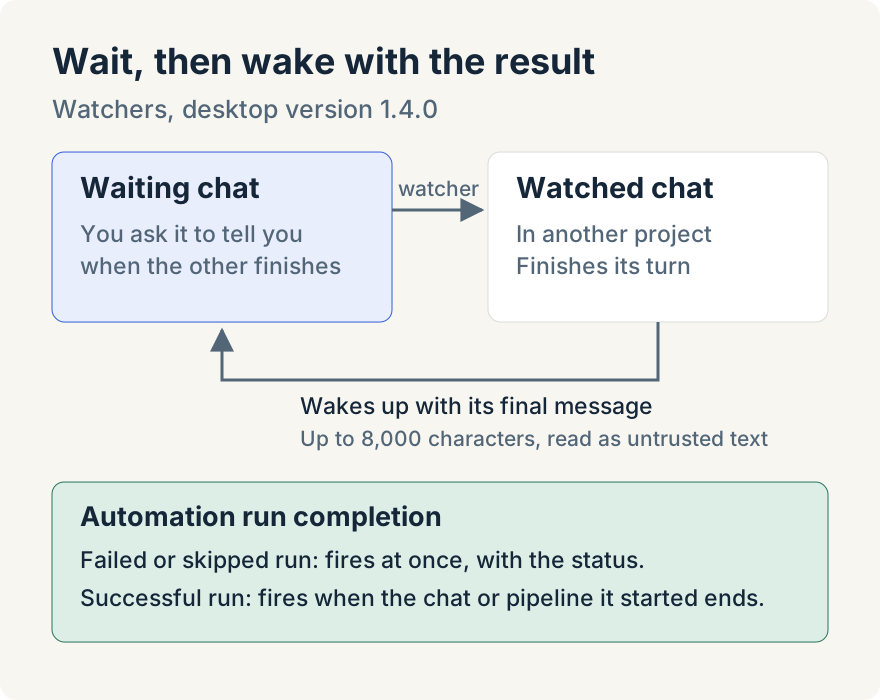
For an automation, a failed or skipped run fires the watcher at once, with the status. A successful run fires it when the chat turn or pipeline that the run started has ended. An agent can attach watchers while it creates an automation or runs one now, so the wait is in place before the run begins. An automation that opens a chat can also open it in an existing worktree instead of creating a new one.
In 1.4.0, active watchers are listed on the Watchers tab of the Automations page, with the chat being watched and the chat that will be told.
Where it stops
- A chat can't watch itself, and watchers can't target App Advisor chats.
- A watcher fires once. To follow every run of a recurring automation, the agent has to arm a new one each time.
- Automation watchers report finished runs only; a pipeline that pauses for input doesn't fire them.
- If the app restarts while a successful run's chat or pipeline is still going, the watcher fires with a note that the link to that work was lost.
- In 1.4.0 the final message reaches worktree chats; cowork chats receive it from 1.5.0.
Mike Sotnichek built cross-chat and automation watchers.
Update (2026-10-19): Watchers now appear alongside pipeline and automation runs on the Runs tab of the Workflows page. Aaron's post on the Workflows page describes it.
Try it
Cross-chat and automation watchers are in version 1.4.0 of the Unstoppable desktop app. Download it, open two chats, and ask one to tell you when the other finishes.