
Slack has filled up with AI agents this year. Anthropic's Claude Tag answers when you tag @Claude, OpenAI's dots work in Slack and Teams, xAI's Grok Bot reached 1.0 in November, and Viktor sells itself as an AI employee that lives in Slack. They're impressive, and they all have one thing in common: the work happens on the vendor's cloud computer, with the vendor's models.
We built the Slack app for Unstoppable Code to work the opposite way, and we think that opens up something new. Mention @unstoppable in a thread and the request goes straight to the Unstoppable Code app on your own computer. The agent that answers already knows your repositories, your branches, your dev servers and your tools, because it lives right next to them. It runs on the model you pick: Claude, Codex, or an open-weight model like DeepSeek. It can even hand work to a model running on your own hardware. Your whole local setup is now one @mention away from any Slack thread.
Here's what that makes possible, how a message gets from Slack to your desk and back, and how we keep your data private along the way.
What it looks like
- In a channel or thread, write
@unstoppableand a request: "why did last night's deploy fail?", "summarize this thread and open a ticket", "try the fix Dana suggested on a branch". - A 👀 reaction appears once your computer has the message.
- The agent in Unstoppable Code, which can see and start work across your projects, catches up on the conversation and replies right there.
- If the work will take a while, it starts a task in the right project and says so. When the task finishes, it posts the result in the same thread and adds ✅.
How it differs from cloud Slack agents
Here's how they compare, as of November 2026:
| Where the work runs | Models | What you pay for model use | |
|---|---|---|---|
| Claude Tag | Anthropic cloud sandbox | Claude | Usage from your organization's Claude balance |
| OpenAI dots | OpenAI cloud computer | OpenAI | Included with eligible ChatGPT plans |
| Grok Bot | xAI cloud computers | Grok | xAI Team and Enterprise plans |
| Viktor | Viktor's cloud computer | Anthropic, OpenAI and others, chosen by Viktor | Credits per workspace |
| Unstoppable Code | Your computer | Whichever you choose, including open-weight models | The accounts you already use, or nothing for local ones |
Cloud agents can make sense: nothing to keep running, and the vendor tunes the agent to its own models. But running the agent on your own machine gives you some unique advantages.
Use any model, including open-weight ones
You pick the agent's model in the app, and Slack requests use that choice. It can be Claude, a Codex model, or a model from any provider OpenCode supports, through your own key or your own AI gateway. Tasks it starts in your projects can use any model the app supports, including a local open-weight model through Ollama.
So you can mention @unstoppable in Slack and have DeepSeek do the work. None of the cloud Slack agents above let you do that. Next month, if a different model suits a job better, you change a setting; you don't need a new Slack app or vendor contract.
Your code stays where it is
A cloud agent needs its own copy of the things you want it to work on: a cloned repository, OAuth grants for each integration, and credentials re-entered in its sandbox. The agent on your computer already has your checkouts and worktrees, your running dev servers, the command-line tools you are signed in to, and the MCP servers you have set up. Nothing has to be uploaded or reconnected for a Slack request.
Your files, command output and tool results stay on your computer. The model provider you configured sees what the agent sends it, as it does for any chat in the app. Slack sees the thread and the reply, as it does for any message. The next sections cover the short path in between.
Pay through the accounts you already have
Slack requests are paid for the same way as your other Unstoppable Code chats. Use the Claude or ChatGPT subscription you already signed in with, your own API keys, your organization's gateway, or a local model that only costs you electricity. You don't buy a separate credit pool for the bot, and a cheap model is often enough for "what's the status of this branch?"
Your rules apply
A Slack request runs under the same permission mode as the agent's other chats on your computer. If a tool needs your approval, the thread says it is waiting for your approval on your computer. You can't approve from Slack. That is deliberate: a channel message shouldn't be able to approve a command on your machine.
Each person uses their own setup
Linking connects one Slack account to one person's computer. In a shared channel, Priya's mention runs on Priya's computer with the models Priya chose, and Sam's runs on Sam's. Only your own messages reach your computer. Someone else mentioning @unstoppable can't start work on your machine.
How a message gets from Slack to your computer
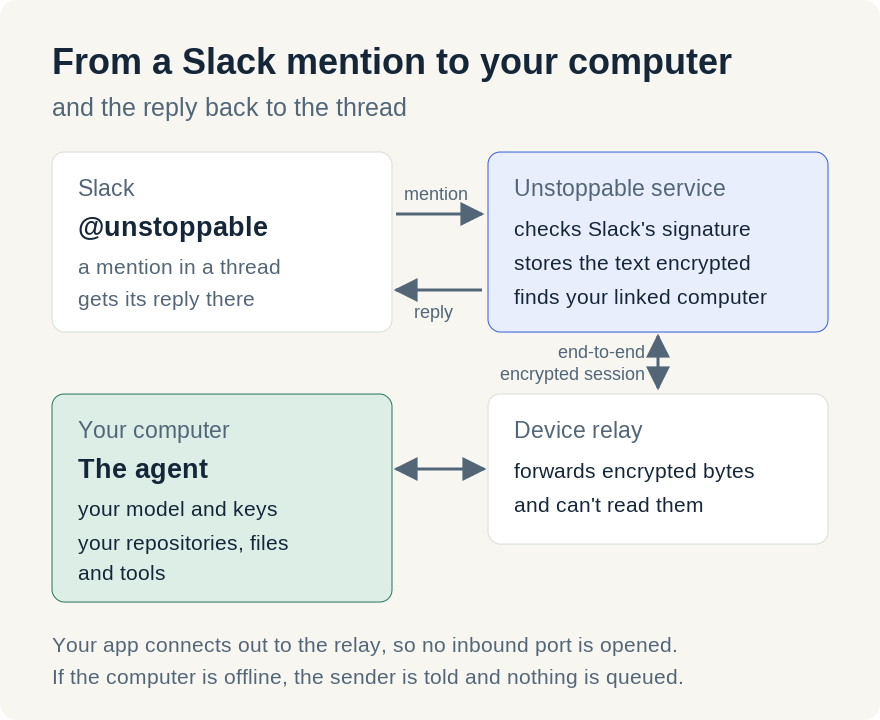
- Slack to us. Slack sends the mention to our events endpoint. We check Slack's request signature, reject anything more than five minutes old, and ignore messages from bots. The mention is stored encrypted, and a job holding only IDs goes on a queue.
- Which computer. A worker picks up the job and looks up the person who sent the message. If they have linked a computer and it is online, the message goes there. If the computer is offline, the sender gets a message only they can see, naming the computer and asking them to open it and mention @unstoppable again. Nothing is queued for later.
- To your computer. Your Unstoppable Code app keeps an outbound connection to our device relay, the same one Remote Control uses, so you don't open a port or change a firewall. The worker opens an end-to-end encrypted session to your app through the relay. The relay passes along encrypted bytes and can't read them.
- The work. The message arrives in its own Slack conversation in the app, one per thread and person. When the agent needs more of the thread, it asks for it. Our service fetches those messages or files from Slack for that request and doesn't keep them.
- The reply. The worker reads the agent's answer back over the same session and posts it as one message in the thread. Slack's message metadata stops a retry from posting it twice.
How your data stays private
The work happens on your computer, so your code, files and tool output stay there. Our Slack service only handles what it needs to connect Slack to your computer: your mention and any follow-up replies you send in that thread, the thread messages or files the agent asks for, and the agent's reply. Slack also sends the service other messages from channels the app is in, and it drops those on arrival without storing them. The device relay in between carries everything encrypted and can't read it.
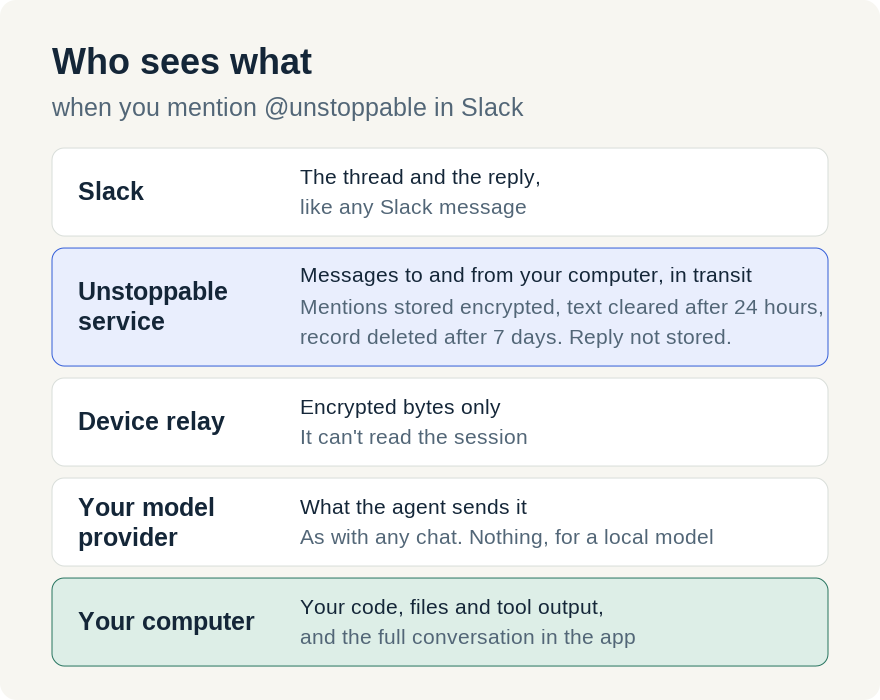
Here's how our service handles Slack data:
- Mention and follow-up text is encrypted at rest, cleared after 24 hours, and the record is deleted after 7 days. Logs leave out message text.
- Replies pass through and aren't stored. We keep only the IDs and timestamps needed to avoid double-posting.
- Thread messages and files the agent asks for are fetched when it asks and aren't stored. Each request is limited to the thread you mentioned it in, and to messages up to your mention.
- Slack tokens are encrypted at rest and rotated about every 12 hours.
- Linking uses Sign in with Slack to confirm who you are. We keep the Slack user ID and discard the access token.
- The bot's Slack permissions are reading mentions, posting messages, adding and reading reactions, reading public and private channel history, looking up users, and reading shared files. The service reads history and files only for the thread a linked person mentioned it in.
Between our service and your computer, the session uses an X25519 key exchange and AES-256-GCM encryption, keyed per session. Each conversation stays in the app on your computer, so you can open it and see exactly what was asked and what the agent did.
Read the code
The desktop side is in the public Unstoppable Code repository, under the MIT license:
slack-turn-guidance.ts: the instructions the agent gets for a Slack request.slack-connect.ts: how Connect Slack links this computer.slack-thread/catalog.ts: the two actions the agent uses to read the thread and open shared files, both marked as untrusted content.handshake.tsandsecure-channel.ts: the end-to-end encrypted session.
The hosted service that receives Slack events and runs the worker isn't in that repository; the sections above describe what it does.
Set it up
- Install Unstoppable Code and sign in.
- Open the Slack page and select Add to Slack to install the app in your workspace. A workspace admin may need to approve it.
- Connect your Slack account to the computer you want to answer. In the desktop app, open Settings, then Account, Integrations and Slack, and select Connect Slack.
- Mention
@unstoppablein a thread.
Limits
- Your computer has to be on. The app must be open and online. If it isn't, you get a message only you can see, and the mention isn't delivered later.
- Results within two hours. If a task runs longer, it keeps going on your computer, and the thread gets a note to check the app there.
- Approvals happen on your computer. Slack tells you when the agent is waiting.
- Text replies only. The agent can read images and files in the thread, but it replies with text.
- One computer per Slack account. You can move the link to another computer from Slack settings.
Frequently Asked Questions
Do my messages go to Unstoppable's servers? Only what's needed to connect Slack to your computer: your mention and follow-ups, any thread messages or files the agent asks for, and the agent's reply. Other channel messages Slack sends are dropped on arrival. Your mention is stored encrypted and its text is cleared after 24 hours, replies aren't stored, and the relay between our service and your computer can't read any of it.
Can I use DeepSeek or another open-weight model from Slack? Yes. Slack requests run on the model you chose for the agent, which can be a DeepSeek model through OpenCode with your own key or gateway. Tasks it starts can also run on a local model through Ollama.
Can someone else in the channel run commands on my computer? No. Only the Slack account you linked can start work on your computer, and tools that need approval wait for you to approve them on the computer itself.
What happens if my laptop is asleep? The mention isn't delivered. You get a message only you can see that names the computer, and you can mention the app again once the computer is back online.
Try it
Add Unstoppable Code to Slack, then download the desktop app if you haven't already. Mention @unstoppable in a thread and see what your own computer can do from there.