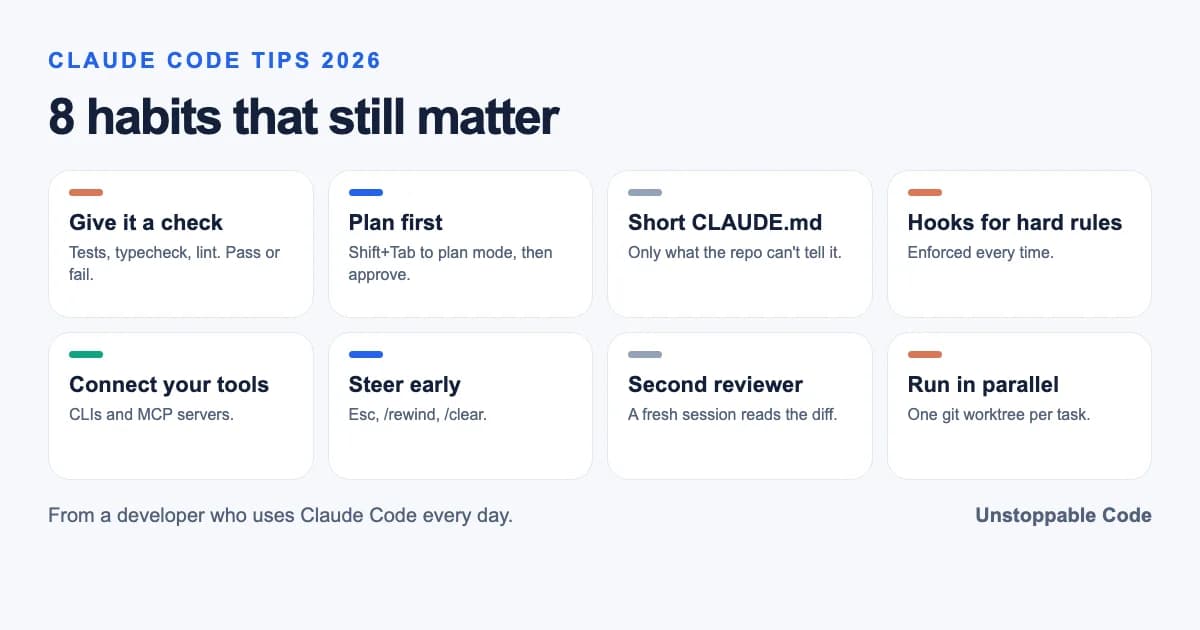

The most useful Claude Code tip in 2026 is to give Claude something it can run that comes back pass or fail, like a test, a typecheck or a lint command, so it can check its own work. After that, plan before big changes, keep CLAUDE.md short, move rules that can't bend into hooks and run separate tasks in separate git worktrees.
The Short Answer
| Tip | What to do | Where it lives in Claude Code |
|---|---|---|
| Give it a check | Put your test, typecheck and lint commands in CLAUDE.md | CLAUDE.md, a Stop hook |
| Plan first | Agree on a plan before Claude edits anything | Shift+Tab to plan mode, or /plan |
| Keep CLAUDE.md short | Only write what Claude can't learn from the repo | /init, then cut lines |
| Hooks for hard rules | Anything that must always or never happen | .claude/settings.json hooks, deny rules |
| Connect your tools | Give Claude your CLI tools and MCP servers | gh, claude mcp add |
| Steer early | Stop, rewind or start over instead of a third correction | Esc, /rewind, /clear |
| Get a second reviewer | Review the diff with a fresh session | /code-review, a second session |
| Run in parallel | One task per git worktree | claude -w <name>, .worktreeinclude |
Most developers are past the "should I try it" stage. In a Stack Overflow pulse survey published in May 2026, 59% of developers and other working professionals said they use AI agents at work. So these tips are about getting more out of a tool you already have open.
1. Give Claude Code a check it can run
Claude stops when the work looks done. Anthropic's own best practices page puts it plainly: if Claude has nothing to run, "looks done" is all it has to go on, and you end up being the test suite. Give it a command that passes or fails and it closes the loop itself. It makes the change, runs the check, reads the error and tries again.
That loop sold me.
This is definitely a big improvement from my experience in Cursor agents. While good, I've found they require a lot more babysitting and personal interaction to keep the agent moving in the right direction. Key difference for me here is that Claude Code was very hands off and it iterated by itself until finding a solution.
The check doesn't need to be a huge test suite either. Keep a few golden tests, typecheck, lint, that's it.
Put those commands in CLAUDE.md so Claude knows them. If a passing typecheck has to happen every single time, make it a Stop hook instead. A Stop hook runs your script when Claude tries to finish, and if the script exits with code 2, Claude gets the errors back and keeps working. When it says it's done, ask for the command it ran and the output. Reading that is faster than running it again yourself.
2. Plan first, then let it go
For anything bigger than a small fix, press Shift+Tab until the status bar says plan mode, or start a single prompt with /plan. In plan mode Claude reads files and writes a plan but can't edit your source until you approve it. The Claude Code team's own tips say the same thing: put your effort into the plan so Claude can get the implementation right in one pass, and if things go sideways, go back to plan mode and plan again.
Plans are cheap. Rewrites aren't. When the plan is right, the build often lands on the first try.
The API key management UX is one-shot from Claude Code. First attempt at anything UI related, did a nice job and also created the authenticated backend CRUD + DB entity.
If you want a second look before any code changes, there's a longer walkthrough on how to review an AI agent's plan.
3. Keep CLAUDE.md short and move hard rules into hooks
Claude Code loads CLAUDE.md into every session, so every line costs a little attention on every task. Run /init to get a starting file. Then delete most of it. Keep the commands for testing and building, places where the code is misleading, and decisions that never made it into the repo. Anthropic's memory guide suggests staying under 200 lines.
Here's the catch with anything written in prose, whether it's CLAUDE.md or a skill. Claude reads it and decides what to do with it.
A skill is at the end of the day a pile of prose that you hope the agent follows.
Anthropic splits instructions the same way. Your prompt, CLAUDE.md and skills are things Claude chooses to follow. Hooks, deny rules and managed settings are enforced by Claude Code itself, every time. So if a rule can't have exceptions ("never read .env", "always run the formatter"), it goes in a hook. If you've written IMPORTANT in capital letters three times and Claude still misses it, the docs say that's your sign to move it.
4. Connect the tools Claude needs
A lot of what Claude can't see lives in other systems. If a system has a CLI, that's the easiest way in. With gh signed in, Claude will open pull requests and read review comments without being told how. For systems without a CLI there's MCP, and you add a server with claude mcp add.
Pick servers that sign in with OAuth when you can. Keys get messy.
OAuth is a game changer, my account connection to Unstoppable Domains got picked up by my Claude Code terminal as well. One OAuth persisted across every device / session.
Turn off the servers you aren't using. Each connected server adds its tool names to the context even when it sits idle.
5. Steer early
Watch the first minute. Press Esc the moment Claude heads the wrong way. It stops and keeps everything so far. /rewind (or Esc twice on an empty prompt) rolls the code, the conversation or both back to an earlier point, which makes it cheap to try the bold approach first. Checkpoints only cover files Claude edited with its own file tools, so keep committing to git as you go.
If you've corrected the same thing twice and it's still wrong, run /clear and write one better prompt. A third correction just adds another failed attempt for Claude to reread. /clear between unrelated tasks also keeps you from paying for old history on every turn.
6. Get a second reviewer
A reviewer that didn't write the code catches different things. In the terminal, /code-review reviews your diff in a fresh subagent that never saw the conversation. Another option is a second session that reads the changed files cold. I also like having a different AI review the PR automatically and then telling Claude to go fix whatever it flagged. Anthropic's docs add one warning worth keeping. Tell the reviewer to skip style. Otherwise it will always find something.
7. Run sessions in parallel, one worktree each
Separate tasks shouldn't share a checkout. claude -w feature-auth starts a session in its own git worktree, so two agents can't edit the same files. A worktree is a fresh checkout, so list small gitignored files like .env in a .worktreeinclude file and Claude Code copies them in. There's more on keeping agents from colliding in running parallel Claude agents without conflicts.
Once each agent has its own lane you can hand it whole jobs. I tried it on a stack of small PRs.
OK it fixed merge conflicts, ran CI till green, gained approvals and merged 9 PRs. These were all patch-level PRs, as a proof of concept.
8. Put repeat work on a schedule
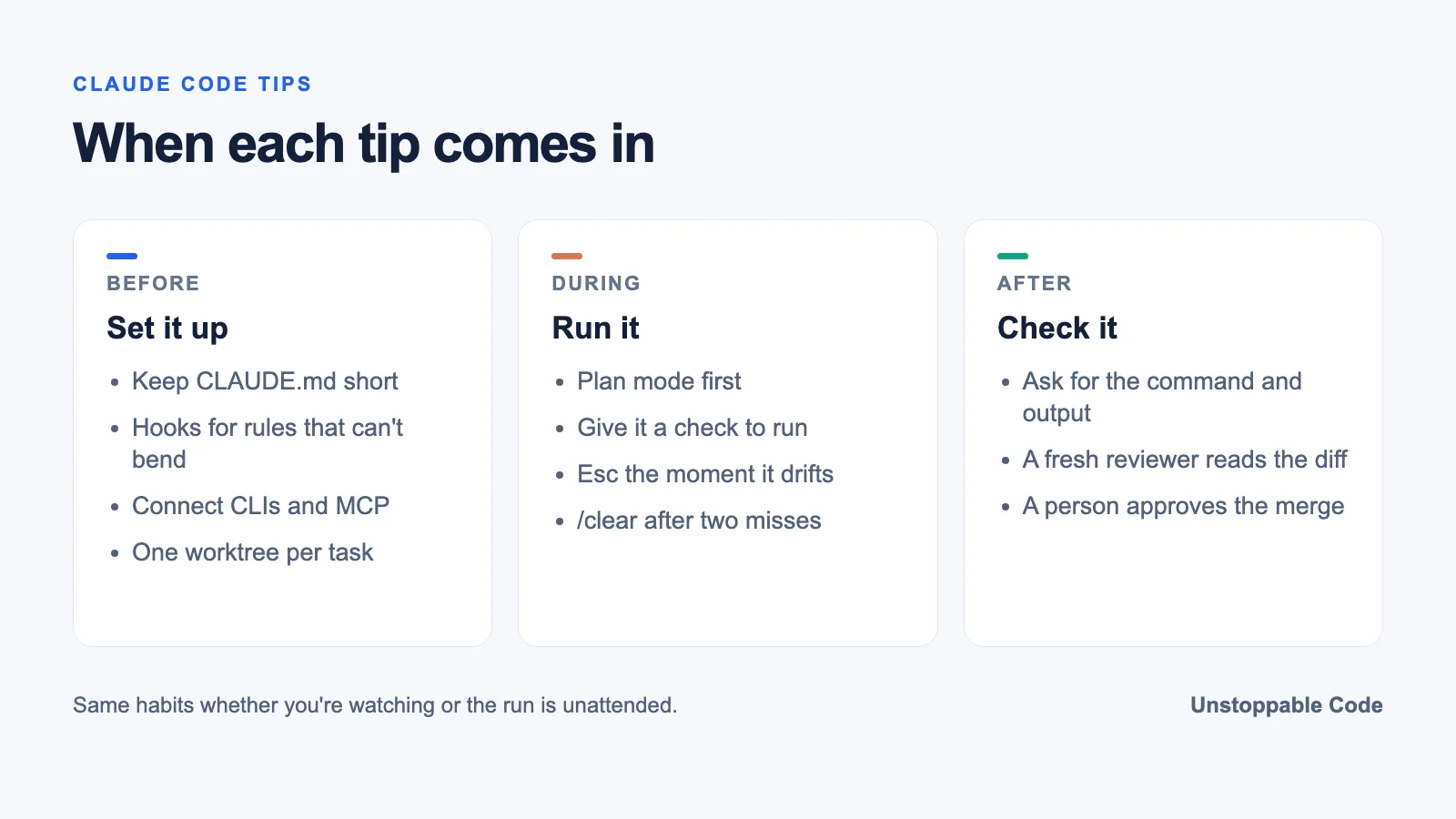
Claude can carry a task through on its own, but something has to start it. Inside a session, /loop 15m repeats a prompt on an interval. /schedule sets up a cloud task that runs while your laptop is closed. Before anything runs unattended, Anthropic's checklist asks a few questions. Does it know what done looks like? Can it check its own work, and what is it allowed to touch? Who signs off at the end?
This is where it pays off.
Oh man, well I love the automations. I use them to basically automate away every annoying task that either I hate or typically forget to do.
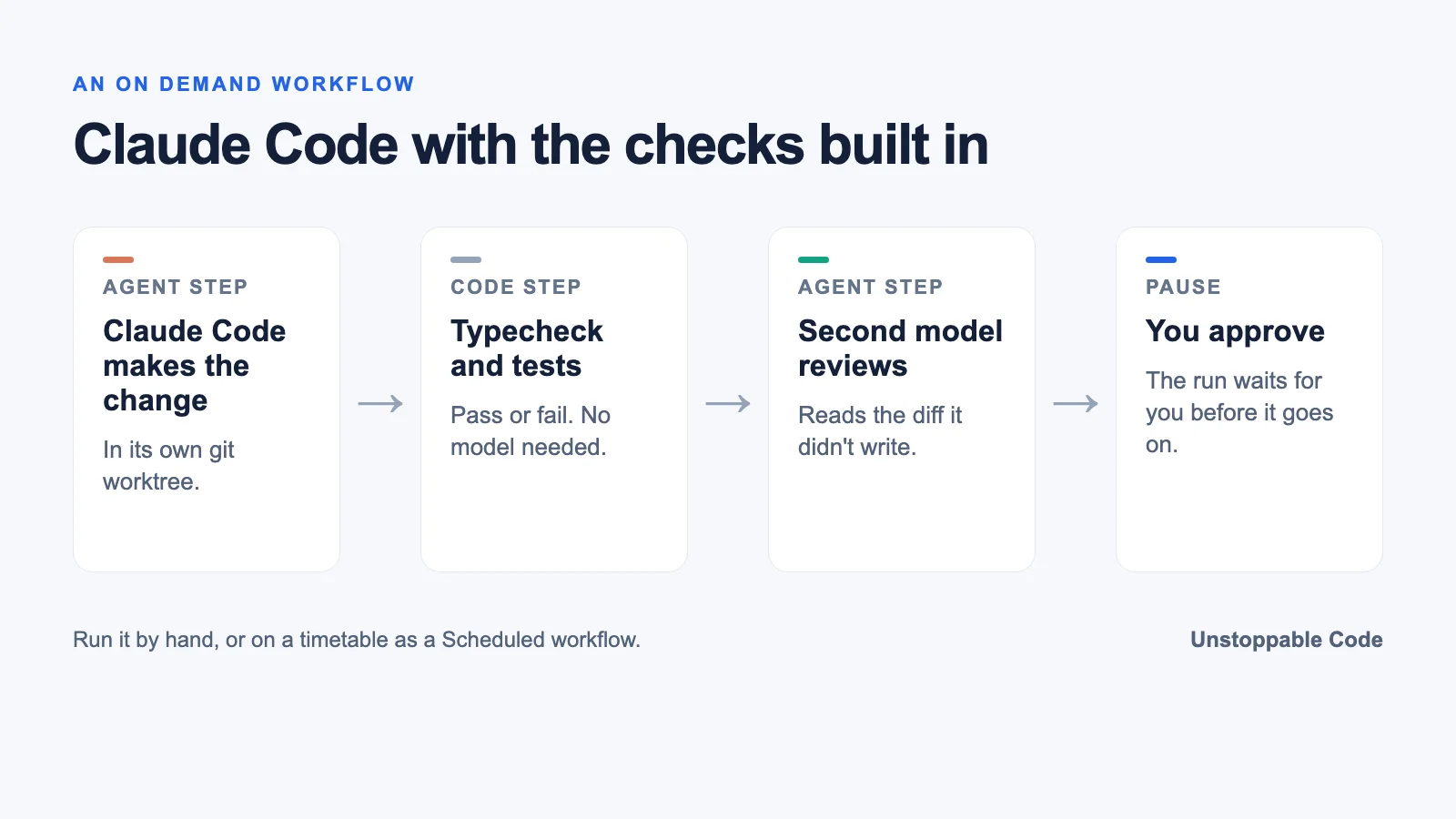
I run most of mine in Unstoppable Code, where each Claude Code agent gets its own worktree and a recurring job becomes an On demand workflow that a Scheduled workflow can kick off. We used to call those pipelines and automations.
To me a pipeline is more deterministic, it's a structured YAML file that defines the process.
The pipeline is good at mixing models for different steps, and adding structured code steps mixed with agent steps.
I'm automation crazy, Unstoppable Code is legit saving me so much time.
Old Claude Code tips you can stop following
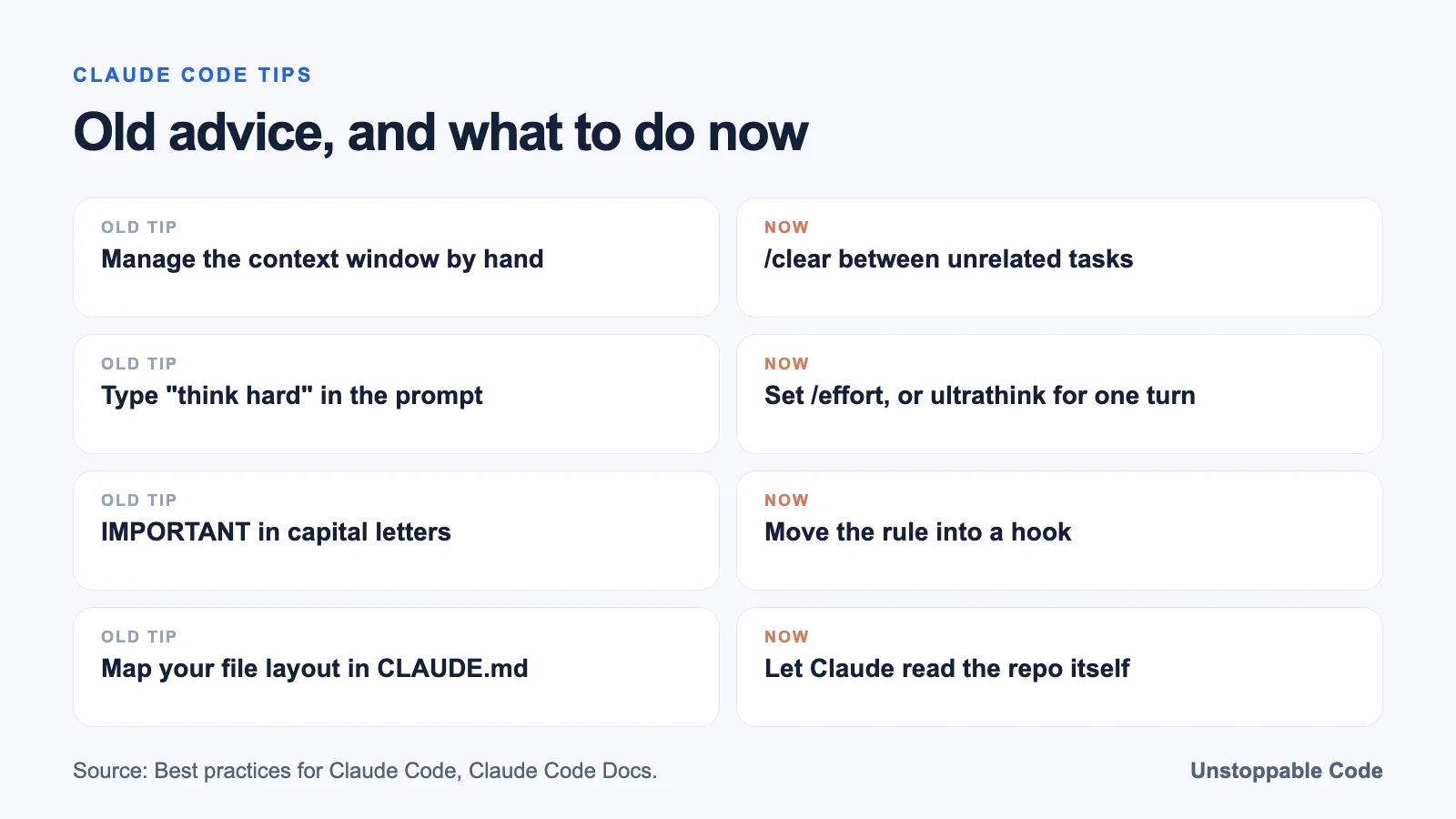
A lot of older advice was a workaround for weaker models. They caught up. Anthropic now lists several habits you can drop. Most current models have a 1M-token context window and compact on their own, so you rarely need to manage context by hand. Typing "think hard" doesn't raise the effort setting (use /effort, or ultrathink for one turn). Writing "don't be lazy, keep going" tends to cause over-work. And describing your whole file layout in CLAUDE.md is wasted space, because Claude reads the repo.
Frequently Asked Questions
What is the best Claude Code tip? Give Claude Code a command it can run that comes back pass or fail, like your tests, a typecheck or a linter. Anthropic's own docs and the Claude Code team both call this the most useful single practice, because it lets Claude check and fix its own work.
How do I turn on plan mode in Claude Code? Press Shift+Tab until the status bar shows plan mode, start a single prompt with /plan, or launch with claude --permission-mode plan. Claude researches and writes a plan but doesn't edit your source until you approve it.
How long should CLAUDE.md be? Short. Anthropic's memory guide suggests staying under 200 lines. Keep the commands for building and testing, places where the code is misleading, and decisions that aren't written down anywhere in the repo.
What's the difference between CLAUDE.md and hooks? CLAUDE.md is guidance Claude reads and usually follows. Hooks are scripts Claude Code runs at fixed points every time, no matter what the model decides, so they're for rules that can't have exceptions.
Can I run more than one Claude Code session at once? Yes. Start each one in its own git worktree with claude -w and a name for the task, so the edits can't collide. Desktop apps like Unstoppable Code also run several Claude Code agents side by side, each in its own worktree.
Sources
- Best practices for Claude Code, Claude Code Docs, checked November 22, 2026.
- Claude Code power user tips, Claude Help Center, checked November 22, 2026.
- Choose a permission mode, Claude Code Docs, checked November 22, 2026.
- How Claude remembers your project, Claude Code Docs, checked November 22, 2026.
- Automate actions with hooks, Claude Code Docs, checked November 22, 2026.
- Checkpointing, Claude Code Docs, checked November 22, 2026.
- Agents on a leash: agentic AI remains mostly monitored at work, Stack Overflow Blog, May 27, 2026, checked November 22, 2026.