
If you set up your Mac from Terminal, you can install the Unstoppable desktop app the same way. The download page now lists a macOS (Homebrew) row under the Apple Silicon and Intel builds, marked Apple Silicon and Intel · Homebrew cask. Its View guide link opens the install instructions.
Install it
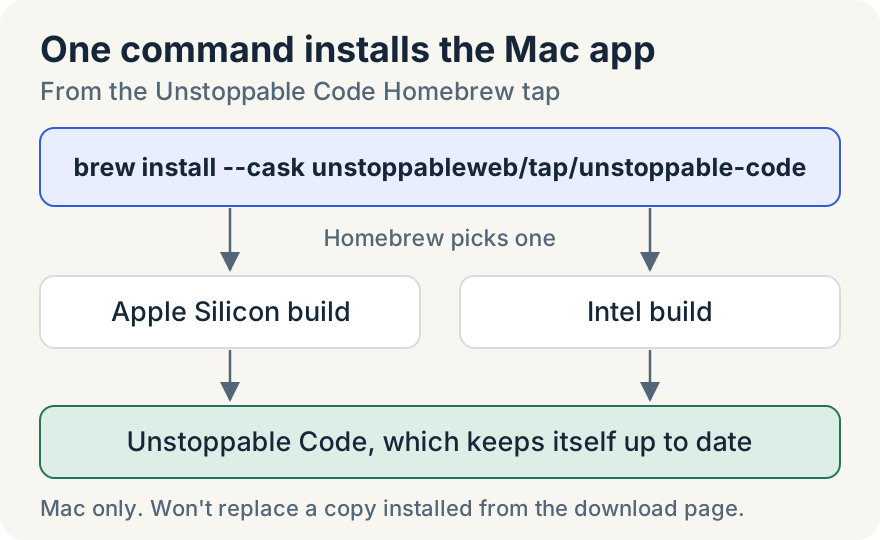
With Homebrew installed, run:
brew install --cask unstoppableweb/tap/unstoppable-codeHomebrew picks the Apple Silicon or Intel build for your Mac and installs Unstoppable Code. Type the full name. The cask lives in the Unstoppable Code Homebrew tap, not in Homebrew's own collection, and Homebrew installs from another publisher's tap only when you name it in full.
When you open the app for the first time, it works the same as a downloaded copy: it asks you to agree to the terms and checks that Git is installed. You don't need an account to start.
How it stays current
The cask follows stable releases. When a new stable version of the desktop app goes live, the release process points the cask at it, but only after both Mac builds download and match the published update feed. The cask accepts only stable version numbers, so release candidates and nightly builds don't reach it.
After that, the app keeps itself up to date, however you installed it. You don't have to run Homebrew to get new versions.
Where it stops
- Homebrew is for Macs only. Windows and Linux keep their own installers on the download page, including the Arch Linux repository.
- If you already installed the app from the download page, Homebrew won't replace that copy. Keep using it, or move it to the Trash before you install with Homebrew.
- The cask requires macOS Ventura or newer.
To remove a Homebrew install, run brew uninstall --cask unstoppableweb/tap/unstoppable-code. Your projects and settings stay on your computer.
Hassan Ali built the cask publishing, the install guide and the download page row.
Try it
Open Terminal and run the command above. Homebrew installs the current stable release of the desktop app. You can also open the download page and choose View guide in the macOS (Homebrew) row. The install guide also covers first launch and Git setup.