
Sooner or later an agent needs a credential: a database URL for a migration, an API token for a deploy, a password for a staging service. The quick answer is to paste it into the chat. That puts the value in the transcript, in the model's context and in your provider's logs.
Desktop v1.25.0 gives agents another way. The agent asks for the secret by name, you type it into a masked form, and the agent uses it in commands without ever seeing it. Command output comes back with the value replaced by its name.
How a request works
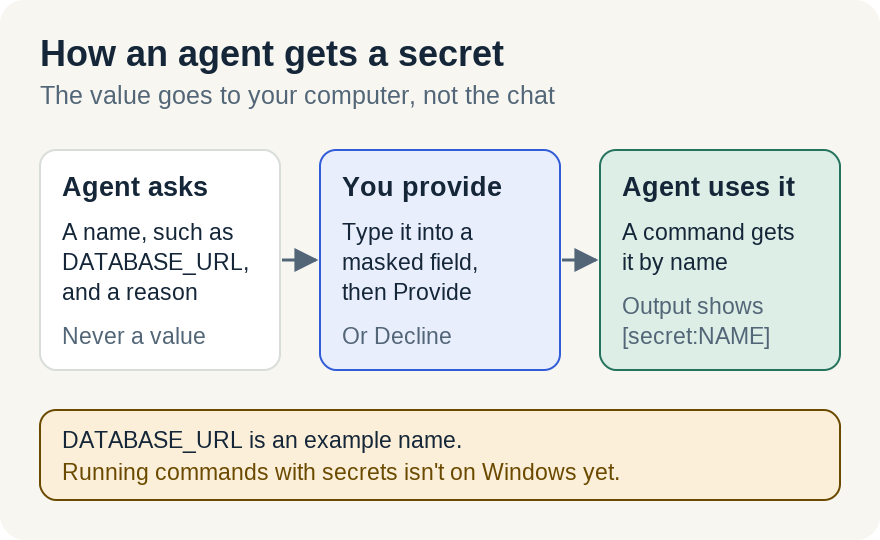
Agents in Claude, Codex, Cursor, OpenCode and Copilot chats on the desktop have a tool for this, RequestSecrets. The agent names each secret like an environment variable, for example DATABASE_URL, and says why it needs it. If you'd rather it asked than guessed, tell it to request the credential.
While the agent waits, the composer turns into a form:
- The agent's reason at the top, then one masked field per secret, named by its variable. Each field can show or hide what you type.
- Paste .env lines fills the fields from
KEY=valuetext. Only the requested names are used, and the text is cleared after reading. - Provide sends the values. Decline sends none of them, and the agent is told to continue without them or stop.
The form also warns you not to enter your account sign-in password. When the agent says what a key usually starts with, a value that doesn't start that way is flagged, and Provide turns into Send anyway… with a confirmation, so a pasted wrong value is easier to catch.
The values go to the desktop app on your computer, which stores them encrypted with the system's secure storage, or only in memory when secure storage isn't available. The agent gets back only the names that are now available. If you select Stop while a request is waiting, the request is cancelled and nothing is stored.
How the agent uses a secret
The agent never handles the value. It uses one of two tools and passes names.
Running a command. RunWithSecrets runs a shell command with the secrets set as environment variables. The value is never in the command text, the command record or the result. Everything the command prints comes back with each secret replaced by [secret:NAME], including encoded forms of the value. When the command ends, the app ends any process it started, so nothing keeps the values in the background.
Writing a file. Some tools only read configuration from a file. In Claude and Codex chats, WriteSecretsFile writes the secrets into a dotenv, JSON or raw file inside the chat's folder. The file is created with owner-only permissions. A path that git tracks is refused, and an untracked path is added to the repository's .git/info/exclude so it isn't committed. The app's own views, such as the Files panel and previews, hide the values, even in a renamed or copied file.
A file is a weaker boundary than a command. The values sit in it as plain text, so any shell command or program that reads the file sees them. The tool's own result says so to the agent and tells it to prefer running commands with the secrets, and to remove the file when it's done.
What you approve
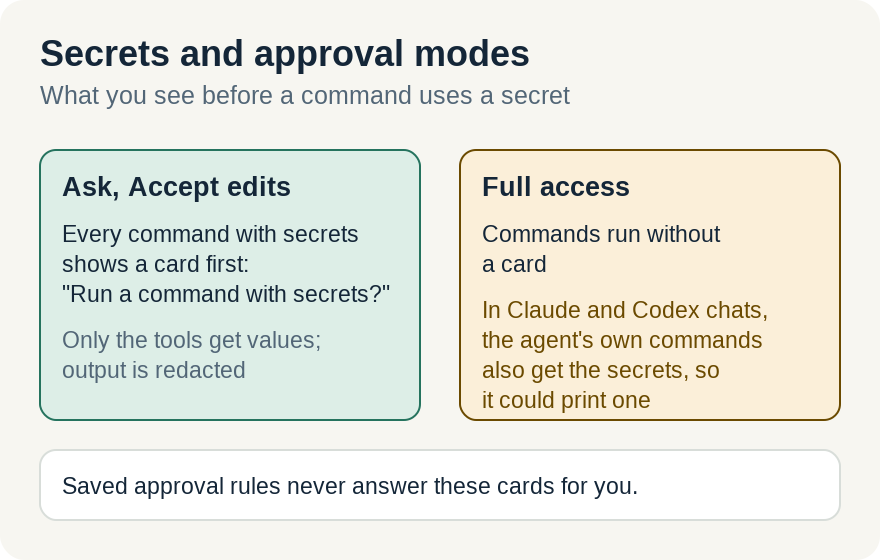
Secrets follow your chat's approval mode, except that saved approval rules never answer these cards for you.
- Ask and Accept edits: every
RunWithSecretscall shows a card, "Run a command with secrets?", naming the command and the secrets it uses. Deny and stop ends the turn and runs nothing. The first time a chat writes a given set of secrets to a given path, a "Write a secrets file?" card asks first. - Full access: commands run without a card. In Claude and Codex chats, the chat's secrets are also set in the agent's own shell commands, not only in
RunWithSecrets. The form spells out the trade-off: "Available to the agent's commands. The agent could print it, so redaction is best effort."
In the stricter modes the form reads "Hidden from the agent. It can use the value in commands; output is redacted." If you'd like secrets to stay that way, use Ask or Accept edits for the chat. The approval modes post and the approval mode guide explain the modes.
See and revoke what a chat holds
A Secrets chip in the chat shows how many secrets it holds ("1 secret", "3 secrets"). Open it to see each one by name, when it was last used, and Revoke. Secrets belong to the chat that asked for them. They're deleted when you archive or close the chat, and seven days after you gave them.
After you revoke or replace a value, the app still keeps the old one, encrypted and only for masking, until the chat ends or its seven days run out. An old log that still holds a revoked key is shown redacted.
Paste guard
If you paste text that looks like a secret into a desktop chat's composer, the app holds it out of the message and says: "This looks like a secret. If you send it as a message, the agent and its provider will see it." Send as secret asks for a name, keeps the value as one of the chat's secrets and puts only [secret:NAME] in your message. Send anyway inserts the text as you pasted it.
The guard looks for text shaped like keys and tokens. It can miss one, and it can't always tell where a secret ends, so it never puts any part of the paste in the message when you choose Send as secret.
Answer from a browser
If you use Remote Control to work with your computer from a browser, v1.25.0 shows the same form in the browser's composer. The values travel inside the encrypted Remote Control session straight to your computer and are never queued.
Two things to know. Only the tab connected to your computer can send values; other tabs show "Provide secrets from the tab that's connected to your computer." And the computer must run v1.25.0 or later. On an older version the form locks before you type and asks you to update the app on your computer.
Where it stops
- Not on Windows yet, for commands.
RunWithSecretsisn't offered on Windows until the app can be sure a command's processes all end with it. - Files are Claude and Codex only. Cursor, OpenCode and Copilot chats can request secrets and run commands with them, but not write secrets files.
- Interactive chats only. The tools are offered to the chat you're working in, not to workflow runs, the Orchestrator, the workflow editor's assistant, subagents or Claude's terminal mode.
- Redaction has limits. Values shorter than four characters aren't redacted, and the form warns about short values. A process that deliberately detaches from the command can keep what it was given, as a command that writes the value to a file does.
- A command that asks for it can still use it. Approving a command gives it the value. Read the command on the card before you approve.
Nick Shatilo built agent secret requests: the form, running commands and writing files with secrets, the Secrets chip, redaction, the paste guard and answering from a browser.
Try it
Agent secret requests are in desktop v1.25.0. Download Unstoppable Code, or update the app you have. The next time an agent needs a key, let it ask for it.