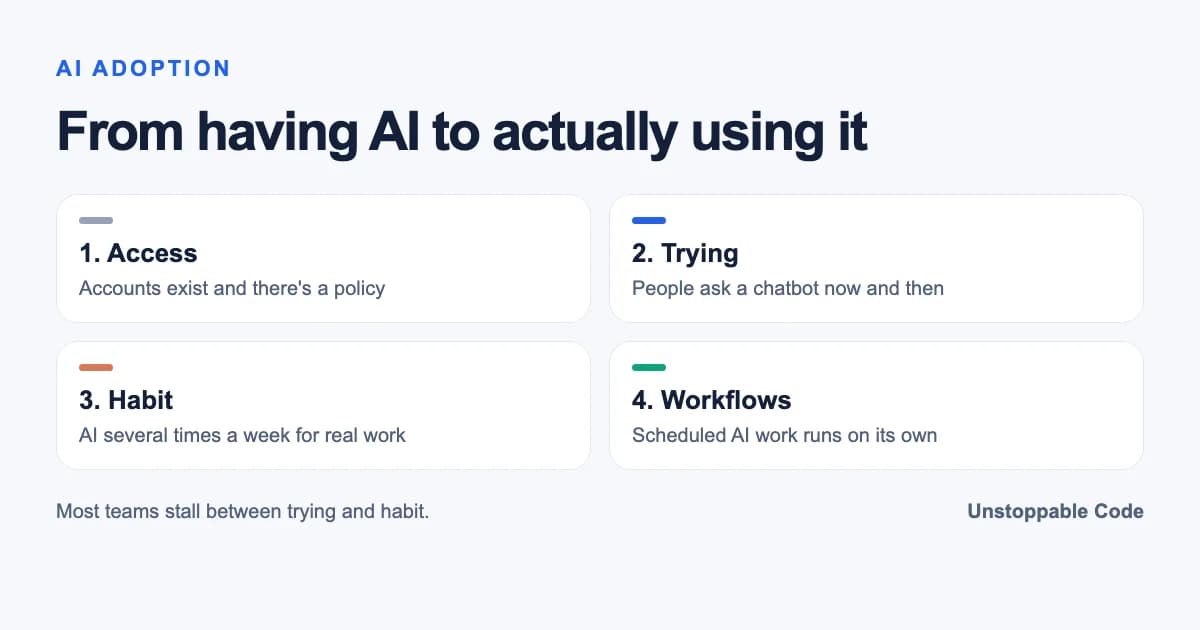

AI adoption is how far a team gets from having AI tools to actually using them in its daily work. Most companies have handed out the accounts by now, and the hard part is getting people to use AI often enough that it changes how the work gets done.
The Short Answer
| Stage | What it looks like | What usually stalls it | What moves it forward |
|---|---|---|---|
| Access | Accounts exist and there's a policy | Cost, approvals and security reviews | Leaders clearing the way |
| Trying | People ask a chatbot now and then | "AI can't help with my work" | One specific job to start with |
| Habit | People use AI several times a week | Friction nobody writes down | A friction log someone actually reads |
| Workflows | Scheduled AI work runs without anyone prompting it | Every person building their setup alone | Sharing setups that already work |
Gallup's numbers show the gap. As of August 2026, 53% of US employees said they use AI in their role at least a few times a year, but only 32% use it a few times a week or more, and 16% use it daily. Lots of people have tried it. Far fewer have made it a habit.
Access isn't adoption
The first thing that stalls adoption usually sits above the team. My colleague Aaron Quirk sees it happen two ways. Some leaders are still waiting to see where AI goes. Others are on board but haven't yet given their teams the freedom to use the tools.
That's where a lot of teams get stuck. The tools cost too much, approval takes months, or nobody upstairs wants to be the one who said yes. Either way the team never gets the chance to build a habit. People want to be able to innovate freely.
When they can't, they don't wait around. In PagerDuty's 2026 survey of 1,250 office workers at large companies, 66% said they'd used AI tools at work even though they believed company policy didn't allow it. So the company ends up with the AI use it was trying to avoid and none of the shared setup that makes it pay off. It also ends up paying for the same thing several times over, which is how AI sprawl drains a coding budget.
Go first and use it for everything
Clearing the way is step one. Then someone has to show what using it looks like. I said this about our own app, but it's just as true for AI anywhere.
I would hammer that we'll arrive at the best product only when internal users are trying to use it for everything. It will be short term painful but it's long term the best for the company.
Our CEO Matt Gould holds himself to the same rule, and he puts it simply.
The best product comes from an intense focus on using it yourself, every day, and turning what you learn into product updates.
Gallup found the same thing at a much bigger scale. Employees whose managers actively support AI use are 1.7 times as likely to use it a few times a week or more.
Start with one specific job
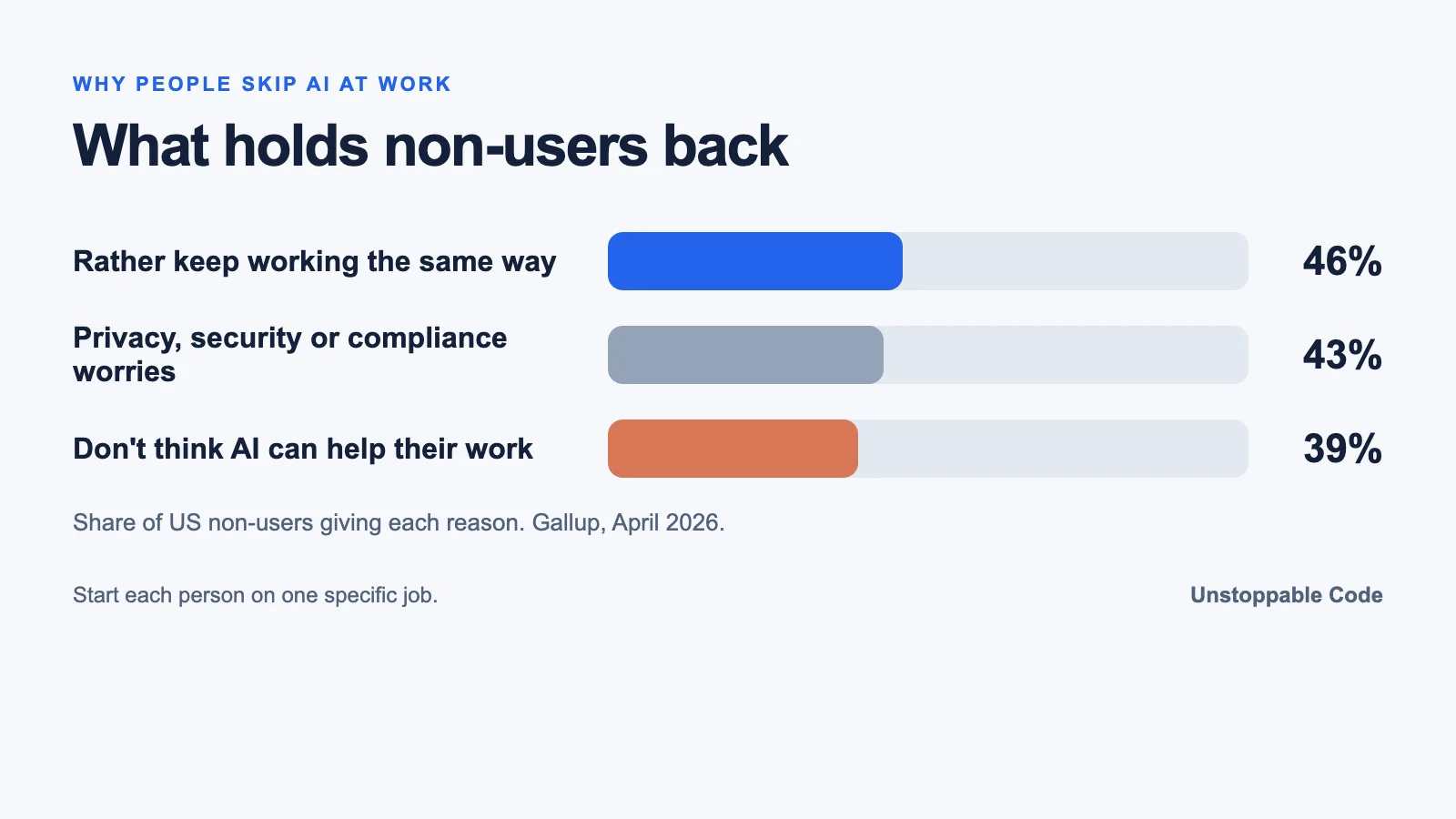
Plenty of people who skip AI aren't against it. In Gallup's April 2026 study of adopters and holdouts, 46% of non-users said they'd rather keep working the way they do now, and 39% said they don't believe AI can help with their work.
A feature tour won't change that. Lead with a specific job instead.
Pick a job the person already hates. Weekly reporting, first drafts of customer replies, the cleanup nobody gets to. Show them that one job done, and skip the explanation of models and context windows. Users don't care how the back end works.
Keep a friction log
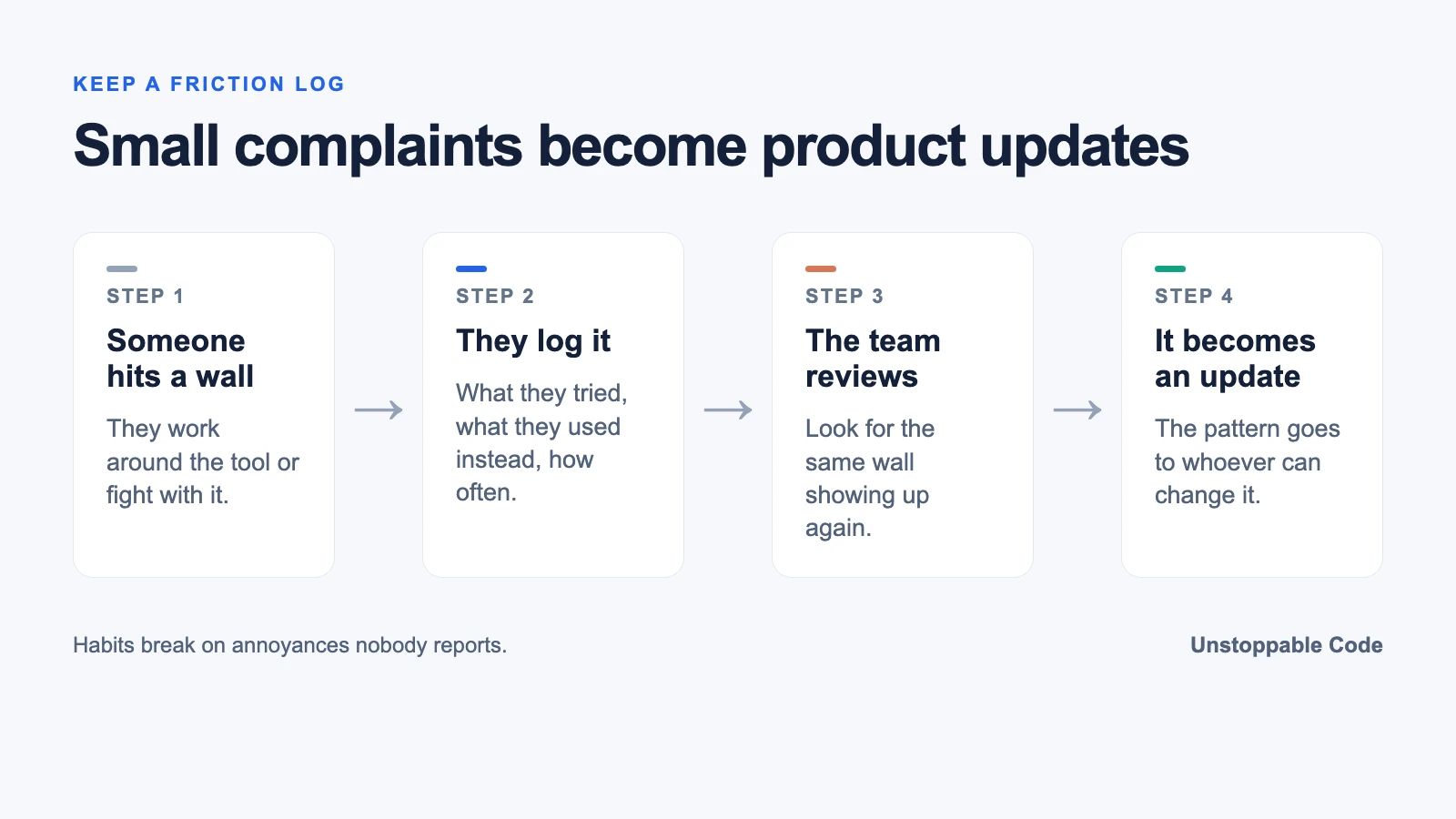
Habits break on small annoyances that nobody reports. Someone tries the AI tool, it gets in the way once or twice, and they quietly go back to the old way. Nobody hears about it, so nothing changes.
A friction log catches that. It's one shared sheet where people jot down what they were trying to do, what they used instead and how often it happens. It takes thirty seconds and there's no form to fill out.
We run one for our own app. When someone reaches for a different AI tool, that isn't a failure. It shows us exactly where Unstoppable Code needs to get better, and when the same note shows up from three different people it becomes a product update. The same habit works for any rollout. Read the log every couple of weeks and act on what keeps coming up. People keep writing in it once they see their notes turn into changes.
Pitch it as growth
How you talk about AI matters too. Most rollouts get pitched as saving time, and that rarely gets anyone excited.
I always say it's so much easier to get people excited about revenue growth than cash savings, even though it does the same thing.
So talk about what the team can now take on that it couldn't before. The hours saved can be the footnote.
Let your power users pull everyone else
Every team has one person who goes all in. On ours it's Aaron. He posted this in October.
I'm automation crazy, Unstoppable Code is legit saving me so much time.
What he uses automations for is pretty ordinary.
Oh man, well I love the automations. I use them to basically automate away every annoying task that either I hate or typically forget to do.
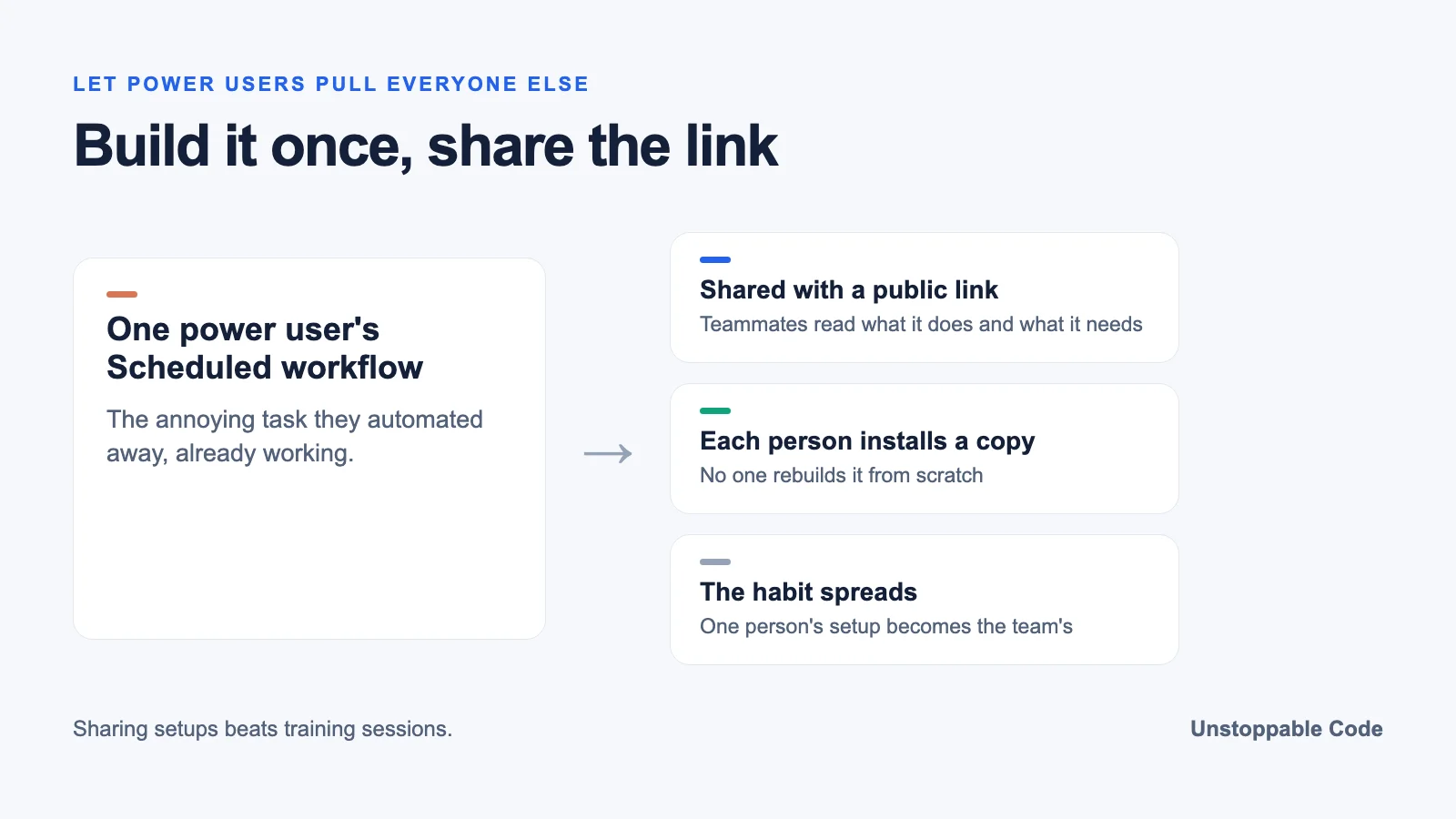
Nothing fancy, and that's the point. The trick is making one person's setup easy for everyone else to copy. In Unstoppable Code a scheduled workflow can be shared with a public link, so a teammate can read what it does and install their own copy instead of building it from scratch.
Make switching cheap
The last blocker is one I didn't expect. Researchers in particular keep complaining about switching costs. They've put months of work into one AI tool and don't want to re-onboard all of it into Claude or ChatGPT when the next model comes out.
Nobody builds a habit on a tool they think they'll have to abandon next quarter. That's a big part of why we built Unstoppable Code to use the Claude and Codex accounts you already have and pick the model per chat. Matt says it best.
Our app enhances what you already pay for.
Frequently Asked Questions
What is AI adoption? AI adoption is how widely and how often people in an organization use AI in their real work. Having accounts is the first step, and regular use for actual tasks is the goal.
How many employees use AI at work? Gallup reported that as of August 2026, 53% of US employees use AI in their role at least a few times a year, 32% a few times a week or more and 16% daily.
Why do employees resist using AI? In Gallup's April 2026 research, the most common reasons non-users gave were wanting to keep working the same way (46%), data privacy and security concerns (43%) and not believing AI can help with their work (39%).
How do you get your team to use AI? Clear the access problems first, have leaders use it themselves and start each person on one specific job. Keep a friction log, then share the setups that already work.
What helps AI adoption the most? Manager support shows up strongly in the data. Gallup found employees whose managers actively support AI use are 1.7 times as likely to use it a few times a week or more.
Sources
- Global Indicator: Artificial Intelligence, Gallup, data as of August 2026, checked November 19, 2026.
- AI in the Workplace: What Separates Adopters and Holdouts, Gallup, April 12, 2026, checked November 19, 2026.
- PagerDuty Report Finds Two-Thirds (66%) of Office Professionals Have Used Unauthorized AI Tools at Work, PagerDuty, June 11, 2026, checked November 19, 2026.