
Here's a fair question to ask any AI tool before you let it into your work: where does my data go?
And "data" means a lot more than code. It's your transcripts, the context you feed your agents, the memories they keep about how you work, the workflows you build, even your taste: your go-to libraries, your test commands, the way you name branches. Put it all together and it's a pretty detailed picture of you.
So here's the honest tour of where all of it goes when you use Unstoppable Code. Spoiler: almost nowhere. We built it that way on purpose, because we use it on our own work every day and we wanted the same thing you do.
The short version
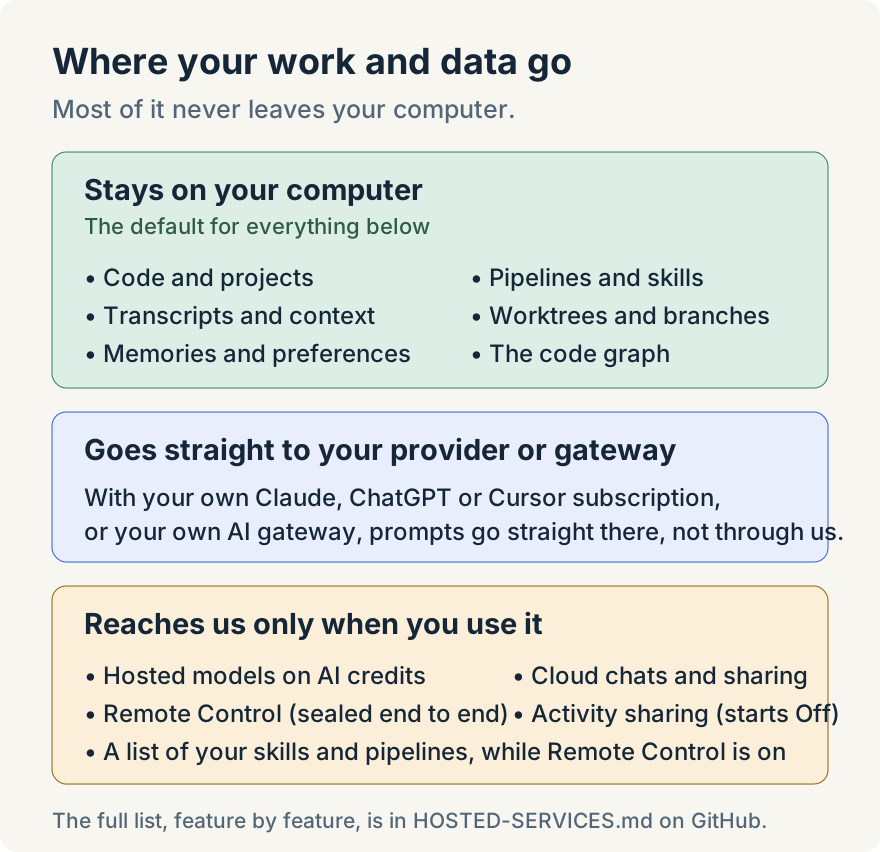
- Your data lives on your computer. Code, transcripts, context, memories, and the pipelines and skills you build stay on your machine. Remote Control keeps only a list of their names in your account.
- What the app learns about you stays with you. Your preferences and habits are saved in memory on your computer, not in a profile on our servers.
- Your prompts go where you send them, not to us. Straight from your computer to Claude, ChatGPT or Cursor on your own subscription, or through your own AI gateway, which you can set up so providers keep nothing at all.
- Your work only reaches us when you use a feature that needs it. Usage data about the app itself and the Remote Control list are separate, and you can switch both off.
- Remote Control is sealed end to end. The relay that carries it can't read what it carries. (An outside agent you connect is the one exception; more on that below.)
- You don't have to take our word for it. The desktop and mobile apps are open source.
Your computer is home base
Unstoppable Code is a desktop app, and that's where the work happens. Your agents read and edit files on your disk, run in your terminals, and commit to your branches. The code graph that helps them find their way around your repository is built and stored locally.
Your conversations live there too. Every transcript, every implementation plan an agent writes, every tool call and its output is saved on your computer. So are the things you build to make agents work your way: pipelines, skills, custom agents and standing instructions. They're yours to share when you decide to, by sharing a run or publishing to the marketplace, and not before.
There's no step where we copy your repository or your history to a server so an agent can look at it. The agent comes to your work, not the other way around.
What it learns about you stays with you
Agents get better when they remember how you work. Memory is how Unstoppable Code does that: it keeps notes about your projects and your preferences, so you don't have to explain your setup in every new chat. It can even sketch a short profile from your chat titles (the tools you use, the tasks you do most) so a fresh chat starts with useful context.
All of that is saved in memory on your computer. The writing is done by the memory model you pick: a local model, your own subscription, or AI credits, whose requests pass through our gateway and aren't kept. Either way, it's your notes, not a profile we keep about you. If a project needs extra care, you can keep a project's memory private so its notes never mix with anything else. Organization memory, for teams that want it, only reads transcripts you've chosen to share with your organization.
Your models, your rules
When you bring your own Claude, ChatGPT or Cursor subscription, the conversation runs between your computer and that provider. We're not in the middle. We don't see the prompt, the code or context it includes, or the answer that comes back. The app does count that a turn happened, with no content attached, and you can switch even that off.
Want to be the one in charge of the route? Connect your own AI gateway, such as LiteLLM, OpenRouter or your company's proxy, and Claude Code and Codex chats run through it. The app talks to your gateway directly, so it works on a private network too, and we never store your API key. Many gateways can also send requests only to providers that offer zero data retention (ZDR), so the model providers don't keep your prompts once the answer comes back. Organizations can go a step further and require everyone to use the company gateway. The AI gateway guide has the setup.
Want the model off the internet entirely? Point the app at a local model and your prompts never leave your desk. I wrote up private, AI-assisted development with Ollama if you want to try it.
If you use AI credits instead of your own subscription, requests do pass through our gateway on the way to the model provider. We keep a usage record (the model, token counts, cost, and the project and worktree names) so we can bill you correctly. We don't keep the prompts. The same goes for automatic model routing, which picks a model for you: a trimmed copy of your prompt and recent messages goes to a routing model to make the choice, and we keep which model it picked and a one-way hash, not the prompt.
Sharing starts at Off
Activity sharing is how you get your past runs on another computer, or share a session with your team. It's useful, and it's also completely optional. Every kind of activity (usage details, the implementation plans agents write, session summaries and transcripts) starts at Off for everyone. Off means the data stays on your computer. The one exception: an organization can require sharing for work you do in it, and the app tells you when it does.
When you do turn something on, secrets such as API keys are stripped out before anything leaves the app, and transcripts and implementation plans are encrypted in transit and at rest. That's standard server-side encryption with keys we manage, which is different from the end-to-end kind Remote Control uses below. You can see and change every choice in Settings → Privacy. The activity sharing guide walks through each row.
Remote Control, sealed end to end
Checking on your agents from your phone is one of the handiest things the app does. It's also the feature where it would be easiest to keep a copy of everything on a server. We went the other way, and built it so our servers can't read it.
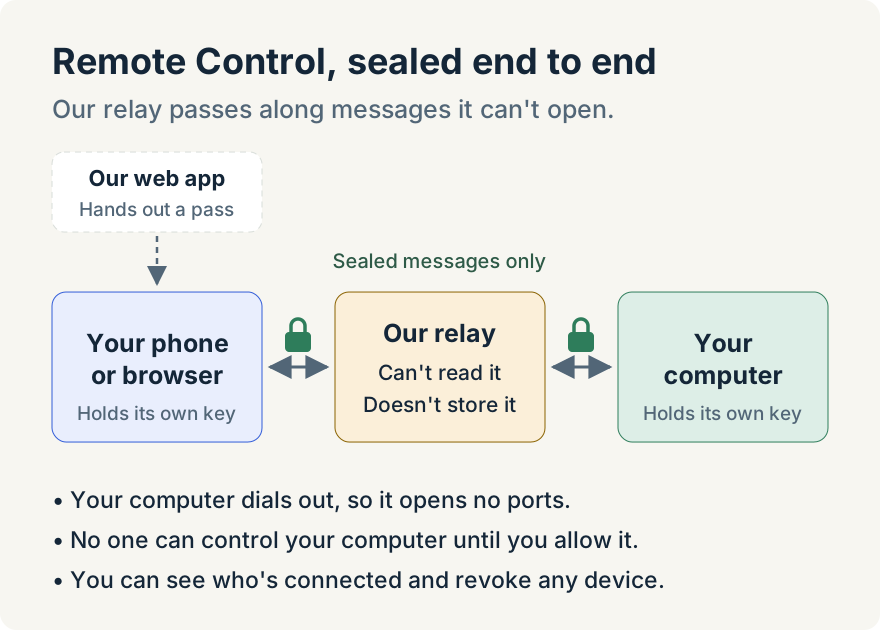
Your phone (or browser) and your computer each hold their own key, and they agree on a fresh lock for every session. Each message is sealed before it leaves the device and only opened at the other end.
So why is there anything in the middle at all? Because your two devices usually can't find each other. Your computer sits behind a home or office router that, sensibly, doesn't let strangers on the internet knock on its door. Your phone might be on cell data or café Wi-Fi across town. Neither one can reach the other directly, so both dial out to a meeting point they can each reach: our relay.
The relay's whole job is passing sealed envelopes back and forth. It can't open them, and it doesn't keep them. Our web app's part is even smaller: it checks that you're signed in and hands your phone a short-lived pass to reach the relay. Your chats, commands and results go through the relay, sealed, never through the web app.
A few more things that help us sleep at night:
- Your computer dials out. There's no port to open on your router and nothing listening for strangers.
- Nobody gets in until you say so. No phone, browser or agent can control your computer until you allow it on the desktop.
- Pairing takes your say-so. Pairing only opens for 10 minutes after you start it on your computer, and the one-time secret in the pairing link never reaches our servers. Without the link, you confirm a matching code on your computer instead.
- You can cut it off any time. The desktop shows which device is connected, and you can disconnect or remove it with a click.
One small thing, so nothing surprises you: while Remote Control is turned on in Settings → Labs (it starts on) and you're signed in, the app keeps a list of your skills, plugins, MCP servers, Collections, marketplaces and pipelines in your account, along with your computer's name, even before you pair a device. That way your phone can show them when your laptop is asleep. It's names, descriptions and a few display details, like an MCP server's address and which items are installed. No credentials, and not what's inside them. Turning that switch off stops it.
And one exception, for completeness: if you connect an outside agent, such as Claude or ChatGPT, on the External agents (MCP) page so it can work on your computer for you, its requests pass through our servers on the way, and we keep a record of each call. What it reads goes on to that agent's provider, like any chat with it would. You can pause or remove it any time.
What we learn about how you use the app
Like most apps, the desktop app sends some usage data so we can find bugs and see which features earn their keep. That tells us things like which screens get opened and where the app is slow. It doesn't tell us what you're working on. Our instrumentation rules keep prompts, transcripts, file contents and terminal output out of analytics and error reports, and error reports strip out API keys and hide your home folder in file paths. Usage analytics is tied to a random install ID, not your account (it does see your email's domain, like example.com), and session recordings hide your chats and what you type.
These switches start on, and you'll find them in Settings → Privacy → Usage data, where you can turn each one off. The one that works a little differently is feature flags, which decide which features you see: by default it gets your account email and the emails of accounts you've connected, and its switch makes it anonymous rather than turning it off, so features keep working. Organizations can also turn most of these off for their members. Choose what usage data Unstoppable sends has the details. The mobile app's crash reports and usage events have their own switches in Settings → App.
Don't trust us, check
Privacy promises are easy to write. That's why the source code for the Unstoppable Code desktop and mobile apps is public on GitHub under the MIT License. You can read it, audit it, build it yourself and see exactly what it sends.
For the parts that run on our servers, we wrote down every one: what it does, which features use it, what data it handles, and what you'd need to replace to run without it. It's all in What runs on our servers. It's written for security reviewers, so it's thorough, and it doesn't hide the parts that do touch our servers.
And the fine print, in one place:
- Privacy Policy: what we collect, why, and how long we keep it. We don't sell your personal information.
- Terms of Service: the agreement for using Unstoppable Code.
- Is Unstoppable Code open source?: what's published, and how to build it.
- Security policy: how to report a security problem.
Frequently Asked Questions
What data does Unstoppable Code collect about my work? Very little. Your code, transcripts, context, memories and workflows stay on your computer unless you use a feature that needs them, such as activity sharing, which starts at Off. While Remote Control is on, which it is by default, the app also keeps a list of your skills, plugins, MCP servers and pipelines in your account, by name and description, not their contents.
Does Unstoppable Code upload my repository? No. Your code stays on your computer. Agents read and edit it there, and the files an agent works with go to the AI provider you chose. On AI credits, those requests pass through our gateway on the way and aren't kept. Cloud chats are the one place your code runs on our side, in a sandbox, because that's what a cloud chat is for.
Is my chat history stored on your servers? Only when you use a feature that needs it: activity sharing for transcripts, which starts at Off, sharing a run, a cloud chat, or a feedback report you choose to send with diagnostics. Activity you share has secrets removed and is encrypted at rest. A feedback report goes to our team as you send it, so leave its diagnostics unticked if you'd rather not include them.
Does Unstoppable build a profile of me? The app's memory can build a short profile from your chat titles, such as the tools you use and the tasks you do most, so new chats start with useful context. It's saved in memory on your computer, as your own notes, not as a profile we keep about you.
Can Unstoppable see my prompts? Not when you use your own Claude, ChatGPT or Cursor subscription or your own AI gateway, because those go straight from your computer to them. Prompts on AI credits or automatic model routing pass through our servers on the way to a model, and we keep the usage record but not the prompt.
Can you read what I do with Remote Control? No, not the chats, commands or results. Messages between your phone or browser and your computer are encrypted end to end, and the relay that carries them can't read or store them. The only exception is an outside agent you connect through External agents, such as Claude or ChatGPT, whose requests pass through our servers on the way to your computer.
Can I check any of this myself? Yes. The desktop and mobile apps are open source on GitHub, and our hosted services are documented feature by feature in HOSTED-SERVICES.md.
Get started
Download Unstoppable Code, open a project, and look around Settings → Privacy. Everything we've described here is right there, with your name on every switch.