
Writing the code is only part of an agent's change. It also needs its own branch, a check of what it did, a review, answers to the checks and comments that come back on the pull request (PR), a merge and a cleanup. The Unstoppable desktop app has a feature for each of those steps. This guide puts them in order, so you can see how one change moves from a new worktree to a merged pull request, and which steps you can hand to an agent.
Each section links to the article that covers its feature in detail, as it was in the release that introduced it. This guide describes version 1.21.0 of the desktop app, released on November 12, 2026; several features have changed since their articles were written.
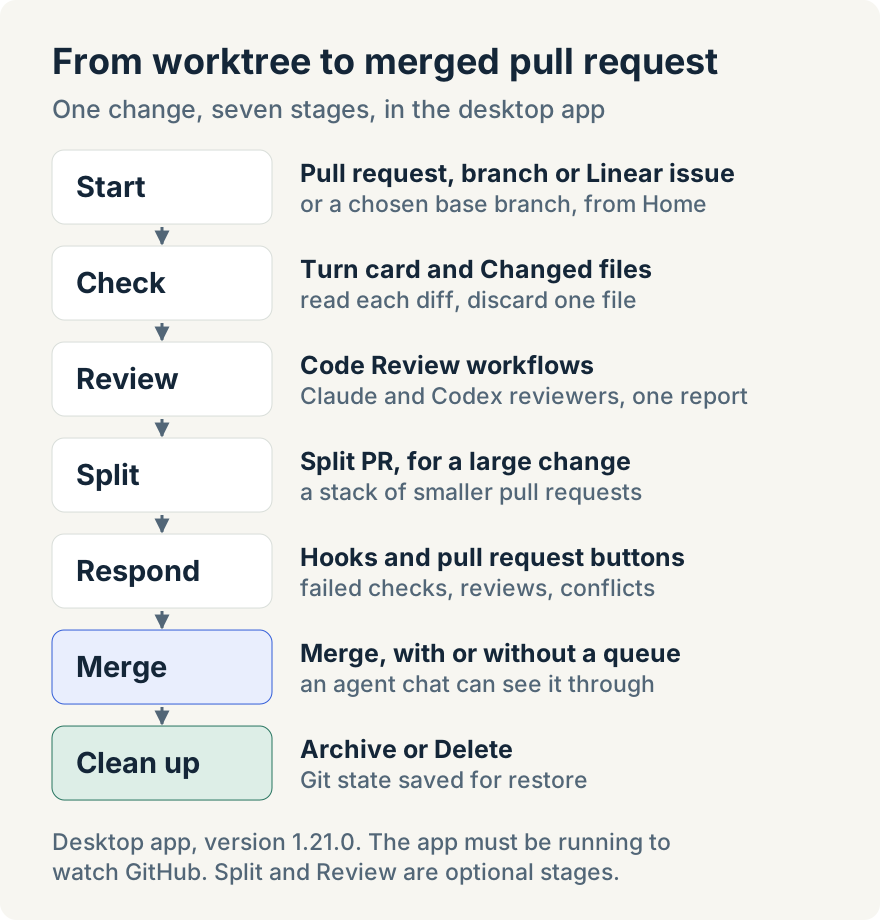
Start the work on the right branch
Every task in a code project runs in a worktree: a separate copy of the repository on its own branch, so several agents can work at once. The first decision is which branch it starts from.
On Home, the branch picker next to the project picker has four tabs: Worktrees, PRs, Branches and Issues. Pick an open pull request and the new worktree checks out that pull request's own branch, so the agent starts from the same commits a reviewer sees. Pick a branch and it is checked out as it is. Pick a Linear issue and the worktree uses the branch name Linear suggests, creating it if it doesn't exist yet. The PRs tab needs GitHub connected and the Issues tab needs Linear. Ryan Le built this create-from flow; Start a worktree from a pull request, branch or Linear issue covers it.
Sometimes the agent should build on a branch rather than work on it. In a single-repository workspace, choosing New worktree shows a base picker beside it with Worktrees, PRs and Branches. Choosing a pull request there creates a new branch from that pull request's head without changing the pull request, which suits follow-up work on something that hasn't merged yet.
A worktree records the base branch it compares against. If its pull request is later retargeted on GitHub, local comparisons describe the wrong branch. The pull request bar then shows Base branch differs from PR, and Update base branch in the Align base branch with PR? dialog updates the worktree's record without changing the pull request. Tommy Irish built the base picker and this warning; Choose the base branch for a new worktree explains both.
See what the agent changed
Each agent turn that edits files ends with a card headed Edited and the number of files, with lines added and removed, and View changes to open the diff. The app snapshots the worktree when a turn starts and ends, so you can tell which turn touched which file.
For the whole branch, the Changed files card in the worktree's Activity panel lists files under Uncommitted and Committed. Select a file to read its diff. Select text in a diff and choose Comment to leave a note on those lines; comments wait in a drawer until you choose Submit N comments, such as Submit 2 comments, which sends them all to the worktree's chat for the agent to pick up. To throw away one file's uncommitted changes, hold the pointer over it, select the discard button and confirm with Discard changes. This can't be undone, and committed changes aren't touched. View diagram in the card's header draws the branch's changes as a Change diagram.
Tommy Irish built the turn summaries, diff views and file revert. See what each agent turn changed, and discard a file describes the first version, and Review changes with Changed files has the current steps.
Review the branch with more than one model
Different models notice different problems. The app includes three built-in Code Review workflows: Code Review (Multi-Provider), Code Review (Claude) and Code Review (Codex). Each runs reviewers, called tracks, for compliance with the repository's own instruction files, a methodical check of what each change affects, and security. The multi-provider workflow runs each track on both Claude and Codex.
To start one, open the worktree's menu in the sidebar and choose Dispatch workflow, or use Dispatch workflow on the Workflow runs card in the Activity panel. By default it includes uncommitted changes (include_uncommitted) and posts to the pull request (post_pr_comment).
The run ends in a report with a verdict and a score out of 10. When the worktree has a pull request, findings are also posted as a GitHub review with inline comments on the lines they concern. Findings from earlier automated reviews are checked again and reported as confirmed, fixed, rejected or unverified. A review that couldn't check everything, for example because a track failed or the pull request's review history couldn't be loaded, can't pass, and its score is capped at 7. The posted review is a comment: it never approves the pull request, requests changes or blocks a merge.
Teams can add their own tracks as Markdown files in .unstoppable-code/review-tracks/ at the repository root; all three workflows pick them up. Tommy Irish built the review workflows, their pull request comments and the custom tracks. Review a branch with Claude and Codex before you merge explains how the first version split its reviewers, and the support article Review code with multiple models covers the current workflows.
Make a large change reviewable
A large pull request is hard to review well. Split PR turns one large open pull request into a stack of smaller ones. Turn on Split PR in Settings, Git, under Pull requests; Split PR threshold sets how many changed lines a pull request needs before the option appears, and Split PR planner model chooses the Claude or Codex model that plans the split.
Choose Split PR… from the worktree's menu. Start Split PR lists what will happen and warns that the worktree is locked while the split runs: no chats, workflows, scripts, terminals or hooks until it finishes. The planner reads the diff hunk by hunk and proposes children grouped by purpose. Nothing changes in Git until you review the plan, edit titles, dependencies, the build and test command or which hunks go where, and choose Approve & split. The app then carves each child onto its own branch in its own worktree, runs the setup script and the build and test command, and opens a pull request for it. A child that fails its build and test command stops the split there. At the end the original pull request is closed with a link to the new integration pull request and its stack.
The split needs a clean, pushed branch, a connected GitHub account and a pull request from the same repository; fork pull requests and workspaces with more than one repository aren't supported. Tommy Irish built Split PR. Split a large pull request into smaller stacked pull requests walks through each stage.
Respond to what happens on the pull request
Once a pull request is open, checks fail, reviewers leave comments and the base branch moves until the branch conflicts with it. The app offers two ways to hand those to an agent: buttons you click, and hooks that act on their own.
The pull request controls at the top of the worktree show the buttons when they're needed. Fix appears next to the continuous integration (CI) badge once checks have finished and failed, and starts an agent chat to investigate and fix them. Resolve, commit & push appears when GitHub reports merge conflicts, and starts a chat that resolves them, then commits and pushes. Each opens its own chat tab, so you can watch the agent and step in.
Hooks do the same without a click. A hook pairs a pull request event with actions that run in that worktree. There are sixteen triggers, including PR Checks Finished With Failures, New PR Review With Inline Comments, PR Merge Conflicts Detected, PR Removed From Merge Queue, and Pre-commit Failure for a commit the app made that failed your pre-commit checks. Each action is a chat that sends your prompt to an agent, a workflow such as a code review, or a shell command. So a hook on PR Created can start a Code Review workflow, and a hook on New PR Review With Inline Comments can ask an agent to work through the comments that review leaves.
Set hooks up in the project's settings under Scripts and hooks (Hooks in a multi-repository project). Source controlled stores them in the repository's unstoppable-code.json, so everyone who opens it gets the same hooks; Local override keeps them on your machine. A chat action can have an If command that runs first: exit code 0 starts the chat and 2 stops the hook quietly. A hook's chat waits for other chats in the worktree to finish their turns unless you turn on Allow chat concurrency, and the Activity panel's Hooks section has Pause all hooks for when you're working on the branch yourself. Tommy Irish built hooks, and Mike Sotnichek added the two merge queue triggers. Start agents automatically from pull request events covers the triggers and actions in detail.
Merge, with or without a merge queue
When the pull request is ready, Merge in the same controls finishes it. It works on a pull request GitHub reports as mergeable, in a clean worktree with nothing uncommitted or unpushed; until then its tooltip names the next step, such as "Commit and push the local changes to merge." Before merging, the app counts unresolved review threads. If there are any, or it can't tell, the button warns you, and clicking it opens a dialog with View pull request on GitHub, Triage review comments, which starts an agent chat to work through them, and Merge anyway. Tommy Irish built Merge and these chats; Merge a pull request, or hand its problems to an agent describes them.
A repository whose base branch uses a GitHub merge queue adds one more wait: the queue reruns checks against everything ahead of the pull request and can remove it. What Merge does there depends on the Agent merge queue eviction handling setting in Settings, Git, under Merge queue.
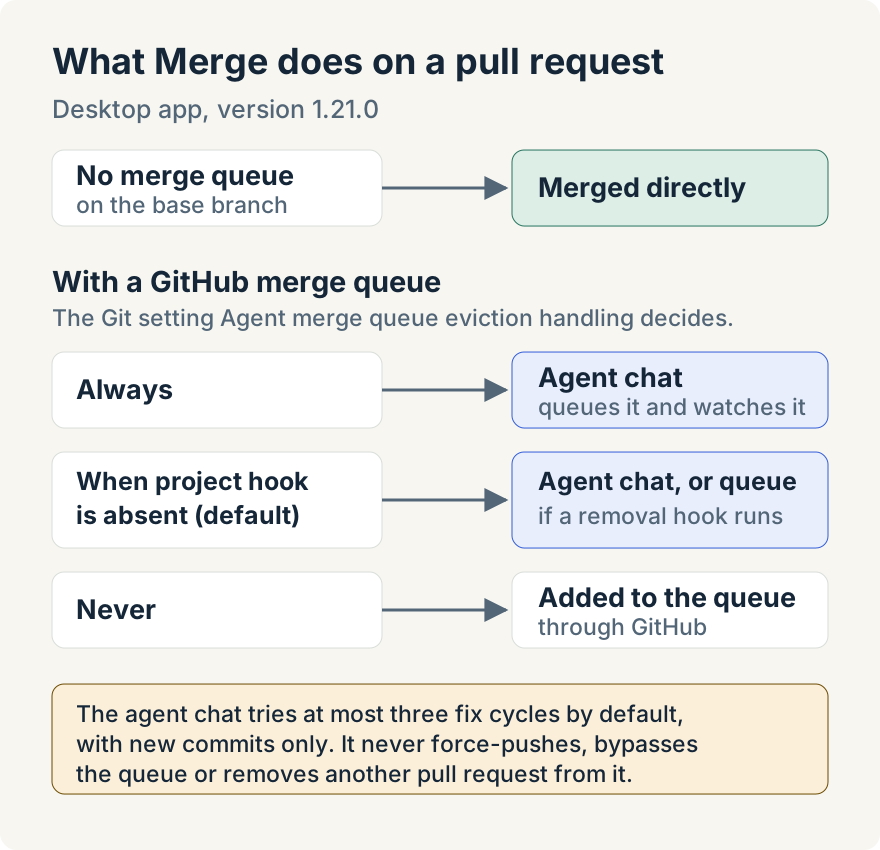
- Always starts an agent chat that adds the pull request to the queue and watches it.
- When project hook is absent, the default, starts that chat unless the project has a PR Removed From Merge Queue hook that isn't paused in the worktree. With such a hook, Merge adds the pull request to the queue and the hook handles any removal.
- Never adds the pull request to the queue.
The chat runs the merge skill that ships with the app. When the queue removes the pull request, it finds out why before acting: it fixes a conflict with something that merged ahead, stops and reports when the base branch is already broken, and requeues a flaky check once. By default it tries at most three fix cycles. Fixes land as new commits; it never force-pushes, never bypasses the queue with admin rights, never removes someone else's pull request from it and never treats removal as success.
When you only want to know that a pull request has landed, ask an agent in chat to tell you when it merges. The desktop app checks GitHub about every 45 seconds and wakes the same chat when the pull request merges, closes without merging or leaves the merge queue. One watcher covers up to 20 pull requests. Aaron Quirk built the Merge chat, and Mike Sotnichek built pull request watching and the queue phases. How I hand off a pull request and stop watching the merge queue is Aaron's account of both.
Clean up without losing work
Parallel agents leave a worktree behind for every task. Removing one takes it off disk while keeping its chats, and when a restorable archive can be created, its Git state too: commits, staged and unstaged edits and untracked files that Git doesn't ignore.
The worktree's menu offers two actions. Archive keeps the saved state until you delete the archive. Delete keeps it for the project's Deletion retention period, 7 days by default, then removes it. Opening an archived worktree shows the saved files' diffs before you decide, and restoring recreates the saved state in a new worktree.
Some things are never saved: ignored files, empty folders and the working folders of nested submodules. Archiving refuses and leaves the worktree in place when there are unresolved conflicts, dirty submodules, nested Git repositories or files Git transforms, such as Git Large File Storage (LFS) files. The archive depends on the original repository, so it isn't a portable backup. Tommy Irish built the Git capture and restore; Archive a worktree without losing its uncommitted work covers what is saved and how restore picks its base.
Where it stops
- Desktop only, for pull requests on GitHub. Pull request watching supports GitHub.com, not GitHub Enterprise Server.
- The app has to be running. Hooks and pull request watching check GitHub from the desktop on an interval rather than through webhooks, so an event is noticed on the next check. While the app is closed, GitHub's own merge queue keeps going but no agent reacts.
- Agents need your review. Chats started by hooks, Fix, Resolve, commit & push or Merge can push commits to the pull request. Read them like any other change.
- Reviews advise. The Code Review workflows post comments and a score; they never approve or block a pull request.
- Accounts and connections. Pull request features need GitHub access. Linear issues need Linear connected, and reviews use your own Claude and Codex accounts.
- Some steps are single-repository. The base picker and Split PR aren't available in workspaces with more than one repository.
Try it
Everything above is in version 1.21.0 of the Unstoppable desktop app. Download it, connect GitHub, and start a task from an open pull request on Home.