
Sending a task to a coding agent starts the work; it doesn't finish it. Between the first message and a finished change, an agent may need permission to run a command, a correction it can use without starting over, a pause while a build finishes, a second agent for a side task, or a way back after the app closes. The Unstoppable Code desktop app has a control for each of those moments. This guide puts them in the order you meet them and links to the post that covers each one in detail.
Everything here is in the desktop app, and the descriptions match version 1.21.0, released on November 12, 2026. Several features have changed names or limits since their own posts were written. Where that happened, this guide gives the current behavior.
Decide what the agent may do on its own
In Claude and Codex chats, every tool call an agent makes passes through one approval layer: shell commands, file writes, Model Context Protocol (MCP) tool calls and network requests. MCP servers are the tools and data sources you connect to the app. A mode sets how often that layer asks you. Choose how much your agent does without asking describes the layer Tommy Irish built in version 1.5.0. The modes have been renamed since, and Choose an approval mode covers them as they are now:
- Ask asks before tool calls that no saved rule already answers.
- Accept edits lets the agent read and edit files in the project, and asks about everything else.
- Full access skips approval prompts and the safety rules. Saved rules that deny a call still apply.
Every kind of chat starts in Full access until you change it. You can change one chat from its composer, or set defaults for Worktree chats, Cowork chats and Orchestrator in Settings, Approvals. Orchestrator is the assistant that earlier posts call App Advisor.
The mode matters for everything later in this guide. A chat that waits, splits off work or resumes still works through the same layer, and so do the subagents it starts, which follow their parent chat's mode. When a request appears, Allow once answers it a single time, while Always in this project or Always everywhere saves a rule so the same question doesn't come back. In Ask and Accept edits, a short list of risky commands, such as a force-push to a protected branch, is blocked whatever the rules say.
Correct a running turn instead of restarting it
An agent's turn can include many steps: reading files, running commands and editing code before it answers. While it runs, anything you send goes into the chat's queue as a Queued row and is sent when the turn ends. Since version 1.7.1, each eligible row offers two ways to act sooner, which Tommy Irish describes in Steer an agent while it works:
- Steer hands the message to the running turn. The agent keeps the work it has done and reads your message at its next opportunity.
- Interrupt stops the turn and sends the message next. Edits and commands that already finished remain.
Steer suits a missing fact or a correction. Interrupt suits a message that makes the current work pointless.
Claude and Codex handle a steered message differently. Claude decides when to read input it has been handed, so until it does, the row reads Sending… and you can still edit or cancel it. A cancelled message keeps its text and can be resent. Codex takes the message into the turn at once, so it can't be withdrawn. Once the agent has taken a message in, it appears in the transcript under a Steering title. If the app can't confirm what happened to a message, the row reads Delivery uncertain, and nothing is resent automatically.
Notifications from watchers, described in the next section, also try to steer an active turn, so an agent hears that something it was waiting for has happened while it is still working.
Sometimes the correction is a capability rather than a fact: the agent needs a skill or MCP server the chat didn't start with. Let your agent load a skill or MCP server mid-chat, also by Tommy, covers that case. Ask for the installed item by name. The agent searches what you have installed, enables the match for that chat, and the chat resumes with your request. It never installs anything new. Deferred plugin loading in Settings, Plugins controls it, and it is on by default.
Steering itself is offered in native Claude and Codex chats. Claude chats in the managed terminal and other agent harnesses keep the queue and Interrupt.
Let the chat wait instead of you
Much agent work is waiting: for a test server, a build, another agent, or a time when you will be back. Unstoppable Code has four ways to leave that waiting to the app. Each keeps the conversation in one chat, so the agent has its full context when it continues.
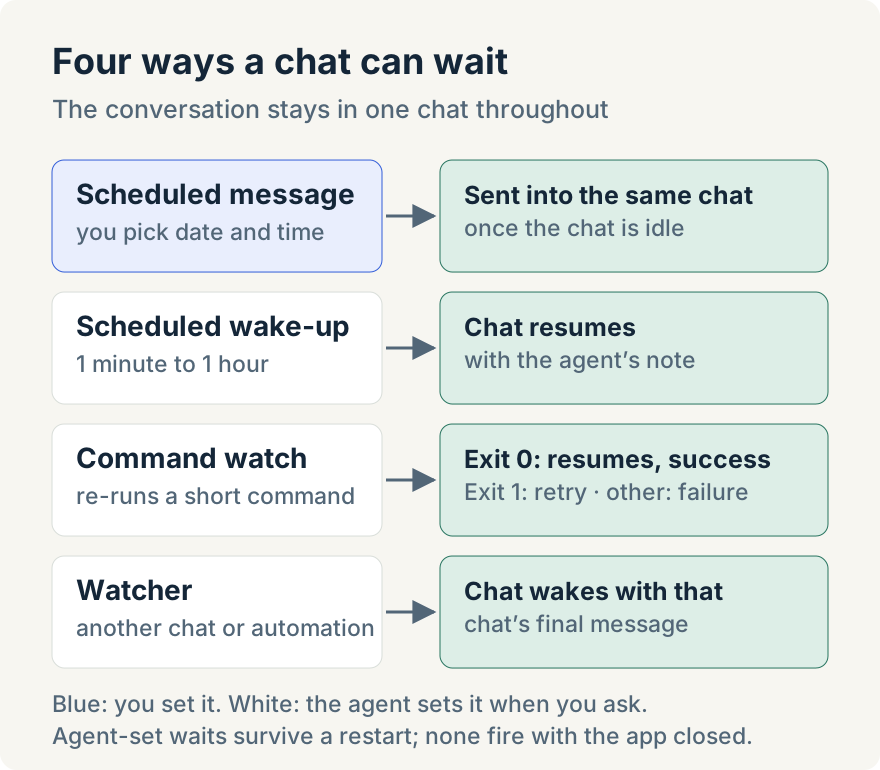
Schedule a message yourself. Choose Schedule message from the composer's + menu, pick a Date and Time, then Set schedule, and write the message as usual. At that time it goes into the same chat with the chat's settings as they are then. If a turn is running or other messages are queued, it waits and checks again every 30 seconds, so it never interrupts the agent. Tommy Irish built scheduled messages in version 0.26.4. Schedule a message for later in an agent chat shows how a scheduled message appears in the chat and how to edit or clear it. Chats running Claude Code in its terminal mode don't offer it.
Ask the agent to check back. An agent can set a scheduled wake-up for 1 minute to 1 hour later, with a note to itself about what to do next. Or it can set a command watch, which re-runs a short shell command. Exit code 0 resumes the chat with success. Exit code 1 tries again after an interval of 5 seconds to 1 hour. Any other code resumes the chat with failure. A command watch runs at most 100 attempts of up to 60 seconds each, and goes through the same approval check as any shell command. There is no button for either; ask in words. Have your agent check back later covers both, which Tommy built for version 1.5.0.
Wait for another chat or an automation. An agent can arm a watcher on a chat in another project, on new chats starting in a project, or on an automation run. When the watched chat finishes its turn, the waiting chat wakes with that chat's final message, up to 8,000 characters. The agent is told to treat that text as untrusted, so it reads the report rather than following instructions inside it. A watcher fires once, and a chat can't watch itself. Mike Sotnichek built these watchers in version 1.4.0. Have an agent chat wait for another chat or an automation explains how automation runs fire them.
Wake-ups, command watches and watchers are stored with the app, so they survive a restart. Nothing fires while the app is closed; a wake-up that came due in that time fires when the app reopens. Agents are instructed to set these up only when you ask to watch, wait or be notified.
Split the work when it divides
Partway through a task, a second piece of work can appear that should run on its own. There are three ways to split it off, and they differ in whether the original chat keeps track of the new work.
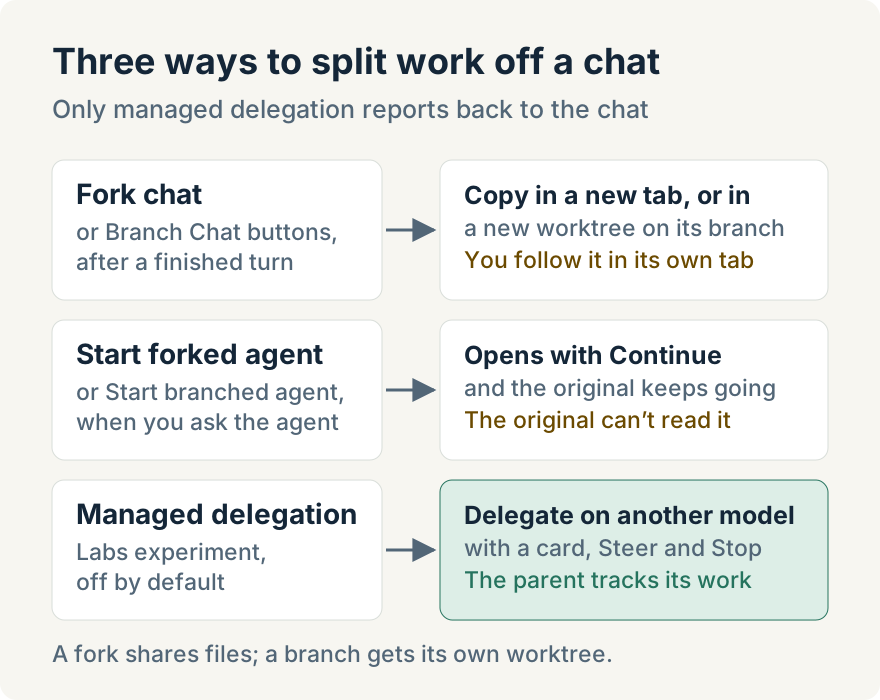
Fork or branch from a finished turn. Beside the timer of the latest finished turn, Fork chat copies the conversation into a new tab in the same worktree, and the agent keeps its context. Branch Chat creates a new worktree from the current branch and continues the copy there. A fork shares files with the original. A branch has its own directory and branch, and leaves uncommitted changes behind. Fork a chat, or branch it into a new worktree covers both buttons. Tommy Irish built branching on top of a Fork button contributed by GitHub contributor Armen-Arakelian.
Ask the agent to split itself. Since version 1.6.0, Claude and Codex chats have Start forked agent and Start branched agent tools. The agent writes the instruction for the new chat, which opens with Continue and starts straight away, while the original chat keeps running. The agent uses these tools only when you, or a skill, explicitly ask for a split. The new chats are independent: the original agent can't read them or get their results back, so check them in their own tabs. Forked agents now also start from Cowork chats and Orchestrator; branched agents still need a Code worktree. Ask an agent to split off work into a new chat has the detail.
Delegate part of the task to another model. Managed delegation, added in version 1.8.0, is the tracked option. A Code worktree chat starts a delegate on another model, for example a Codex model from a Claude chat, records it as a card in the conversation, and can send it a follow-up, steer it or stop it. It is an experiment and off by default. In Settings, Labs, Managed delegation, set Delegate tasks to Only when requested or When useful. Turning it on replaces the provider's own subagent tools in those chats. It runs on macOS, Windows and Linux.
Maximum concurrent subagents defaults to 5 and goes up to 64; extra work waits as Queued and starts when a slot frees. Maximum delegation depth defaults to 1, which means no nesting. A delegate either shares the chat's worktree and edits only the paths the parent allows, or works in an isolated checkout whose changes the parent applies all at once or discards. Your approval settings still apply to its commands and file changes. Each delegate is a separate session that uses tokens on its own provider. Tommy describes the settings, cards and stop controls in Hand part of a task to another model.
See what was handed off
Once work is spread across agents, the question is which one needs you. The Subagents panel draws the tree of agents a chat has handed work to, with each one's status and model. Its filters are All, Active and Needs attention; the last shows subagents that are waiting for an approval or have failed. Any subagent's own chat opens from the tree, with its setup, what it changed and the task it was given.
Claude Code and Codex subagents, which those agents start themselves, appear without any setup but are view-only, apart from interrupting a Claude Code subagent. Managed delegates can also be messaged, steered with the same Steer and Interrupt controls as a chat's queue, or stopped together with everything they started. Tommy built the panel for version 1.9.0. How I keep track of what my subagents are doing walks through the filters, the list view and the partial view in the web app for a paired desktop.
Forked and branched chats are separate chats, not subagents. Follow them in their own tabs.
Pick work up after an interruption
Long work doesn't always finish in one sitting. The app closes for an update, the computer restarts, or a provider's usage limit ends a session. Version 1.16.1 added a resume flow that answers which chats stopped, why, and what resuming will send. Aaron Quirk built most of it, and How I pick up agent work after the app closes or hits a limit shows it step by step.
Interrupted chats appear in the Continue row on Home. The resume dialog gives the reason, for example "A Codex usage limit stopped this chat.", the last step the agent took, and whether the worktree has uncommitted changes. It then states what Resume will do. For most chats it says: "Resuming sends "Continue" in this chat, so the agent picks up where it stopped without sending your original request again." For others it re-sends your last message, and says so. Chats still waiting on a limit offer Resume at reset, with Undo. Several chats resume one at a time, 10 seconds apart, and the same dialog can continue interrupted workflows too. A chat the app closed on shows its own notice in the chat, with Resume chat.
Nothing resumes on its own. Wake-ups and watchers that came due while the app was closed fire when it reopens, but an interrupted turn waits for you.
How the pieces fit
Together, these controls make it possible to run agent work without watching every step:
- Set the approval mode, and save rules for the calls you trust, so the agent stops only where you want it to.
- Use Steer for corrections, and Interrupt only when the current work is no longer useful.
- Hand waiting to the app: a scheduled message, a wake-up, a command watch or a watcher on another chat.
- Split independent side work with a fork or branch. Use managed delegation when the original chat should track and review the result.
- Check the Subagents panel for anything that needs you, and use the resume dialog after an interruption.
Where it stops
- Desktop app, running. Everything here is in the desktop app. Scheduled messages, wake-ups and watchers fire only while it is open.
- Claude and Codex chats. Steering and the split-off tools are for native Claude and Codex chats.
- Managed delegation is an experiment. It is off by default, works in Code worktree chats only, and each delegate uses its own tokens.
- Independent chats aren't tracked. The original chat can't read a forked or branched agent's transcript or get its result back.
- Full access is the starting mode. It skips the safety rules. Choose Ask or Accept edits where you want the agent to stop and ask.
- Waiting needs a request. There are no buttons for wake-ups, command watches or watchers on other chats; ask the agent in words.
Try it
These features are in version 1.21.0 of the Unstoppable Code desktop app. Download the app, start a Claude or Codex chat in a worktree, and send a follow-up while the agent works to see Steer on the Queued row.